September 6, 2026
·
Updated September 22, 2026
·
8 min read
Start chat: 11 live chat limitations to test in 2026
What breaks when you add a Start chat button: widget blockers/CSP, 5‑minute reply expectations, JWT identity checks, plan limits, and Telegram routing.

You’re about to add a “Start chat” button to your website so visitors can reach you faster. The obvious path is to pick a widget, paste a script, and assume it will show up for everyone—and that you’ll “reply when you can.”
In production, the first problems are more basic: some visitors never see the chat bubble at all, and the ones who do often expect a reply in minutes. Get it wrong and you’ll miss leads, frustrate customers, and create awkward security edge cases. This case study walks you through 11 live chat limitations worth testing before you ship.
Start chat, clarified
Android meaning
On Android, “start chat” usually has nothing to do with a website. It’s commonly a button or utility inside an app that lets you begin a WhatsApp/Telegram-style conversation quickly, sometimes without saving a contact first. That’s why a “start chat” search so often lands you in Google Play listings or mobile how-tos.
It also gets tangled with Google Chat: “start chat” can simply mean opening the Google Chat app and starting a direct message thread there. Useful, but it’s a consumer messaging workflow—not a decision about adding chat to your product site.
Website meaning
In this article, “Start chat” means the on-site call-to-action: the chat bubble or button on your website that opens a live chat widget so a visitor can message your team.
Search results are misleading because the same phrase is used for unrelated things like the Amazon Connect StartChatContact API (a developer endpoint for contact-center chat) and mobile chat starters. None of that answers the buyer’s real question: what breaks when you put a “Start chat” CTA into production.
So the evaluation here is narrow and practical: the on-site widget decision—whether it reliably shows up where you expect it, can be operated day-to-day by a small team, and fits your security and plan constraints. Even mainstream messengers can be configured to only appear on “trusted domains,” which is the kind of detail search results won’t surface when you’re just trying to choose a widget.
Invisible widget failures
A “Start chat” button only exists if the widget’s JavaScript actually loads and runs in the visitor’s browser. “Activating chat” is therefore two jobs: install the vendor’s script snippet on your site, then prove it still appears under real-world blocking and security rules.
-
Confirm the widget script is present and executing
Put the snippet on the pages where you expect “Start chat” to appear, publish, and then check the page in a fresh browser session. If the bubble never renders, treat it like a production outage, not a design tweak. -
Rule out script blocking (ad blockers / privacy extensions)
Ad blockers and privacy extensions can block chat widgets entirely by blocking their JavaScript. Intercom’s own troubleshooting notes that some ad blocking extensions block JavaScript “such as the Messenger,” which is exactly how you end up with a site that “has chat” but visitors can’t see it. -
Check your CSP first when the bubble is “invisible”
CSP (Content Security Policy) is a browser-enforced allowlist delivered via HTTP headers; if you don’t explicitly allow a third-party script or connection, the browser will refuse it. Intercom documents that CSP misconfiguration can make the Messenger “fail to load or [be] invisible,” and their fix is concrete: allowlist the domains the widget needs (for example, widget.intercom.io, js.intercomcdn.com, .intercom-chat.com, and api-iam.). -
Verify any “trusted domains” / domain allowlist settings
Many chat tools let you restrict where the widget is allowed to appear. Intercom’s Messenger can be restricted to a list of “trusted domains,” and once set it “will only appear on these domains”—so a missing www, a new custom domain, or a staging-to-production move can silently turn “Start chat” off. Practically, teams disagree on how strict to be: leave the trusted-domain list empty during development/testing so the widget renders anywhere, then lock it down in production so it can’t be embedded on unintended domains. -
Make visibility a release check, not a one-time setup task
Test at least one “hardened” browser (extensions on + your real CSP headers) before you ship. If you can’t reliably make the bubble appear, you’re not choosing UX—you’re choosing whether support will exist for a slice of visitors.
Five-minute expectation
Adding a “start chat” button isn’t just adding a channel. You’re also publishing a response-time promise—whether you meant to or not.
-
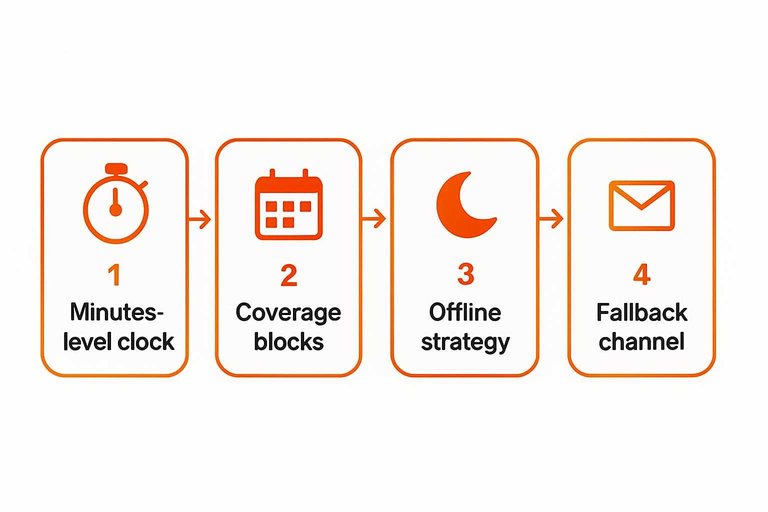
Limitation #4: live chat sets a minutes-level clock. HubSpot reports that 66% of consumers (surveyed in the U.S., n=100) expect a response within five minutes when they use live chat for customer service. If you can’t reliably answer inside that window, the chat bubble becomes a “we’re ignoring you” button.
-
Limitation #5: small teams inherit interrupt-driven coverage. With one person (or a tiny team), “minutes-level” chat means you either (a) intentionally schedule coverage blocks where someone is watching and responding, or (b) accept constant context switching throughout the day. If you treat chat like email—“I’ll get to it later”—you’re breaking the expectation the UI created.
-
Limitation #6: you must pick an offline strategy—and own the trade-off. Practitioners disagree on the right move:
-
Hide chat when nobody’s online so visitors can’t start a conversation that won’t be answered.
-
Leave it visible, but set expectations (your hours, typical reply time, and what to do for urgent issues).
If you can’t commit to minutes-level replies, design your “offline” path on purpose: clear availability, an away message that redirects, and a fallback channel that you actually check.
Identity can be faked
A lot of “start chat” setups treat identity as a couple of fields in the widget. That’s client-side identity: the browser tells you who the user “is,” and the browser is the attacker’s playground.
-
Decide whether this chat will ever touch account data
If agents will look up an order, subscription, invoices, or reset access, you’re in “logged-in support” territory. -
Assume name/email fields are cosmetic, not proof
A visitor can type any email they want. If your workflow trusts that field, you’ve created an impersonation path. -
Add signed identity verification, not more form fields
Use a JSON Web Token (JWT)—a server-generated, signed token—to assert the user’s identity to the chat provider. Intercom explicitly warns that without Messenger identity verification, “a bad actor could gain unauthorised access to the data in your workspace through impersonation of your real users.” -
Gate “account help” behind verification
If the chat session isn’t verified, treat it as anonymous: general FAQs only, and route the user to sign in before you discuss anything specific.
If a lightweight widget can’t do signed verification, keep it for pre-sales and public questions—not support tied to an account.
Plans change the product
Your “start chat” button is a feature on day one. Six months later, it’s a policy: what you can store, integrate, and show to customers is decided by the plan you’re on.
Gloss: Retention = how long your chat history is kept. An API is a developer interface for syncing data. A rate limit is a hard cap on requests per minute.
| Plan constraint | How it rewrites “start chat” | 6–12 month check |
|---|---|---|
| Chat history retention | Old conversations disappear | Free: 60-day history (Chaport) |
| API access | Integrations become paywalled | APIs paid-only (Chaport) |
| API availability on free | “Sync later” isn’t possible | OpenAPI not on Free (Tidio) |
| Rate limits | Automations hit a ceiling | 60 req/min (Plus), 120 (Premium) |
| Branding / white-label | Widget stays vendor-branded | Logo removal prohibited (tawk.to) |
| Branding add-on pricing | “Clean UI” becomes a line item | $39/month to remove branding |
If you’re budgeting chat, don’t price the widget—price the version of “start chat” you’ll still be allowed to run after history, integrations, and branding requirements show up.

Telegram routing trade-off
Routing your website “start chat” to Telegram is the no-dashboard move: messages land where you already are, and you can reply fast from your phone. The trade-off is that you inherit Telegram’s bot rules and limits.
Ship when the main problem is missed chats because nobody is watching an inbox, and you’re happy with a lightweight “message in, message back” loop.
Don’t ship when you need proactive outreach or controlled workflows: Telegram’s Bot API docs are blunt that bots can’t start conversations with users (the user has to message first). If you’re deciding what your CTA should do (open the widget vs send a first message) and where routing can break, see what an “I want to chat” CTA triggers.
If you land on “don’t ship,” you’re not failing at live chat—you’re picking the other category: a helpdesk-style tool with its own operator console (for example, Crisp).
Subsections: [
{
“subheading”: “Eloqra in practice”,
“content”: “Eloqra is the concrete “live chat → Telegram” pattern: each visitor message is delivered to Telegram, and your replies from Telegram appear back inside the on-site chat. Setup is straightforward: connect Telegram via their bot, then drop a single script snippet on the site; configuration lives in a small web dashboard, but you don’t keep it open to reply. Eloqra also emphasizes a lightweight widget script (under ~5kb) that loads after your page.\n\nThe win is operational: you can cover chat without living in yet another support tab. The cost is that your day-to-day support inbox is now Telegram, with Telegram’s bot constraints along for the ride.”
}
]
Prove chat works in production
A “Start chat” button isn’t real until the widget consistently loads for real visitors—so treat visibility like a release check, and debug blockers, CSP, and domain allowlists before you debate UX. Then be honest about the promise you’re publishing: either staff minutes-level replies, or deliberately design the offline path so people aren’t left hanging. If the conversation could touch account data, don’t trust whatever the browser types into name/email fields—gate “account help” behind signed identity verification and keep unverified chats generic. And choose the category that matches your operations: routing chat to Telegram is built for fast replies without living in a dashboard, while a helpdesk-style console is the better fit when you need controlled workflows beyond “message in, message back.”
Frequently Asked Questions
- How do I activate start chat on my website (not Android apps)?
- Install your chat vendor’s script snippet on the pages where you want the Start chat button, publish, then verify it renders in a fresh session and in a “hardened” browser (extensions on + your real CSP headers). If it doesn’t appear, treat it as a production outage and debug loading, blocking, CSP, and domain allowlists.
- Can I use Telegram as my start chat inbox and still message visitors first?
- No—Telegram bots can’t start conversations with users; the visitor has to message first (or add the bot to a group). Use Telegram routing when your flow is “visitor starts chat → you reply,” not for proactive outreach.
- Do I need a paid plan to integrate start chat with my CRM or backend?
- If your chat tool paywalls APIs, you’ll need a paid plan to do real integrations; for example, Chaport’s REST & JavaScript APIs are only available on paid plans. Check API access before you design workflows that assume syncing contacts, events, or conversation history.
- Can I remove the chat widget branding from my start chat button?
- Not always—some vendors forbid it in their terms; for example, tawk.to prohibits removing or altering the tawk.to logo and branding in the widget. Confirm branding rules before you promise a white-label chat experience to clients.
- What’s a lightweight start chat widget that won’t add much page weight, and what does it cost for multiple sites?
- Eloqra’s widget script is stated as under ~5kb, and its Pro pricing lists 4.99 USD per month or 49.99 USD per year for each additional project beyond the free one. It routes visitor messages directly to your Telegram so you can reply from your phone without keeping a support dashboard open.
Route Start Chat to Telegram
Once you’ve validated load reliability and set the right response expectations, the next challenge is keeping replies fast without living in another support dashboard.
Eloqra forwards every website chat bubble message to your Telegram and lets you reply back to the visitor with context included. It’s Free Forever.
Written by
Eloqra
Notes from the Eloqra team on collecting testimonials and building authentic social proof.
Share: