October 5, 2026
·
8 min read
I Want to Chat”: What It Actually Triggers (Open vs First Message)
What an “I want to chat” CTA really does: open the widget, send the first message, route to Telegram, and where the chain breaks.

You add a button that says “I want to chat,” click it, and expect a real support conversation to start. But what you see on the page and what reaches you as an operator aren’t the same event, and that mismatch is why “it opened but nobody got notified” is so common.
If you treat an open panel as a started conversation, your response-time clock, volume counts, and troubleshooting all drift away from reality. This guide walks you through the exact click → open → first message → delivery → reply loop, plus the breakpoints and the metrics that tell you which step failed.
Two kinds of trigger
When someone says “I want to chat,” they might mean two very different events: opening the chat UI, or actually starting a conversation.
A chat launcher / bubble (the floating button on a page that opens the chat panel) is just a doorway. A conversation (thread)—the grouped message thread between one visitor and the operator(s), usually created/considered “started” when the first message is sent—doesn’t exist until a message is successfully sent.
Open the panel
A click on a CTA like “I want to chat” commonly triggers UI-only actions:
- Show the launcher (if it was hidden)
- Open the chat panel
- Focus the input so the visitor can type immediately
- Prefill draft text without sending it (for example, Intercom can open a “new message” state with pre-filled content)
At this point, you’ve helped the visitor get to their chat, but you haven’t necessarily notified anyone.
Send the first message
A conversation becomes real only when the visitor hits send:
- The first message is stored as an actual message, not just typed text
- A thread is created (or an existing one is resumed)
- Routing and operator alerts can fire (this is what gets you a reply)
- Delivery failures now matter, because you’re promising “someone will see this”
That’s also why analytics that count “opened” as “started” tend to inflate volume and break response-time metrics.
How widgets expose “open”
Most site chat widgets start life as an embed snippet: a small <script> tag you paste into your page. When the browser hits it, that script downloads the widget code, mounts the launcher/panel UI, and exposes a JavaScript “control surface” you can call from your own buttons.
A common implementation detail is Shadow DOM (a browser feature for isolating a widget’s DOM/CSS so host-page styles don’t break it, and vice versa). Some widgets choose an iframe for the same “don’t let my CSS leak into yours” reason; Shadow DOM gives you DOM/CSS isolation while staying in the same document, but it’s not a JavaScript security boundary. The widget renders its UI inside that isolated tree, while your page talks to it through an API rather than by poking at its internal HTML.
That’s where timing bites. Your “I want to chat” CTA might run before the widget finishes loading, so the global object you expect to call doesn’t exist yet. Good widget SDKs solve this by letting you queue calls early and replay them once the widget is ready.
For example, Crisp exposes a global $crisp object you can push commands into. Opening the chatbox and prefilling a draft message are two different calls:
$crisp.push(["set", "message:text", ["I want to chat"]]);
$crisp.push(["do", "chat:open"]);
Notice what’s missing: no “send.” If your CTA’s promise is “open chat,” you call open (and optionally prefill). If your CTA’s promise is “start the conversation,” you need a send-style API call—and you need to treat load state as part of the feature, not an edge case.
Delivery makes it real
Opening a widget is still just UI. Delivery is the moment your “I want to chat” turns into an actual message that lands in an operator inbox—and then makes the return trip back to the visitor.
That round-trip has two different “transports,” and they directly shape reply latency. A webhook (an HTTPS callback where a service pushes events to your server) can deliver an operator’s reply to the chat provider immediately, but the visitor still won’t see it until the widget pulls it down. That pull is often HTTP polling (a browser pattern where the widget checks the server on an interval for new messages/typing state instead of keeping a persistent socket open), so the experience includes up-to-interval delay by design.
If you’re trying to let visitors talk to a real person without paying for a full helpdesk, this is also the line between “free chat UI” and “free operator inbox.” A lightweight setup that routes messages into a channel you already use (like Telegram) can stay free during early access and still create a real, reply-able thread—because the cost is mostly in delivery and routing, not in drawing a chat box.
Eloqra: Telegram round-trip
- Install the single
<script>snippet so the chat bubble loads on every page with no build step and no backend. - Your CTA calls
eloqra('open'), but the conversation only starts when the visitor sends their first message and it’s stored and forwarded into Telegram. - The operator replies inside Telegram; under the hood this flows through the Telegram Bot API (Telegram’s HTTPS API that lets a backend send messages and receive updates for a bot account).
- Telegram delivers the reply to the vendor via a webhook, and the website widget shows it to the visitor on its next short poll—roughly every 4–5 seconds—roughly every 4–5 seconds.
- Connecting the operator inbox is explicit: the operator messages
@eloqra_botwith a linking code from the dashboard; the code is valid for 15 minutes, and five incorrect/expired attempts trigger a 15-minute lockout.
That’s why “instant” is never just about how fast you type: it’s bounded by the push hop (Telegram → webhook) and the pull hop (widget polling interval).
Where it breaks
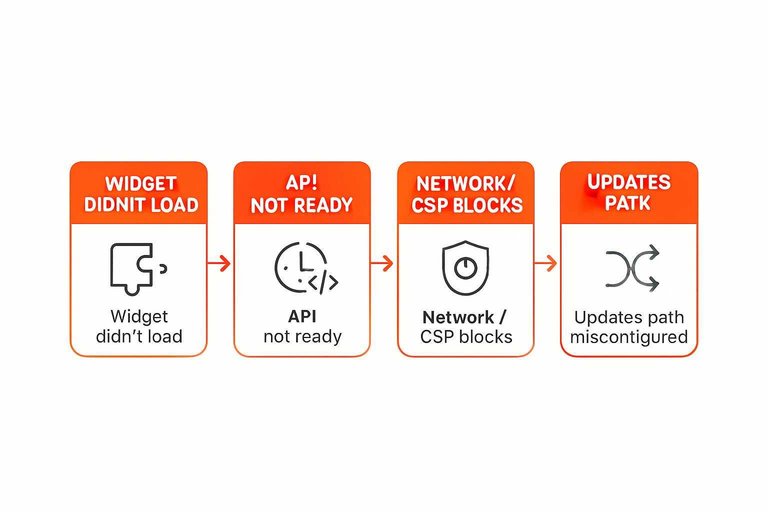
Treat “I want to chat” like a chain of hops. When it fails, identify the hop that didn’t complete.
-
Widget didn’t load (no UI to open). In DevTools → Network, confirm the embed script request actually completes and isn’t 404/blocked. If the launcher never mounts, your CTA can’t open anything.
-
API not ready (UI exists, but your button call is too early). Check the console for “undefined” errors on the widget global. Fix by queuing calls until the SDK is ready (for example, Crisp’s
$crisp.push(...)) or by disabling the CTA until the widget exposes its API (same idea with Intercom Messenger JavaScript API or the tawk.to JavaScript API). -
Network / CSP blocks (script loads, but requests are refused). A Content Security Policy (CSP) is a site security policy that can block third-party scripts or network connections unless allowlisted; if CSP blocks
script-srcorconnect-srcfor your chat provider, you’ll see refused requests in the console. If your widget uses WebSockets, the WebSocket endpoint may also need to be allowlisted. -
Telegram linking didn’t happen (no operator inbox). Telegram bots can’t start a private chat with a user; the user must message the bot first (including via a
t.me/<bot>?start=...deep link). If the operator hasn’t initiated/link-authorized the bot chat, messages won’t land where replies are written. -
Updates path misconfigured (replies don’t come back). Telegram gives you two mutually exclusive ways to receive updates:
setWebhook(push) orgetUpdates(long polling)—you can’t use long polling while a webhook is set. -
Platform limits (works, then “randomly” fails under load). Telegram message text is limited to 1–4096 characters after entity parsing, and bots are rate-limited (for example 1 message/second per chat and 20 messages/minute per group). Even client-side, some SDK calls are throttled (Intercom’s
updateis limited to 20 calls per 30 minutes).
If you can name the hop that broke, you can fix the right system instead of “re-clicking the button.”
What to measure
The cleanest reporting starts with separating a UI event from a delivery event. “Open” is a signal that someone looked; “send” is the moment a message leaves the browser and becomes something an operator can actually receive and reply to.
| Moment | What’s captured | What it does not prove | Use it for |
|---|---|---|---|
| Panel opened | Interest / intent | A conversation exists | UX funnel drop-offs |
| First message sent | User-submitted content | Operator received it | “Started” count (draft) |
| Message received (delivery-confirmed) | Provider has the message | A reply is coming | Start response-time clock |
| First reply shown | Visitor saw the reply | Issue resolved | End response-time clock |
Privacy/consent-wise, treat “open” like behavioral analytics: you’re recording someone’s action even if they never type. “Send” is where you must be explicit about what you store and where the message is routed.
If you care about fast, defensible response-time SLAs, require a delivery-confirmed start—and be honest about transport. A persistent WebSocket is the common “real-time” bar; if your widget uses HTTP polling instead, the experience includes up-to-interval delay by design (which can still be “real enough” for lightweight support). If you care about minimizing collection before consent, prefer tools that do nothing durable until the first send.
Treat the click as intent
A button that says “I want to chat” doesn’t start support by itself—it just opens UI until a first message is actually sent and delivery makes it reachable in an operator inbox. Set your metrics and alerts around that reality: count “open” as intent, and start response-time clocks only when you have delivery-confirmed receipt, not when the panel appears. When someone says “it opened but nobody got notified,” don’t re-click—name the broken hop (load, API readiness, CSP/network, inbox linking, webhook/updates path) and fix that system. And if your operator channel is Telegram, bake the push-and-pull transport into expectations: replies are real, but the widget won’t show them until its next poll.
Frequently Asked Questions
- How do I get to my chat after I clicked “I want to chat” and closed it?
- Reopen the site’s chat bubble/launcher (the floating button) to open the same chat panel again. If you never hit Send, there may be no conversation thread to return to—only the UI you opened.
- Can “I want to chat” automatically send the first message, or does it only open the chat?
- Many widgets treat “I want to chat” as an open-only action and only create a real conversation when a message is actually sent; prefilling text is separate from sending it (for example, Crisp lets you prefill message text and open the chatbox via separate commands).
- Do I need WebSockets for “I want to chat” to feel real-time?
- No—WebSockets are one way to do real-time chat, but HTTP polling can still support a two-way chat experience with up-to-interval delay by design. The key is measuring “message delivered” and “reply shown,” not just “panel opened.”
- Why did I click “I want to chat” but nobody replied—was my message actually delivered?
- Opening the chat panel doesn’t notify an operator; only a successfully sent message creates something to route and reply to. If your setup routes to Telegram, the operator must have initiated/linked the bot chat first (often via a t.me deep link) so messages have an inbox to land in.
- What should my “I want to chat” button do on my website—open the widget or start a conversation?
- Match the promise in the copy: if it says “I want to chat,” wire it to open the widget and focus the input; if it says “Chat with us now,” also ensure a first-message send path exists and is delivery-confirmed. With Eloqra, your button can call eloqra('open') to open the bubble, and the conversation starts when the visitor sends their first message to your Telegram inbox.
Route Chats to Telegram Fast
Once you’re tracking “open” separately from delivery, the next bottleneck is operational: making sure every delivered message reaches a channel you actually watch.
Eloqra forwards every visitor message straight into your Telegram and lets you reply there so responses show up instantly in the on-site chat. Start with Free Forever.
Written by
Eloqra
Notes from the Eloqra team on collecting testimonials and building authentic social proof.
Share: