August 26, 2026
·
Updated October 10, 2026
·
10 min read
Telegram Live Chat vs Helpdesk Chat: Which Fits Small Teams?
A practical comparison collection to help small teams choose between Telegram live chat and a helpdesk chat—decision snapshot, use‑case fit matrix, customer experience tradeoffs, workflow realities, automation/integrations, and risk/compliance considerations.

You want customers to get answers fast—but the “right” chat tool depends on where your conversations actually live. If your team is already living in Telegram, it can feel like the simplest path. If you need structure, reporting, and predictable ownership, a helpdesk chat may save you from chaos.
This collection walks you through a clear decision snapshot, a use-case fit matrix, and the day-to-day realities: friction for customers, continuity across channels, routing and collaboration for your team, automation options, and the compliance risks you can’t ignore.
Decision Snapshot
Telegram live chat is support run inside Telegram, where messages flow like a conversation thread. Helpdesk chat is support inside a ticketing system, where chats become tracked cases with ownership and history. Small teams choose between speed and familiarity versus control and process.
When Telegram Wins
Telegram fits when you need fast replies without heavy tooling.
- Low daily support volume
- Informal, conversational tone
- Community answers common questions
- Tight budget, minimal tools
- Mobile-first team operations
If your support feels like a group chat, Telegram is the native habitat.
When Helpdesk Wins
Helpdesk chat fits when you need repeatable service, not heroic memory.
- SLA targets and escalations
- Audit trail and transcripts
- Multi-agent routing and ownership
- Compliance and data controls
- Rising volume and complexity
When failure has a cost, you want a system that remembers for you.
Tie-Breaker Questions
Decide based on where conversations start and where they must end. Ask where your customers already message you, how you will track each issue to closure, and which risks you must control. If you can’t answer the tracking and risk questions clearly, you’re already in helpdesk territory.
Telegram Live Chat Basics
Telegram-based support is your customer conversation happening inside Telegram, not inside a dedicated helpdesk UI. Small teams use it because it is fast, familiar, and already installed for many customers.
Day-to-day, customers message a support account, then your team replies from phones or desktop apps. You might run support from one shared inbox-style account, or from individual agent accounts with a clear tag system.
Groups and channels fill different roles. Groups are for multi-person troubleshooting or internal swarming, while channels are for one-way updates like outage notices or release notes.
Bots handle the repetitive first layer. A bot can greet, ask for an order number, present buttons for common issues, and route the conversation to a human when needed.
Handoffs are usually manual unless you build workflow. A common pattern is “bot collects details → posts to an internal group → the on-call agent jumps into the customer chat.”
Telegram support works best when you treat it like a lightweight helpdesk, not a casual chat thread.
Helpdesk Chat Basics
Helpdesk live chat starts with a website or in-app widget, then lands in a shared team inbox. One customer message becomes a trackable conversation, tied to a profile and history.
Behind the scenes, most tools add structure fast: profiles capture email, device, and past threads; tags label intent like “billing” or “bug”; routing sends chats to the right person or queue. Agents can leave internal notes, mention teammates, and split work without the customer seeing the coordination.
When a chat needs follow-up, it can become a ticket with an owner, status, and SLA-style priority. That’s how “quick question” turns into accountable work instead of a forgotten tab. (This matches how connected channels can automatically create tickets in a help desk.)

Use-Case Fit Matrix
Pick the tool that matches your support shape, not your preferences. Different teams need different workflows, visibility, and routing.
| Scenario | Telegram live chat fits when | Helpdesk chat fits when | Watch out for |
|---|---|---|---|
| E-commerce | Simple order questions, repeat buyers | Returns, disputes, multi-agent coverage | Lost context, no ticket trail |
| SaaS | Early-stage, founder-led support | SLAs, triage, bug-to-ticket flow | Feature requests get buried |
| Local services | Fast quotes, scheduling, photos | Job tracking, reminders, handoffs | Chats die after hours |
| Agencies | Client groups, quick approvals | Account ownership, reporting, escalations | Too many separate threads |
| Creators | Fan replies, lightweight moderation | Merch support, paid tiers, refunds | Boundary and burnout risk |
| Internal IT | Small teams, urgent pings | Asset tracking, audits, change logs | Shadow IT via DMs |
| Community support | Peer-to-peer answers, group context | Sensitive issues, private escalations | Privacy and compliance gaps |
If your scenario needs ownership, history, and accountability, you want a helpdesk.
Customer Experience
Customers judge your support channel fast. They notice speed, friction, trust, and whether you remember them next week. A small team wins when the experience feels effortless and consistent — especially when you can respond quickly without juggling a separate support dashboard.
Entry And Friction
Telegram starts in an app many customers already use. A helpdesk chat usually starts on your site, inside a widget.
Telegram often requires an app install and a username-based first message. Helpdesk chat often requires a page visit, a widget click, and sometimes an email field. A hybrid approach can reduce friction: a lightweight on-site widget that routes messages into Telegram (like Eloqra) lets visitors start where they already are (your site) while you reply from the app you already use.
Pick the channel that matches where customers already are, not where you wish they were.
Conversation Continuity
Continuity matters when customers come back with “same issue, different day.” Compare how each option handles context and history.
- Telegram keeps full chat history in one place
- Helpdesk keeps ticket history by customer identity
- Telegram follows the user across devices
- Helpdesk follows the browser session unless identified
- Helpdesk can link multiple conversations to one record
If identity is shaky, your “continuity” becomes guesswork — so it helps when your setup preserves both the thread (in Telegram) and basic visitor context (like page and device) from the moment they first message you, rather than relying purely on a later form fill.
Brand And Trust
A helpdesk widget feels native to your domain, which signals “official channel.” Telegram can feel personal and fast, but it can also feel unofficial.
Verified helpdesk domains, branded chat widgets, and consistent sender names reduce hesitation. Telegram trust rises if you use a clear handle, pinned guidance, and consistent reply behavior. If you route site chat into Telegram, the branded widget on your domain can do some of the legitimacy work while still giving you Telegram-speed responses.
When customers share sensitive details, perceived legitimacy beats convenience.
Rich Interactions
Rich interactions reduce back-and-forth. They also reveal where each channel is strong or awkward.
- Telegram handles screenshots and files smoothly
- Helpdesk handles forms and structured fields better
- Telegram supports voice notes and quick media
- Helpdesk supports links, macros, and routing rules
- Helpdesk supports automated replies and follow-ups
If you need structure, use a tool built for structure — but if your main goal is quick clarification, screenshots, and fast replies, keeping the conversation in Telegram (with an optional pre-chat form on the widget when you do need name/email) can cover most day-to-day support without the overhead of a full suite.
Team Workflow Reality
Small teams don’t fail on tools. They fail on coverage gaps, fuzzy ownership, and messages that quietly slide away.
Telegram live chat feels fast because it mirrors your internal chat habits. A helpdesk chat feels slower at first, because it forces decisions: who owns this, what’s next, and what’s tracked.
Ownership And Routing
You need one clear owner per conversation, or you’ll ship two replies and miss the real problem.
In Telegram, ownership is social. You rely on “I’ve got it,” @mentions, and manual handoffs in-thread. In a helpdesk chat, ownership is structural. You assign, queue, and route by rule, with visible states like open, pending, and solved.
If you’re already arguing about “who answered,” you’re ready for a queue.
Internal Collaboration
You need to collaborate without leaking half-formed thinking to customers. That line gets crossed fast in Telegram.
- Add private notes for context and decisions
- Use @mentions to pull in specialists
- Escalate with clear ownership changes
- Separate internal debate from customer messages
- Leave a visible trail of handoffs
If collaboration happens in the same stream as support, customers will eventually read your process.
Operating Hours
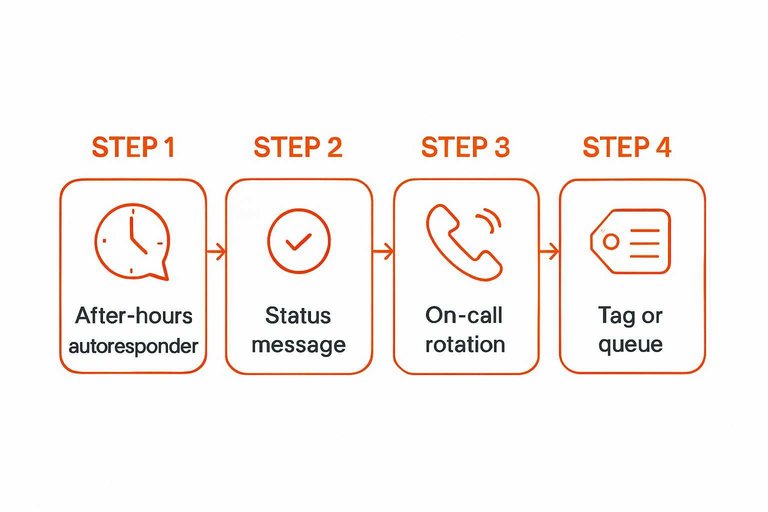
After-hours is where small teams burn out or break trust. You need a default response that doesn’t depend on who’s awake.
- Set an after-hours autoresponder with next-response expectations.
- Show a status message that matches your real availability.
- Define a simple on-call rotation for true emergencies.
- Tag or queue messages so morning handoff is clean.
- Document what counts as “urgent” in one sentence.
If your hours aren’t explicit, customers will create them for you.
Quality Control
Quality control is hard when “fast” becomes your only KPI. Small teams need guardrails that don’t feel like bureaucracy.
Telegram can use copied snippets and pinned checklists, but consistency depends on individual discipline. Helpdesk chat usually supports macros, saved replies, and lightweight workflows, plus signals for coaching like reassignment, reopen patterns, and internal notes.
If you can’t coach from the record, you’ll keep re-learning the same mistakes.
Automation And Integrations
Automation decides whether your chat stays lightweight or turns into a real support system. You want quick wins now, and a clean path to deeper workflows later.
Think in two timelines: what you can automate inside the tool, and what you can automate across your stack.
Telegram Automation
Telegram can automate a lot with bots, but you assemble the pieces yourself. Start with small, high-leverage flows that reduce repetitive typing.
- Bot menu for top actions
- FAQ replies for common questions
- Lead capture with forms
- Keyword routing to humans
- Spam filters and rate limits
If you need repeatable structure, bots help fast—until edge cases pile up. For the building blocks, see the official Telegram Bot API docs.
Helpdesk Automation
Helpdesk chat automation is built for consistency and accountability. Use it when you need rules that scale beyond one person’s memory.
- Triage rules by topic
- Auto-tags and labeling
- CSAT prompts after resolution
- Follow-ups on silence
- Lifecycle triggers for status
If support is a process, not a person, helpdesk automation keeps it from drifting.
Integration Depth
Integrations matter most when agents need context without asking customers to repeat themselves. Identity, order data, subscriptions, and internal logs are the usual dealbreakers.
Telegram often connects through bot APIs and middleware. That works well for simple lookups and notifications. It gets harder when you need secure identity matching, audit trails, and multi-app workflows.
Helpdesks usually offer deeper, opinionated integrations with CRM, ecommerce, and knowledge bases. You trade flexibility for faster setup and cleaner data handoffs. Choose the ecosystem that matches how “connected” your support must be.
Risk And Compliance
Telegram feels lightweight because it is. That simplicity is great until customer conversations become records you must keep, export, or defend.
A helpdesk chat is built for accountability. Telegram is built for messaging first, controls second.
Data Control
You need to know who owns the conversation and how long it lives. That includes retention rules, exports, and the “one missing staffer” problem.
Telegram history usually follows accounts and devices, not a shared inbox. A helpdesk keeps a centralized thread, with consistent history, exports, and audit-friendly ownership.
If staff turnover is normal, treat “where did the chat go?” as a design flaw, not an accident.
Security Basics
Assume a lost phone or reused laptop will happen. Your job is limiting the blast radius when it does.
- Enforce 2FA on every admin account
- Restrict admin rights to a small group
- Use role permissions for viewing and exporting
- Treat devices as risk, not identity
- Remove ex-staff access immediately
Security is mostly offboarding discipline, not fancy features.
Compliance Fit
Compliance is rarely about one law. It is about repeatable processes you can prove under pressure.
If you need GDPR-style access requests, formal retention, legal holds, or consistent exports, a helpdesk usually fits better. If your industry expects audit trails, access logs, and role-based controls, Telegram can become a workaround you must constantly defend.
When “we can’t easily retrieve that conversation” becomes a common sentence, you already need the helpdesk.
Make the Call With a 15-Minute Pilot
- Pick your primary goal: speed and familiarity (Telegram) or accountability and control (helpdesk).
- Run a one-week pilot: route the same inquiry type through each option and note response speed, missed messages, and handoff pain.
- Validate the basics: who owns new chats, how you handle off-hours, what gets logged, and what automation you truly need.
- Decide with your tie-breakers: customer entry friction, required compliance/data control, and whether you can live without helpdesk-grade reporting.
Frequently Asked Questions
- Can I use Telegram live chat on my website without forcing visitors to install Telegram?
- Yes—use a website chat widget that relays messages to Telegram so visitors chat in-page while your team replies from Telegram. This keeps the customer experience familiar while preserving your Telegram-based workflow.
- What’s the best way to prevent missed messages when running support through Telegram live chat?
- Create a single shared support inbox (one bot or one team account), turn on reliable notifications, and use a clear tagging/ownership convention (like “I’m on it” + handoff notes) so two people don’t reply—or nobody does. For higher volume, add an escalation rule that moves unresolved chats into a ticketing system.
- How do I add visitor context (page URL, device, location) to Telegram live chat messages?
- Telegram itself doesn’t automatically include website context, so you need a web widget or bot integration that passes metadata with each message. Look for setups that attach page URL and basic device/browser info directly in the Telegram thread so agents don’t have to ask repeat questions.
- Can Telegram live chat replace a helpdesk for customer support, or do I still need tickets?
- Telegram live chat can cover real-time questions and low-volume support, but tickets are still useful for anything that needs SLAs, multi-step follow-up, or cross-team accountability. Many small teams start with Telegram for speed and add ticketing only for issues that can’t be resolved in one conversation.
- Is there a simple way to route website live chat messages straight into Telegram for a small team?
- Yes—tools like Eloqra let you drop a single script snippet on your site and receive every visitor message in Telegram, with basic context like the page they’re on. This is a good fit when you want “helpdesk-like” capture on the site without running a full support dashboard.
Turn Telegram Into Live Chat
If a full helpdesk feels heavy but you still need fast replies, Telegram live chat can be the simplest workflow for small teams.
Eloqra routes website messages straight into your Telegram with visitor context, so you can respond without a dashboard. Choose the Free Forever plan to get started.
Written by
Eloqra
Notes from the Eloqra team on collecting testimonials and building authentic social proof.
Share: