September 5, 2026
·
Updated October 20, 2026
·
12 min read
How Chat Works Without Sign-Up: Identity and Routing
A pillar guide to how “no sign-up” website chat still identifies and routes messages — anonymous vs logged-in identity, cookies vs LocalStorage vs session storage, carrying IDs during the WebSocket upgrade handshake, fan-out routing to operators (including Eloqra’s Telegram flow), and the breakages + security/privacy boundary so you can predict when conversations persist or reset.

You add a chat bubble to your site because you want visitors to ask a question immediately, without creating an account. Then the confusing parts show up: a conversation resets after a refresh, the thread doesn’t follow the visitor between pages, or you can’t tell whether two messages came from the same person.
Get this wrong and you lose context, miss leads, and create privacy and impersonation risks. This guide walks you through what “no sign-up” really relies on, where the visitor ID lives, how it’s sent and routed to an operator channel, and the browser/privacy conditions that make it fail.
What “No Sign-Up” Means
“Chat without sign up” is about skipping account creation, not about skipping identity entirely. The widget can avoid asking for email/password and still keep enough state to make a conversation behave like a conversation, not a one-off form submission.
Anonymous vs logged-in
In a logged-in chat, your site already has an authenticated identity (the user proved who they are by signing in), so the chat can safely attach messages to that known user.
In a no-sign-up chat, the system typically creates an anonymous identifier—a random ID stored in the browser that lets the chat system recognize the same visitor again without knowing who they are—and uses that as the “handle” for the conversation.
That distinction matters because anonymity is about not knowing the person, not about being unable to recognize the browser. For example, Intercom Messenger explicitly uses first-party cookies scoped to your website’s domain, and it includes a cookie named intercom-id-[app_id] described as a “Unique anonymous identifier,” with a default duration of “None (local storage entries do not expire).” It also uses a separate intercom-session-[app_id] with a default duration of 1 week to identify a browser session and give access to previous conversations (per Intercom’s Messenger cookies documentation).
Why IDs are mandatory
Even if you never show a “Sign up” button, a chat system still needs an identifier because it has to:
- Keep continuity: restore the same thread as the visitor navigates pages or comes back later. Crisp says chatbox cookies are needed to restore the chat session and messages across page loads and returns days later.
- Deduplicate and protect the system: distinguish one device/browser from another for abuse prevention. Intercom lists
intercom-device-id-[app_id](270 days by default) and says it uses it to determine unique devices interacting with the Messenger to prevent abuse. - Route replies correctly: when an operator sends a reply, the backend must know which open conversation (and which browser) should receive it, otherwise replies turn into “shout into the void.”
Once you accept that “no sign-up” still implies “stable identifier,” the next question becomes practical: what kind of ID is it, where does it live in the browser, and what properties does it need to survive real browsing behavior?
Where Identity Lives
A “no sign-up” chat still needs somewhere to put its anonymous identifier so it survives refreshes, navigation, and (sometimes) coming back later. In practice, widgets mix a few browser storage primitives, and the mix tells you what they’re optimizing for: continuity, privacy/consent posture, and abuse control.
Cookies as default
Cookies are the default because they’re naturally sent back to the server on every request to that site, and they keep working as you move across pages. A session cookie—a browser cookie used to associate multiple requests with one session so the server can keep a conversation state—covers “keep this thread alive while I browse.”
Many widgets also lean on first-party vs third-party cookies—whether a cookie/state is accessed in the context of the site in the address bar (first-party) or by embedded content from another site (third-party)—because modern browsers are hostile to third-party identity. WebKit’s Intelligent Tracking Prevention (ITP) blocks all third-party cookies by default, which means an embed that depends on its own third-party cookie jar is brittle unless it handles explicit storage access flows.
Crisp’s cookie policy shows the continuity bias clearly: chatbox cookies have a default expiration time of 6 months (renewed when the user returns and loads the chatbox). On the conversation side, Crisp says sessions with messages are permanent unless deleted by a website agent; otherwise the session is temporary and destroyed 30 minutes after the last website access. That’s a vendor drawing a hard line between “a real support thread” and “a drive-by that never became a conversation.”
Local/session storage
When a widget wants more control than cookies provide—or wants to avoid relying on cookie behavior—it will also write to Web Storage.
LocalStorage—a browser storage area that persists on disk and is readable by JavaScript on the page—is the “stickiest” of the common client-side options for remembering an anonymous ID. sessionStorage is similar but scoped to a single tab and cleared when that tab is closed.
tawk.to is explicit that its widget uses local storage and session storage (in addition to cookies). It documents a tawk_uuid_propertyId value that stores a session token to keep chat running smoothly across pages, and it notes that PreviousNav in session storage is cleared when the visitor closes the browser tab. That pairing is typical: one identifier for cross-page continuity, and one short-lived value for in-tab behavior.
This is also where vendor tradeoffs get opinionated. Security guidance often prefers keeping session identifiers in cookies because HttpOnly cookies can be made unreadable to JavaScript, reducing the blast radius of an XSS bug; anything in LocalStorage is directly accessible to page JavaScript. On the privacy side, tawk.to documents consent gating: if a built-in consent form is enabled, cookies and local storage data won’t be set until the visitor agrees, which trades “always-on continuity” for stricter consent behavior.
One more constraint matters even if you never touch third-party cookies: WebKit’s ITP deletes cookies created in JavaScript and other script-writeable storage (including LocalStorage and SessionStorage) after 7 days of no user interaction with the website. If your chat relies on “come back weeks later and pick up the thread,” that policy becomes part of your identity design.
Real vendor identifiers
Here are concrete identifiers real widgets place in the browser, and what they’re buying with them:
| Vendor | Storage type | Key name | Purpose | Retention |
|---|---|---|---|---|
| Intercom | Cookie | intercom-session-[app_id] |
Browser session | 1 week |
| Intercom | Cookie | intercom-device-id-[app_id] |
Device uniqueness / abuse | 270 days |
| Intercom | Local storage | intercom-id-[app_id] |
Anonymous visitor ID | None (no expiry) |
| Crisp | Cookie | (chatbox cookies) | Restore chat across visits | 6 months (renewed) |
| tawk.to | Local storage | tawk_uuid_propertyId |
Session token | Not specified |
| Chatwoot | Cookie | cw_conversation |
Persist conversation | Not specified |
Once you know which primitive holds the ID, the next question is how it’s presented to the backend—implicitly via cookies, or explicitly as a token the widget attaches to HTTP/WebSocket requests. That’s the bridge to “identity over the wire.”
Identity Over the Wire
When a “chat without sign up” widget boots, it has one immediate job: ask the backend “do I already have a conversation, and where should new messages go?” That happens over ordinary HTTP first, because HTTP is how the browser loads the script, fetches configuration, and makes the first request that either resumes an existing thread (if your browser still has the identifier) or creates a new one.
On the wire, the identity usually shows up as a conversation token: a value the browser presents on each request so the backend can attach messages to the right conversation. If that token lives in a cookie, the browser sends it automatically with same-site requests; if it’s stored elsewhere, the widget has to attach it explicitly (for example, in a request body or header) so the server can still say “this message belongs to conversation X.”
To get real-time delivery without polling, most systems upgrade the connection to a WebSocket using a WebSocket opening handshake—the HTTP request/response that upgrades an HTTP connection into a persistent, bidirectional connection for real-time messaging. In RFC 6455 (the WebSocket Protocol), that handshake is an HTTP GET with an Upgrade: websocket header and a 101 Switching Protocols response, and the client includes a Sec-WebSocket-Key. Because it’s still HTTP at the start, normal request metadata can be present too (including cookies, and an Origin header), which lets an existing conversation cookie ride along during the upgrade.
Once the backend has both (1) a stable conversation token and (2) a live socket, routing becomes a table lookup: token → active connection(s). Incoming visitor messages are written to storage and fanned out to whatever operator channel is attached; operator replies come back in, get mapped to the same token, and are pushed down the correct socket to the browser.
Routing to Operators
Fan-out mental model
Routing is the part that makes “chat without sign up” feel real-time instead of “I sent a form into space.” Once the browser has a conversation token and a live connection, the backend’s main job is to keep a continuously updated mapping from that conversation to wherever a human is listening.
Conceptually, the backend maintains two linked lookups.
First: conversation ID → operator channel(s). That “channel” might be an internal dashboard inbox, a team queue, or an external sink like Telegram. If your product supports multiple operators, this is also where assignment lives (one operator vs a shared inbox).
Second: conversation ID → active browser connections. A single visitor can have more than one (multiple tabs, a reconnect after network blips), so the value is usually “one-to-many,” not a single socket.
When the visitor sends a message, it arrives tagged with the conversation ID, gets written to storage, and then gets fanned out to every operator channel subscribed to that conversation. When an operator replies, the message comes back with the same conversation ID attached, and the backend fans it back in the other direction: it looks up the active browser connection(s) for that ID and pushes the reply to the right session(s). That’s the entire trick: stable ID in, stable ID out.
Eloqra’s Telegram routing
A Telegram-routed widget like Eloqra uses the same table-lookup shape, but swaps “operator dashboard” for “Telegram chat.” The browser talks to Eloqra’s backend; the backend forwards new visitor messages into Telegram; your replies in Telegram are delivered back to the backend and then pushed to the correct browser session.
This is where webhook first shows up: a webhook is a push delivery mechanism where a platform sends HTTP requests to your server when new events/messages happen, instead of you polling for them. Telegram supports both pull (getUpdates) and push (setWebhook), where setting a webhook means giving Telegram a URL to send updates to.
Telegram webhook POSTs are delivered over HTTPS to ports 443, 80, 88, or 8443, and Telegram publishes the IP ranges those POSTs come from (149.154.160.0/20 and 91.108.4.0/22) in its Telegram webhook guide. If you can’t run a reachable webhook endpoint, a dashboard-style inbox is the simpler fit.
When It Breaks
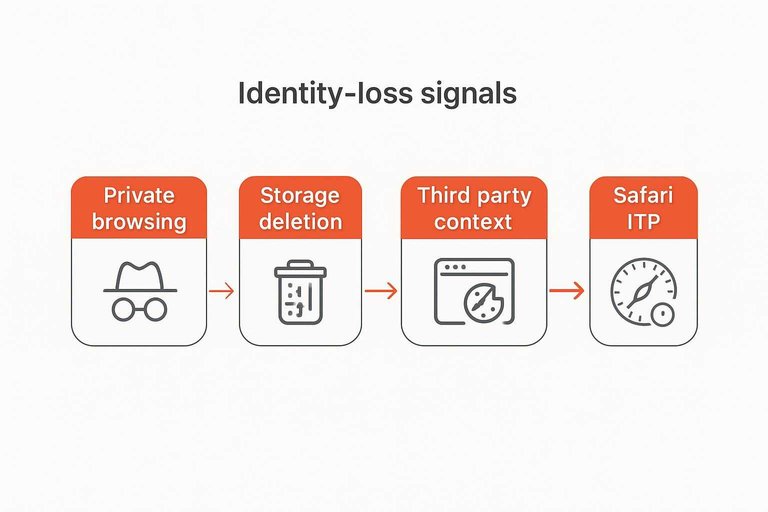
“Chat without sign up” breaks the moment the browser stops presenting the same anonymous identity back to the widget—either because storage is gone, or because the browser refuses to expose it in the context the widget is running.
The easiest failure to recognize is private browsing / incognito. The chat works while the tab is open, but when the window closes the identifier disappears with it. The visitor comes back and sees a fresh thread; on your side it looks like a brand-new person starting over.
Next is explicit storage deletion: clearing site data, cookie blockers set to “delete on exit,” or aggressive privacy extensions. If your continuity is anchored in a first-party conversation cookie (for example, Chatwoot’s cw_conversation, which exists specifically to persist the conversation when the contact navigates across pages or revisits later, per Chatwoot’s cookie documentation), wiping that cookie is equivalent to wiping the visitor’s “handle.” The symptom is blunt: history vanishes and replies you send to the old thread no longer route to the visitor’s current browser session.
Then there’s third-party context breakage. If the chat runs as embedded cross-site content (for example, an iframe or script operating under a different site than the one in the address bar), modern browsers may block or partition that third-party cookie/storage jar. This is where the Storage Access API—a browser API that lets embedded cross-site content request access to third-party cookies/state when browsers block them by default—becomes the difference between “resume the same conversation” and “start a new one every time.” If access isn’t granted, the widget sees an empty identity store.
Safari’s ITP (Intelligent Tracking Prevention)—WebKit/Safari privacy features that restrict cross-site tracking and limit how long script-writeable storage persists without interaction—adds a time bomb: even without a user manually clearing anything, the browser can age out state and you’ll see “it worked last week” resets.
Treat these as identity-loss signals, not UX mysteries: if state can’t survive, routing can’t either.
Security and Privacy Boundary
“Chat without sign up” buys you anonymous continuity, not authentication. A stable browser/conversation token lets the system route replies, but it does not prove who is typing—anyone who can obtain that token can speak as that thread.
Even without a registration form, chat traffic still carries personal data: whatever the visitor types, plus network metadata. The Court of Justice of the European Union (CJEU) has held that a dynamic IP address logged by a site operator can be personal data for that operator if the operator has legal means to identify the visitor with help of additional information held by the ISP (Breyer v Bundesrepublik Deutschland, Case C‑582/14) — see the CJEU press release on the Breyer case. Treat the transcript and its metadata like user data: keep only what you need, avoid spraying it into analytics logs, and be explicit in your policy.
On the abuse side, treat the conversation token as a bearer secret and put checks at the edge. Set expectations in the UI (“anonymous chat”), enforce an allowlist on where requests may originate (for browsers, the Origin header is the line you validate), rate-limit by conversation/device, and design the operator view to avoid trusting display names the visitor provides.
If you’re troubleshooting why always-anonymous or “no-email” chat leads to abandoned threads or lost sales, see no-email live chat mistakes.
When the visitor is already logged in, switch modes: require a JWT (a signed token used to prove a user’s identity/claims to another system, typically issued by your server) or an HMAC-signed request so the backend can bind the chat to the authenticated user and reject impersonation-by-token-copy. That “anonymous-by-default, verified-when-logged-in” split is the policy to write down and implement.
Treat “no sign-up” as identity
If your chat resets on refresh, won’t follow between pages, or strands operator replies, the problem isn’t “no account” — it’s that the browser stopped presenting the same anonymous conversation identity, so the backend has nothing stable to route against. Design this on purpose: decide where the identifier lives (cookie vs LocalStorage vs session-only), how it’s attached to HTTP/WebSocket traffic, and what you’ll do when private browsing, storage clearing, third‑party context limits, or ITP erase it. Then set the boundary in writing: anonymous tokens give continuity but not proof of person, so treat the token like a bearer secret and only switch to verified identity (JWT/HMAC) when the visitor is already logged in. If your real goal is “messages go to the place I actually reply,” a Telegram-routed setup fits the same routing model; if you need strong user binding and stricter impersonation controls, run the chat in an authenticated mode instead of leaning on anonymous continuity.
Frequently Asked Questions
- Is “chat without sign up” the same as a fully anonymous chat with no tracking?
- No—“chat without sign up” skips account creation, but the widget still needs a stable anonymous conversation identifier so it can restore the thread and route replies back to the right browser.
- Does chat without sign up always use WebSockets, or can it work over plain HTTP?
- It starts over HTTP to load the widget and create/resume the conversation, then upgrades to a WebSocket for real-time delivery; the WebSocket upgrade is an HTTP request with an `Upgrade: websocket` header and a `101 Switching Protocols` response (RFC 6455).
- Why does my chat without sign up history disappear in incognito or after I clear cookies?
- Because the anonymous identifier is stored in browser site data; private browsing and “clear site data” wipe that storage, so the widget can’t present the same token and has to start a new conversation.
- If a visitor doesn’t sign up, how can I reply later when they’ve left the site?
- You can only reply into the same thread if their browser comes back with the same conversation token; if you need follow-up outside the browser, collect a reachable contact method (like email) via an optional pre-chat form.
- Can I run chat without sign up and answer from my phone without a helpdesk dashboard?
- Yes—use a chat widget that routes messages to a mobile inbox; Eloqra forwards each website message to Telegram and sends your Telegram replies back to the visitor’s on-site chat.
Keep Replies Routed Reliably
Once you’ve defined your anonymous identity boundary, the next constraint is operational: making sure messages reach the person who can answer, fast, without a dashboard open.
Eloqra routes every website chat message straight to your Telegram and delivers your replies back into the on-site chat, so you stay responsive from your phone. It’s Free Forever.
Written by
Eloqra
Notes from the Eloqra team on collecting testimonials and building authentic social proof.
Share: