August 31, 2026
·
Updated October 16, 2026
·
9 min read
What Is a Website Live Chat Widget and How Does It Work?
An explainer of what a website live chat widget is and how it works end-to-end—where it shows up and who it connects, how the on-page script captures events and manages UI state, how messages travel and are routed reliably, and what backend services handle storage, agent tools, automation, and CRM/helpdesk sync.

Ever added a live chat bubble to a site and wondered what’s actually happening after you paste that one “install script”? To visitors it looks simple: type a message, get a reply. Under the hood, it’s a mini real-time app with identity, routing, storage, and performance trade-offs.
This explainer walks you through the full path—from the widget’s on-page mechanics to message delivery, backend components, and the context data that makes chats faster and more personalized—so you can evaluate tools, troubleshoot issues, and implement chat with fewer surprises.
Widget, Defined
A website live chat widget is a small UI component embedded on your site that lets visitors message you in real time. It routes those messages to a human, automation, or both, without forcing the visitor to leave the page.
Where it appears
The widget is added with a script or tag-manager snippet, then renders on your pages automatically. Visitors usually see a launcher button in a corner, which opens a modal chat panel inside the browser.
So what? Placement is product design, because it controls who talks to you.
Who it connects
It can connect the visitor to different endpoints, depending on routing rules and availability.
- Support agents
- Sales reps
- Chatbots or automations
- Helpdesk tickets
- Knowledge base links
So what? Your widget is a switchboard, not a single inbox.
Why it exists
Live chat exists to reduce friction versus forms and email. It keeps the visitor’s page context and enables fast back-and-forth while intent is still high.
So what? The win is fewer dropped conversations, because you respond before they bounce.
On-Page Mechanics
Embed script loading
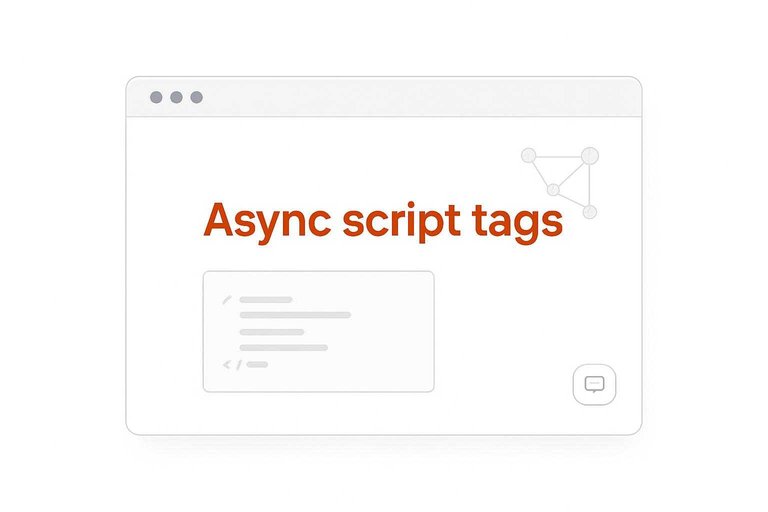
Most live chat widgets start as a tiny script snippet you paste into your site. It loads a larger runtime without blocking your page.
Async script tags let the browser keep rendering while the widget downloads. The file is usually served from a CDN, so it’s cached and fetched fast from a nearby edge. The snippet then bootstraps the runtime by creating a global stub function, queuing early calls, and injecting the real script.
If your snippet runs, the widget can evolve independently from your site releases. For a concrete example, see Zendesk’s Google Tag Manager embed snippet.
UI and state
The widget is a small app with predictable states. Those states decide what renders and what actions are allowed.
- Collapsed: launcher button only
- Open: chat panel visible
- Typing: agent or user typing
- Offline: message form or fallback
- Unread count: badge incrementing
- Error/retry: resend or reconnect
When you can name the state, you can debug the behavior.
Event capture
Every interaction becomes an event the widget can process. That includes clicks, keystrokes, and context like URL and referrer.
The widget attaches listeners to its UI, then normalizes actions into small payloads like “opened,” “message_sent,” or “form_submitted.” It queues events in memory, sometimes in localStorage for resilience, then sends them in batches using fetch or sendBeacon. If the network drops, it retries with backoff and preserves ordering where it matters.
Event design decides whether chat feels instant or flaky.
Performance constraints
Widgets live inside your page, so they must behave like a good neighbor. Small decisions here prevent slowdowns and layout bugs.
- Lazy-load after first interaction
- Defer heavy fonts and media
- Reduce reflows with stable sizing
- Isolate CSS with prefixes
Treat the widget like third-party JavaScript, because it is.
Message Delivery Path
You type a message, but the widget doesn’t “send it to an agent.” It packages text plus metadata, then pushes it through a transport, a session layer, and a routing layer.
From there, servers fan it out to the right inbox, then confirm delivery back to the browser. If any hop fails, the system switches to retry and recovery rules. Some lighter setups simplify the “inbox” hop by routing straight into an existing messaging client—Eloqra, for example, delivers visitor chat into Telegram—yet the same underlying delivery steps (transport, identity, routing, acknowledgments) still apply.
Transport choices
Your widget needs a way to keep a connection open and move small messages fast. Vendors choose transports based on how much control they have over networks, proxies, and hosting.
WebSocket keeps one long-lived, two-way connection, which is great for real-time chat and typing indicators. Long polling fakes “push” by holding requests open, then reopening them, which is simpler but chattier. SSE is one-way server-to-browser streaming, often paired with normal POSTs for sending messages.
Pick the transport that your infrastructure can keep alive without flaking under proxies and load balancers—especially if you’re aiming for a lightweight widget that stays responsive without adding much overhead to the page.
Session identity
The server must know which browser tab and which visitor the message belongs to. Most systems stack multiple identifiers, then reconcile them when a user logs in.
- Cookie-based session ID
- localStorage visitor ID
- Anonymous device or browser fingerprint ID
- Authenticated user ID mapping
If identity is shaky, routing looks random and history gets split. Even when replies happen in a separate operator surface (like Telegram), you still need solid identity on the web side so context like page, device, and location stays correctly attached to the thread.
Routing logic
After the server accepts the message, it decides where the conversation should live. That decision uses queueing rules plus a view of who is online and what they handle.
Messages often enter a queue tied to a team inbox, then get assigned to an available agent. Skills-based routing can filter candidates by language, product area, or priority tags. The conversation record stays attached to the team and inbox, even if agents change.
In smaller teams, routing can be intentionally simpler: instead of skills and shifts, the “right inbox” might just be the founder’s Telegram, with a thin console to separate conversations across sites—still routing, just with fewer moving parts.
Delivery guarantees
Chat feels instant, but delivery is negotiated with safeguards. Those safeguards prevent duplicates, preserve order, and survive temporary disconnects.
- Client/server acknowledgments
- Retry with backoff
- Idempotent message IDs
- Ordering via sequence numbers
- Offline fallback to email
If you design for failure first, “real-time” becomes dependable instead of lucky. This matters even more when your operator experience depends on timely notifications (e.g., replying from a phone-based inbox), because missed or duplicated messages are what turn “simple” setups into noisy ones.
Backend Internals
Real-time chat feels simple in the browser, but the backend is doing constant coordination. It has to route messages instantly, persist them safely, and expose clean controls for operators. Get the internals right, and the widget stays fast under load and boring in production. One practical reference for managing real-time routing at scale is Amazon’s overview of API Gateway WebSocket APIs.
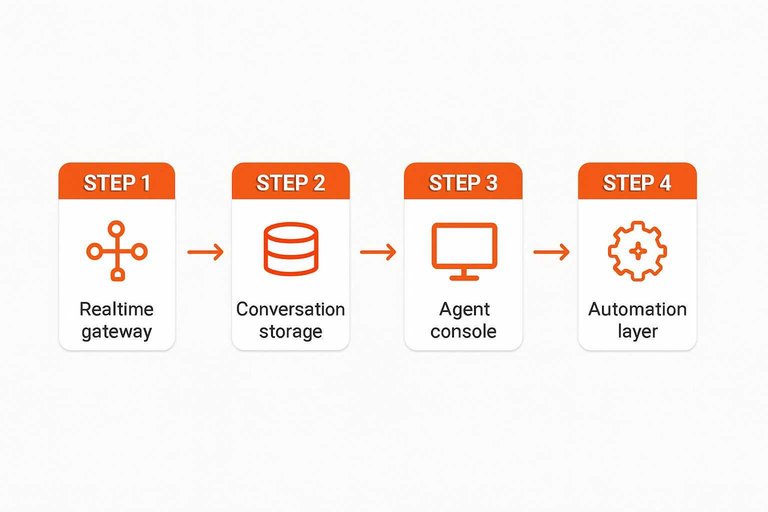
Realtime gateway
A live chat widget is usually connected to a realtime gateway over WebSockets or SSE. That gateway concentrates thousands of client connections, then fans events back out to the right browsers and agent tabs.
Presence tracking sits here too. The gateway tracks who is connected, which conversation they are in, and which agent is actively viewing it, then broadcasts only the updates that matter.
Routing discipline is what turns “realtime” into “reliable enough to run a support team.”
Conversation storage
You need storage that preserves context and supports audits. It also needs clear retention rules, because chat data grows fast.
- Threads: participants, status, assignment
- Messages: content, sender, timestamps
- Attachments: files, metadata, scans
- Events: joins, leaves, reads
- Tags and audit logs: routing, compliance
Retention is a product decision with technical teeth, so encode it as policy, not habit.
Agent console
The agent console is a subscriber first. It opens its own realtime connection, listens for queue changes, new messages, and assignment updates, then re-renders quickly.
When an agent replies, assigns, tags, or closes a thread, the console writes actions back through authenticated APIs. The backend validates permissions, records an audit trail, and emits the resulting updates to everyone watching.
If the console can’t trust the stream, operators start screenshotting bugs instead of helping customers.
Automation layer
Automation keeps humans focused on the conversations that need judgment. It runs on events, checks conditions, then emits actions back into the same system.
- Triggers: message received, idle timeout
- Business hours: routing by schedule
- Auto-replies: acknowledgments, FAQs
- Bot flows: questions, handoff points
- Escalation rules: VIPs, sentiment, retries
Make automation observable, or you will debug “ghost agents” at the worst time.
Context and Personalization
Live chat feels “aware” because each message carries a small bundle of context. The widget attaches page, traffic, and device metadata to the conversation. Agents and bots use it to respond faster, not to guess your thoughts.
Collected context
The widget quietly collects basics so the conversation starts with clues, not questions.
- Current URL and page title
- Referrer and campaign UTM tags
- Device, browser, and OS
- Locale, language, and time zone
- On-site events like clicks
When this is missing, your chat becomes generic fast.
How it’s used
Context turns one inbox into a usable queue. It helps your team respond with intent, without “reading minds.”
A common flow looks like this:
- Routing: billing pages go to billing; docs pages go to support.
- Suggested replies: macros match the page, product, or plan.
- Bot branching: UTMs and URLs choose the next question.
- Prioritization: repeat visitors or checkout errors rise to the top.
Treat context like a compass, not a crystal ball.
Identity resolution
Most chats begin anonymous, then later connect to a real customer. Identity resolution merges those footprints into one thread.
The widget usually ties identity together using cookies, chat session IDs, and login-linked identifiers. Mismatches happen when cookies reset, browsers differ, devices change, or privacy settings block storage.
If you see duplicates, fix identity rules before you “fix” agent performance.
CRM/helpdesk sync
Sync makes chat useful after the window closes. It pushes the right fields to the right system, at the right moment.
- API calls to create or update records
- Webhooks for real-time events
- Field mapping for custom properties
- Ticket creation on conversation close
Integration quality decides whether chat becomes history or leverage.
Use This Mental Model to Choose (and Debug) Live Chat
- Start at the page: confirm the embed script loads asynchronously, the UI state is predictable, and tracking/event capture doesn’t block rendering.
- Follow the message path: identify the transport (WebSockets/SSE/HTTP), how sessions are created, and what routing rules decide which team or bot responds.
- Inspect the backend: verify there’s a real-time gateway, durable conversation storage, an agent console with presence/assignment, and an automation layer for triage.
- Validate context: know what data is collected (page, device, referrer, identity), how it’s resolved, and whether CRM/helpdesk sync is reliable and consent-aware.
Frequently Asked Questions
- Will a website live chat widget slow down my site or hurt Core Web Vitals?
- A live chat widget can affect performance if it blocks rendering or loads large scripts, so load it asynchronously/deferred and limit third-party dependencies. After installing, verify impact in Chrome DevTools Lighthouse and WebPageTest, and watch Real User Monitoring (RUM) if you have it.
- Do I need a support team to run a website live chat widget, or can one person manage it?
- You can run live chat solo if messages route to where you already work (phone or a single inbox) and you use simple routing rules like business hours and quick replies. Tools like Eloqra forward every website message to Telegram so a single person can respond without living in a separate dashboard.
- How do I measure whether a website live chat widget is actually helping?
- Track chat-to-lead rate (chats that produce an email/demo request), first response time, and chat outcomes (resolved, escalated, abandoned) in your chat tool. Also tag chats as an acquisition channel in your CRM/analytics to see downstream conversions and revenue influence.
- Can a website live chat widget work with my CRM, email marketing, or ticketing system?
- Most widgets integrate via native apps (e.g., HubSpot, Zendesk) or via webhooks/Zapier/Make to push transcripts and contact fields into your systems. Check that the widget exports transcripts, captures email when needed, and supports event/webhook triggers for automation.
- Is a website live chat widget the same as a chatbot, and do I need both?
- A live chat widget is the on-site interface for messaging, while a chatbot is the automation that can answer or triage inside that interface. Many sites use both by starting with human chat and adding bot flows only for FAQs, routing, or after-hours coverage.
Turn Visitors Into Conversations
Once you understand how a website live chat widget delivers messages and context, the next step is choosing a setup that’s fast, lightweight, and easy to manage daily.
Eloqra routes every visitor message straight to your Telegram—complete with page and device context—so you can reply from your phone in seconds. Start on the Free Forever plan.
Written by
Eloqra
Notes from the Eloqra team on collecting testimonials and building authentic social proof.
Share: