September 12, 2026
·
Updated October 3, 2026
·
8 min read
Free Live Chat Software: Run It at $0 Without Missed Chats
Choose free live chat software, install it safely, set honest hours, route chats to Telegram, and log transcripts so a tiny team stays responsive.

You want a chat bubble on your website that costs $0 and still feels responsive when someone reaches out. The obvious setup is easy to publish and just as easy to miss: one broken install, one “we’re online” lie, or one slow reply can turn a warm lead into a frustrated visitor.
This guide gives you a simple playbook: what “free” really means, how to choose a free tool, how to install it reliably, how to set expectations you can meet, how to stay fast with limited coverage, and how to capture and review chats later. If you meant customer-support live chat (not anonymous video chat), you’re in the right place.
Define “free” chat (and what it’s not)
When people search for free live chat software, they sometimes mean two different things: a customer-support chat widget on their website, or an Omegle-style anonymous chat with strangers. This article is only the first one—support chat for your site—so an “Omegle replacement” is simply a different category of product.
For support live chat, “free” is slippery. A free forever plan is a plan with no time limit; a free trial is a limited evaluation period that ends unless you pay (LiveChat advertises a 14‑day trial). Then come the constraints that actually break your use case.
A seat (agent) is a named operator login; some free plans cap how many people can reply. Crisp’s free plan supports up to 2 seats, while Tidio’s free plan includes up to 10 live chat operators. A branding / “Powered by” badge is vendor attribution shown in the widget; some tools explicitly forbid removing it unless you pay—tawk.to’s Terms prohibit removing or altering its logo/branding.
Finally, “free” may still be metered: Tidio’s free plan includes 50 conversations per month. If you miss one of these limits, you didn’t pick “the wrong tool”—you picked a $0 plan that forbids what you assumed was included.
Free-plan checklist
- Confirm it’s free forever (no end date) vs a trial with a fixed cutoff
- Count seats/agents you get at $0 (and whether you can add more)
- Read the branding rule: can you remove the “Powered by” badge, or is it forbidden?
- Check conversation/message caps (per month) and what happens when you hit them
- Check per-site/project limits before you install it across multiple domains
What is replacing Omegle? (Different problem, different tools)
If you landed here searching “What is replacing Omegle?”, you’re in the wrong product category.
- Omegle-style chat = anonymous, consumer chat with strangers (often text/video) on a public network.
- Live chat software (this article) = a customer-support chat widget you install on your website so visitors can message your team about your product.
So in this guide, an “Omegle replacement” isn’t a specific tool—it’s simply not what we’re talking about. Everything below is about choosing and running a free website support chat widget without missing customer messages.
Pick a free tool
“Best” free live chat software isn’t one app—it’s the free plan whose limits match what you can actually run at $0. Start by naming your non‑negotiable (unlimited agents, mobile replies, chatbot automation, Telegram routing), then pick the plan that’s explicitly free forever and transparent about the cap you’ll hit first.
| Your $0 constraint | Free plan to shortlist | Hard limit you accept at $0 |
|---|---|---|
| Unlimited agents, chat volume, and sites | tawk.to | Widget behavior controlled by vendor |
| Run chat inside Telegram | tawk.to + Telegram integration | 1 bot ↔ 1 property; no history import; no group chats |
| Unlimited conversations, but simple ops | Crisp Free | Seat cap; no advanced automation (AI/workflows) |
| Chatbot “Flows” on the free tier | Tidio Free | Flows capped at 100 unique monthly visitors |
If you can’t live with the first hard limit you’ll hit, it’s not “free live chat software” for your use case—it’s a future upgrade you’re scheduling without realizing it.
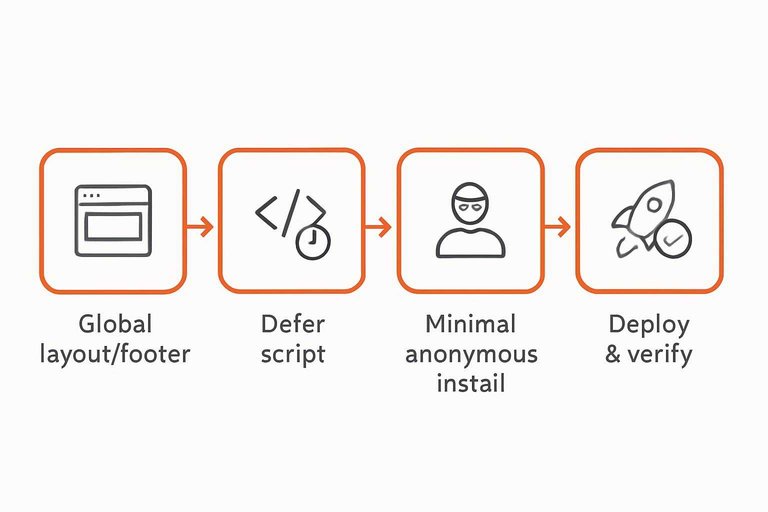
Install it reliably
-
Put the snippet in the one place that renders on every page
Add the widget code to your global layout/footer template (not a single page). If you’re using a vendor’s JavaScript snippet, place it immediately before the closing</body>tag so it’s present site-wide without competing with critical CSS/HTML at the top of the page. -
Load it without blocking page rendering
Usedefer(a way to load a widget script so it executes after HTML is parsed, reducing parser-blocking behavior) on the<script>tag. MDN notes that deferred scripts run after the document is parsed, and multiple deferred scripts still execute in document order—so don’t mix “defer” and non-deferred versions of the same widget. -
Keep the “anonymous visitor” install minimal
For logged-out visitors, avoid stuffing identity fields into the snippet. Intercom’s install guidance is explicit: don’t includeuser_id,email, oruser_hashfor logged-out visitors—only the app identifier—so you don’t accidentally mis-identify people before you actually know who they are. -
Deploy, then verify on the real domain (not preview URLs)
After launch, open your production site (and any alternate domains likewww) and check: the widget appears on homepage + a deep page, the script request returns 200 in DevTools → Network, and there are no Console errors. -
Re-check the paths that usually break widgets
Test one “app” route change (single-page navigation), one cached return visit, and one incognito visit. If it fails anywhere, treat it as a broken install—because missed chats fail silently.
Set honest availability
Live chat sets a “right now” expectation. If you can’t cover it like a helpdesk, design the widget to tell the truth—and still collect the conversation. If you’re deciding between a widget and simpler contact options, see embedded widget vs chat links for where reply expectations break.
- Publish real hours (in the widget, not just your footer). Nielsen Norman Group recommends specifying the hours when live chat isn’t always available, so visitors don’t waste time waiting in a “live” channel.
- Show an obvious status, and make it match reality. Use clear states like “Online” vs “Offline,” and change the call-to-action with it (“Chat now” vs “Leave a message”).
- Set a response-time promise you can actually keep. NN/g also recommends keeping users updated on how fast they’ll get a response. If you can’t reply quickly, say so—Zendesk notes customer satisfaction drops after 30 seconds of waiting.
- Build an offline path that captures leads. Use a pre-chat form—a form (name/email/question) shown before a chat starts—to collect contact details when you’re offline (or when the visitor is about to leave). Make email required in offline mode.
- Confirm what happens next. After the message is sent, show a short confirmation: when you’ll reply, where you’ll reply (in-chat vs email), and one alternative path (contact page or docs) if it’s urgent.
Honest availability is how “free live chat software” stays a trust-builder instead of a missed-message machine.
Stay fast with few
Live chat punishes slow replies: when the widget invites a real-time conversation, a delayed first response reads like you’re ignoring the visitor. With a tiny team, the fix isn’t “try harder”—it’s designing your workflow so you don’t invite more live conversations than you can actually handle.
Treat speed as a system: route notifications to where you already are, limit how many conversations you’ll carry at once, and use automation sparingly. A proactive trigger—a rule that automatically invites or starts a chat based on behavior (like time on your pricing page)—is inherently interruptive; keep it timely, relevant, and easy to ignore, and favor “pull” (visitor-initiated chat) over “push” (interruptive invites) unless you’re actively staffed on the pages you trigger. A canned response / shortcut—a saved template reply you can insert quickly for common questions—can save you, or make you sound like a bot if you overdo it.
Phone-first operations
- Route alerts to the one place you’ll actually notice. If a chat depends on “someone checking the dashboard,” you’ll miss chats.
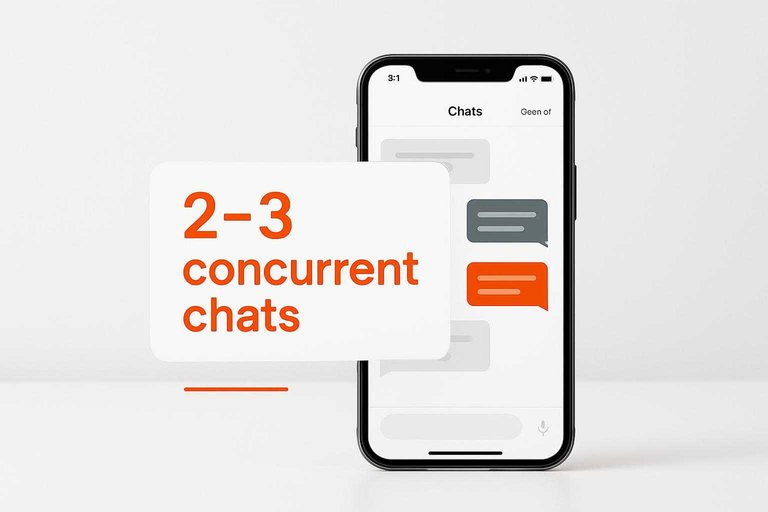
- Hard-cap concurrent chats at 2–3. Zendesk’s benchmark is that an agent can only reasonably handle 2–3 concurrent chats—make that your rule, not a suggestion.
- Use canned replies for FAQs, then personalize the first line. Templates are for accuracy and speed; your opening sentence is for trust.
- Keep your templates narrow and specific. “Here’s the refund policy link” beats a three-paragraph macro that screams copy-paste.
- Be conservative with proactive triggers. If you can’t respond quickly, favor “pull” (visitor-initiated chat) over “push” (interruptive invites), and only trigger on pages you actively watch.
Eloqra via Telegram
- Connect Telegram using the entrypoint shown on the homepage (
t.me/eloqra_bot). - Add the single script snippet to your site; the widget is positioned as lightweight (about ~5 KB).
- Reply from Telegram and rely on the attached context: each visitor message can include the page they were on, plus device and country.
- Use the Mini App operator console inside Telegram when you need it: combined inbox across sites, visitor details, and widget settings.
- Turn on an optional pre-chat form when you need basic qualification (name/email) before the conversation starts.
This setup fits a $0 workflow because your “support desk” is the app you already carry; if your team can’t use Telegram for support, pick a dashboard-first tool instead.
Capture and review
Live chat only stays “free” if you don’t rely on automation you don’t have. If your $0 plan doesn’t include AI workflows or advanced automation (Crisp’s Free plan doesn’t), you need a manual loop: save the transcript, tag it, and review the repeats.
-
Save every transcript to a place you control
Export, email-archive, or copy/paste chats into one running log (a doc, sheet, or notes tool). Store: date, page/URL, and the final resolution. -
Tag the outcome while it’s still fresh
Use three tags only: Bug, Lead, Question. Add one sentence: “What would have prevented this chat?” (doc link, pricing copy, UI fix). -
Capture the follow-up handle
If the chat ends without a clear resolution, collect an email so you can finish the thread outside the widget. -
Run a 20-minute weekly check
Scan the last week’s log and count: Bugs, Leads, Questions, and “no-reply” chats. Pull the top 1–2 repeats and turn them into a doc/update task. -
Design for manual review if your free plan lacks automation
Crisp’s Free plan supports unlimited conversations with up to 2 seats, but it doesn’t include Hugo credits, AI workflows, or advanced automation features—so your tags + weekly review become the system that keeps free live chat software from degrading as traffic grows.
Make $0 chat actually work
“Free” live chat only stays free if you run it like a real-time channel: pick a free-forever plan whose caps you can live with, install it so it can’t silently fail, and be explicit about hours and response expectations instead of pretending you’re always there. Then protect speed by routing alerts to where you already pay attention, limiting concurrency, and leaning on tight canned replies without sounding robotic. If you want the simplest way to avoid the “nobody was watching the dashboard” failure mode, a widget that forwards every message to Telegram fits the phone-first workflow; if your team can’t use Telegram for support, choose a dashboard-first tool and commit to checking it like it’s part of the job. Your first move: set the widget’s real status and offline flow today (hours, “leave a message,” required email), so every chat either gets a fast reply or turns into a follow-up you can finish.
Frequently Asked Questions
- Is free live chat software the same thing as an Omegle replacement?
- No—free live chat software is a customer-support chat widget for your own website, while Omegle-style tools are anonymous chat platforms for talking to strangers.
- Is there a free live chat website with no limits on agents or chat volume?
- Yes—tawk.to states it’s completely free with no limits on the number of agents, chat volumes, or sites you can add widgets to.
- Can I remove the “Powered by” branding on free live chat software?
- Not always—tawk.to’s Terms of Service prohibit removing or altering its logo and branding from its widget or pages.
- Can I run free live chat software inside Telegram instead of a support dashboard?
- Yes, but check the integration limits: tawk.to’s Telegram setup connects one bot to one property, doesn’t import old messages, and doesn’t support Telegram group/supergroup/channel messages.
- What’s a free live chat option with no per-seat pricing if I’m supporting multiple client sites?
- Eloqra includes 1 project free forever with no per-seat pricing, and additional projects are $4.99/mo (or $49.99/yr) per project.
Route Chats to Your Phone
Once your hours and offline flow are set, the next bottleneck is response speed—especially when nobody is actively watching a separate support dashboard.
Eloqra forwards every visitor message straight to your Telegram, so you can reply from your phone with visitor context and no inbox to babysit. It’s Free Forever.
Written by
Eloqra
Notes from the Eloqra team on collecting testimonials and building authentic social proof.
Share: