October 8, 2026
·
9 min read
Free Website Chat: Embedded Chat Widget vs Chat Links—Which Gets Replies?
Choose a free website chat setup by comparing widgets vs email/SMS/app links: message delivery, failure points, and honest time-to-first-reply promises.

You add a “chat with us” option to your site, but the real problem is making sure the message reaches you at a moment you’ll notice and can reply. If you pick the wrong pattern, you don’t just miss conversations—you train visitors to expect instant help and then leave them hanging.
This guide compares two setups: an embedded chat bubble on your website versus simple chat links that open email, phone, SMS, or a messaging app. You’ll see where each message ends up, how each fails under stress, how to set honest response expectations, and a step-by-step rubric to decide what to ship.
Two ways to chat
There are two patterns people mean when they search for “free website chat,” and they behave very differently once a real visitor tries to reach you.
“Gets replies” isn’t a vibe. Operationally, it means three things happen in order: the visitor’s message is delivered somewhere you actually receive it, you notice it (notifications matter), and you can answer in the same channel so the visitor sees the response.
The “totally free chat sites” and “top 10 chat sites” people ask about are usually public chat communities. That’s a different problem than adding a contact path to your own business website. Same mismatch for “websites that pay you to chat with lonely foreigners”: that’s not website support chat at all.
Embedded live chat
An embedded live chat is the on-page chat bubble. The visitor stays on your site, types into a widget, and expects a conversation to continue right there.
On your side, those messages typically land in a “widget inbox” (a web dashboard, an app, or a routed inbox). When it works, it’s the most direct path: no app-switching for the visitor, and you can keep context like what page they were on.
The catch is that delivery starts with the widget loading. Intercom, for example, documents cases where ad blockers or private browsing prevent its Messenger script (js.intercomcdn.com) from running—so the chat never appears and the visitor can’t message you.
Outbound chat links
A chat link is a normal hyperlink that opens a communication app or composer (mailto:, tel:, sms:, wa.me, t.me, tg://) instead of an embedded on-page chat.
These are “just links” from your website, so they can be totally free to add. WhatsApp’s official Click to Chat format is wa.me/<phone_number> (international format), and Telegram supports both t.me links and tg:// URIs.
Links “get replies” only if the click turns into a message you notice—and you can answer back in that same thread.
Where messages land
A “free website chat” option only gets replies if the visitor’s message lands somewhere you actually notice. The main difference is where the conversation lives: inside your site (widget) or inside an external channel (link).
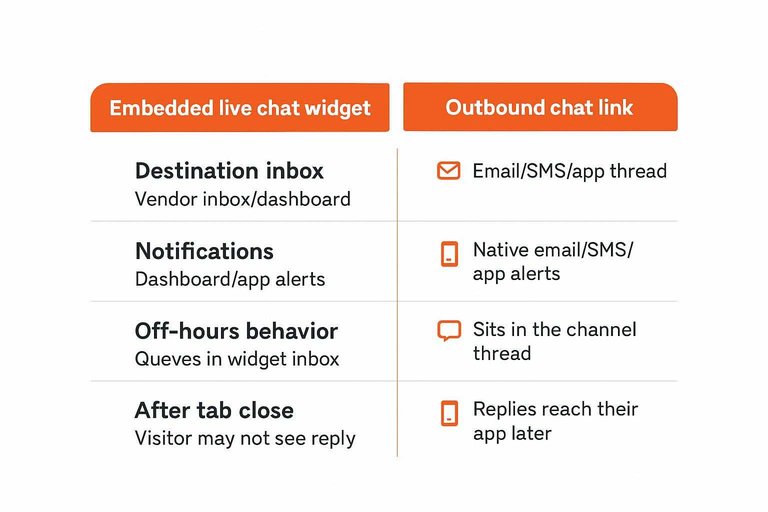
| Delivery moment | Embedded live chat widget | Outbound chat link | What you miss (and why) |
|---|---|---|---|
| Destination inbox | Vendor inbox/dashboard | Email/SMS/app thread | Wrong inbox not monitored |
| Notifications | Dashboard/app alerts | Native email/SMS/app alerts | Alerts muted or unopened |
| Off-hours behavior | Queues in widget inbox | Sits in the channel thread | “I replied later” mismatch |
| After tab close | Visitor may not see reply | Replies reach their app later | Visitor never returns to page |
| What metadata survives | Full transcript in widget | Prefill is limited/fragile | Draft abandoned or details lost |
A few concrete “metadata” gotchas matter more with links than most people expect:
- Telegram bot deep links can include a start= parameter (up to 64 base64url characters); clients show a Start button that starts the bot with that parameter.
- sms: has one standard field, body, and it must not appear more than once in an sms: URI.
- sms: can target multiple recipients as a comma-separated list, and user agents should make the recipient list clear before sending.
- tel: is safest in global +
form on public pages.
If you want fewer missed messages, optimize for the inbox you already live in—not the one you’ll “totally check later.”
A few concrete “metadata” gotchas matter more with links than most people expect:
- Telegram bot deep links can include a start= parameter (up to 64 base64url characters); clients show a Start button that starts the bot with that parameter.
- sms: has one standard field, body, and it must not appear more than once in an sms: URI.
- sms: can target multiple recipients as a comma-separated list, and user agents should make the recipient list clear before sending.
- tel: is safest in global +
form on public pages.
If you want fewer missed messages, optimize for the inbox you already live in—not the one you’ll “totally check later.”
Reliability stress test
“Free website chat” fails in boring, repeatable ways—and each one puts a hard ceiling on replies no matter how fast you are.
A deep link—a link format that hands the user from the browser into a native app (or a specific in‑app screen), like tg://… or a WhatsApp wa.me link—only works if its URI scheme (the prefix like mailto:, tel:, sms:) is recognized and your browser/OS protocol handler (the setting that decides what app/site handles that scheme) can actually route it.
Non-starters checklist
- The widget never loads. Intercom documents cases where ad blockers or private browsing stop its Messenger from appearing by blocking its script (js.intercomcdn.com). If the bubble doesn’t render, the visitor can’t even try to message.
- Your domain can’t set the cookie the widget needs. Intercom also states its Messenger depends on creating a first‑party cookie, and that this fails on domains registered as public suffixes (it calls out examples like firebaseapp.com and herokuapp.com).
- Your “just use email” link opens nothing. mailto: depends on the visitor having an email app (or webmail) registered as the default handler; Mozilla documents changing the program Firefox uses to open email links. If no handler is set, a link-only contact path can fail silently.
- Deep links break when the app isn’t there. Scheme-based app links (like tg://…) require the target app (and handler) on the device. Prefer an https fallback when the ecosystem supports it.
- Your entry channel has been deprecated. Google Business Messages stopped allowing new conversations after July 15, 2024, and Twilio’s GBM API plus Google Business Profiles chat stopped working after July 31, 2024.
The safest pattern is a deliberate “Plan A + Plan B”: an embedded widget for people who can load it, plus a plainly visible link-based contact option that still works when scripts, cookies, apps, or entire channels don’t.
Set response expectations
Visitors don’t judge “free website chat” by your widget features. They judge it by TTFR (time to first reply — the time from their first message to your first response), because that first gap signals whether anyone is actually there.
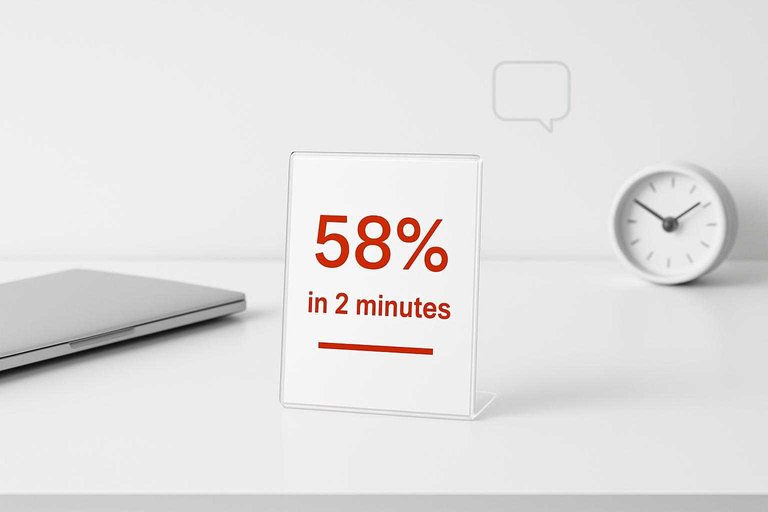
That gap needs to match the promise you imply. In a 2024 consumer survey, 58% of respondents expected an online chat response in 2 minutes or less. Phone is similar pressure (40% expected a phone response in 2 minutes or less). If you can’t reliably notice and answer that fast, labeling the button “Live chat” sets you up to disappoint even when you eventually reply.
If you want the convenience of chat without the real-time commitment, choose asynchronous web messaging — website chat that behaves like messaging (you can leave and come back; history persists) rather than a real-time ‘agent is here now’ session. That’s an explicit product pattern in the market: SupportPal, for example, describes its embedded chat channel as an asynchronous messaging experience where conversations persist over time.
SMS expectations show why wording matters. The same survey found 17% expected an SMS response in less than a minute, and 42% would have their expectations met by a response in 6 minutes or less. “Text us” can still create urgency; “Message us and we’ll reply” is a different contract.
Your site copy should state availability, not aspiration: “Online now” only when it’s true; otherwise “Leave a message” (with hours) so the channel you pick is one you can staff honestly.
Recommendation and rubric
-
Set the promise you can keep (before you pick a tool).
Decide whether your “free website chat” is truly live (you’re watching it) or “leave a message” (you’ll reply later). Then write that promise next to the entry point so you’re not training visitors to expect instant responses you won’t see. -
Default for solo teams: pick the channel that lands in the inbox you already check.
If you miss messages because they sit in a dashboard you don’t keep open, your default should be an embedded widget that routes notifications into your daily messaging thread.
Eloqra (best free choice when Telegram is your inbox): it adds a chat bubble via one
Written by
Eloqra
Notes from the Eloqra team on collecting testimonials and building authentic social proof.
Share: