August 21, 2026
·
Updated October 27, 2026
·
13 min read
Best Telegram Chat Widgets for Websites in 2026
A Telegram chat widget usually means one of three things: a live chat box on your site whose messages you answer from Telegram, a button that opens a Telegram chat, or a helpdesk that adds Telegram as a channel. If you want visitors to type on your website and you to reply from Telegram on your phone, you need the first kind: Eloqra, Human Reply, ChatBro, the open-source Intergram and a handful of WordPress plugins work this way.

This guide compares the options, with prices taken from each vendor's own site as of October 2026, and shows how a message travels from the widget to Telegram and back, so you can judge reliability before you install anything.
If you came here for Telegram's own website widgets (Login, Share, Post and Discussion), jump to the section on official widgets near the end. None of them is a chat widget.
Three kinds of Telegram chat widget
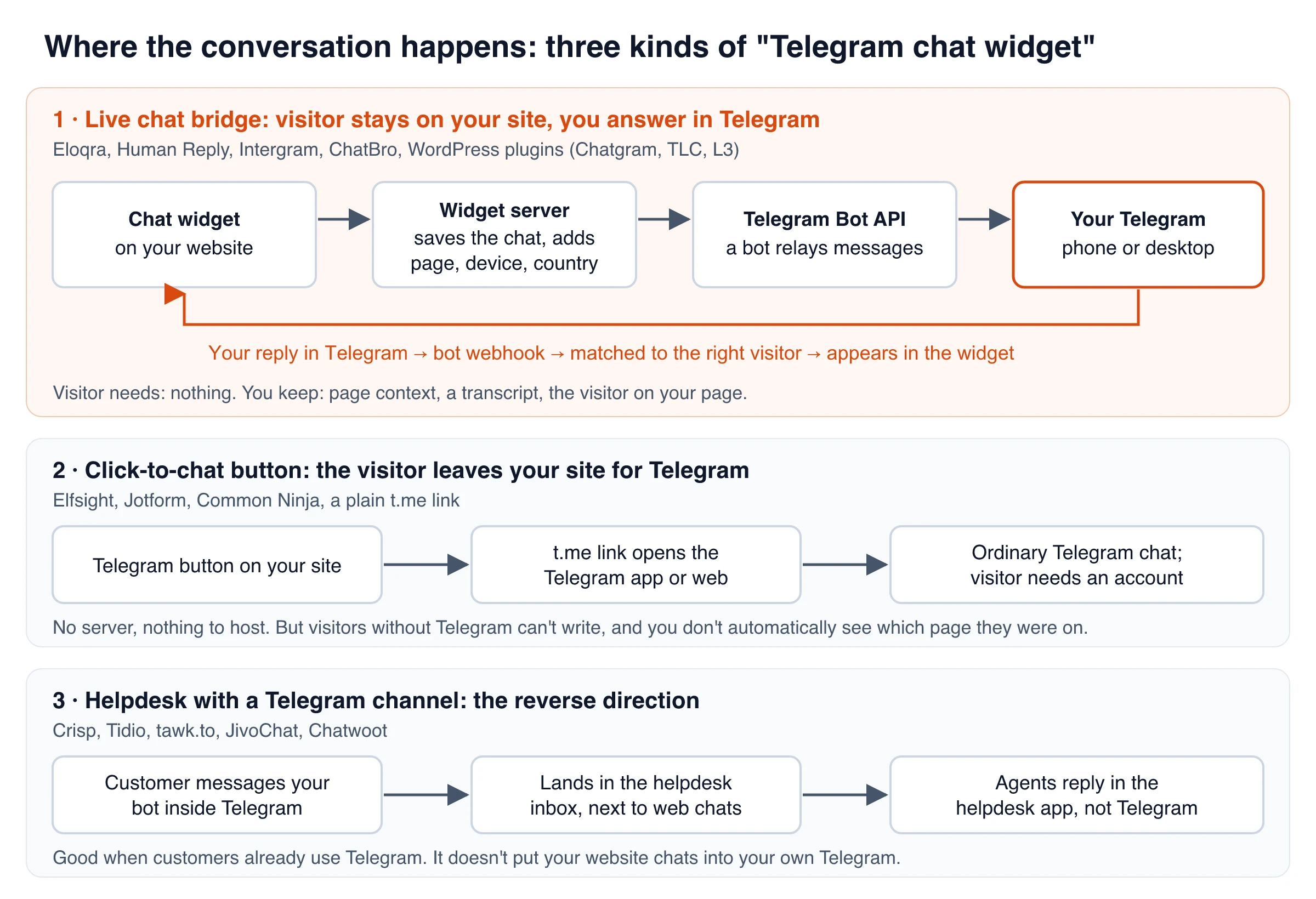
Vendors use the same words for very different products. Before you compare features, check which of these you are actually looking at:
- Live chat bridge. The chat box lives on your page. A Telegram bot forwards each visitor message to your Telegram, and when you reply there, the reply shows up in the visitor’s widget. The visitor never needs Telegram.
- Click-to-chat button. A floating Telegram icon that opens a t.me link to your account. The conversation moves into the Telegram app, so visitors without an account can’t write to you, and you don’t automatically see which page they were on.
- Helpdesk with a Telegram channel. Crisp, Tidio, tawk.to, JivoChat and Chatwoot let customers message your Telegram bot and pull those messages into the helpdesk inbox. Agents answer in the helpdesk app, not in Telegram. That’s the reverse direction from a widget that sends your website chats to Telegram.
Telegram chat widgets compared (October 2026)
Prices and features below come from each vendor’s website or WordPress.org listing as of October 2026. “Visitor needs Telegram” is the single most important column: it decides whether people without Telegram can reach you at all.
| Tool | Type | Visitor needs Telegram? | You reply from | Price (Oct 2026) |
|---|---|---|---|---|
| Eloqra | Hosted bridge, any site | No | Telegram chat or Telegram Mini App | 1 project free forever; Pro $4.99/mo per extra project |
| Human Reply | Hosted bridge | No | Telegram group, one topic per visitor | $12/mo per site ($10/mo billed yearly), 7-day trial |
| ChatBro | Web chat synced with Telegram | No | Linked Telegram group or channel | Telegram sync needs Premium: $1/mo per 65 simultaneous connections (usage-based) |
| Intergram | Open-source bridge | No | Telegram, by replying to a message | Free (MPL-2.0); self-host or hosted bot |
| Chatgram | WordPress plugin, hosted service | No | Telegram, Slack or a browser dashboard | No price listed |
| TLC – Live chat with Telegram | WordPress plugin, your own bot | No | Telegram (several admins) | No price listed |
| L3 – Live Chat via Telegram | WordPress plugin, your own bot | No | Telegram, by replying to a message | “No monthly fees” |
| Elfsight Telegram Chat | Click-to-chat button | Yes | Telegram | Free up to 200 views/mo; paid from $5/mo billed yearly |
| Jotform Telegram Chat | Click-to-chat button | Yes | Telegram | Free |
| Crisp | Helpdesk + Telegram channel | Yes (they message your bot) | Crisp inbox | Telegram from the Mini plan, $45/mo per workspace (not on Free) |
| Tidio | Helpdesk + Telegram channel | Yes | Tidio inbox | Telegram needs the Premium or Plus plan |
| tawk.to | Helpdesk + Telegram channel | Yes | tawk.to inbox | Free; branding removal $29/mo |
Eloqra is our product; its limits are listed in its own section below.
How to pick the right one
Four questions narrow the field quickly:
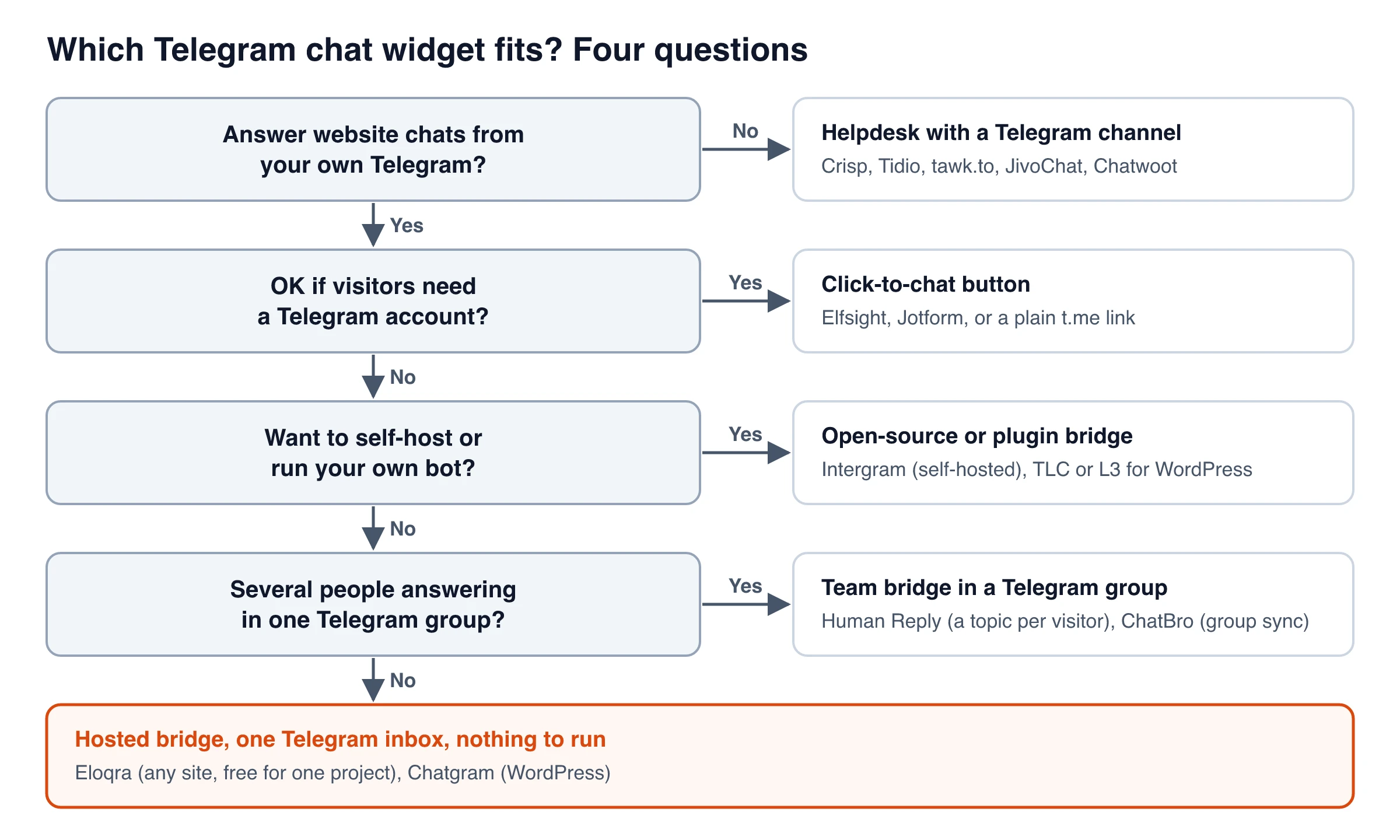
In practice, common situations map to a tool type like this:
- Solo founder or small team, any website: a hosted bridge. You paste a script, connect Telegram once and answer from your phone.
- A team that already shares a Telegram group: Human Reply (one topic per visitor) or TLC on WordPress (several paired admins).
- You want full control of the code and data: Intergram, self-hosted with your own bot.
- You only need a way for Telegram users to contact you: a click-to-chat button or a plain t.me link.
- You need ticketing, AI answers or many channels in one inbox: a helpdesk. Our comparison of Telegram live chat and helpdesk chat for small teams goes deeper on that tradeoff.
Live chat widgets you answer from Telegram
With these tools, the visitor chats on your site, you answer in Telegram, and the answer lands back in the widget.
Eloqra
Eloqra is a hosted live chat widget built around Telegram. Every visitor message is delivered to your Telegram, and the first message of a new conversation says which site it came from, along with the page, device, browser and country. You answer by replying to the visitor’s message, and the reply appears in their widget in real time. Because it’s a two-way Telegram inbox, you don’t need a dashboard open to chat.
If you type a plain message without using Reply, Eloqra sends it to the conversation you were last in. If several chats are open and it can’t tell, the bot asks “Who is this for?” with one button per chat. The Telegram integration docs explain the routing rules in full.
What you get:
- One
<script>tag, under ~5kb, that loads after your page (works on Next.js, Webflow, WordPress, Astro, Framer or plain HTML) - Visitor context on every conversation, plus an optional pre-chat form for name and email
- A Telegram Mini App for full history, widget settings and switching between sites
- Optional reminders when a visitor has waited too long for a reply
- Widget text in 10 languages, and one project per site, each routed to its own Telegram
- You can start from Telegram without creating a web account first
Limits: Eloqra is human live chat only. There’s no AI bot, ticketing, knowledge base or co-browsing, so teams that need those are better served by a helpdesk.
Price (October 2026): one project is free forever, with no credit card to start. Pro adds each extra project for a flat $4.99/mo (or $49.99/yr), with no per-seat pricing.
Human Reply
Human Reply also puts the chat bubble on your site and the replies in Telegram, but it is built for teams. Each visitor conversation opens as its own topic in a Telegram group with Topics turned on, with a lead card showing the page viewed, how the visitor found you, visit count, language and device.
Setup takes a bit more work: you create your own bot in BotFather and a group with Topics enabled. It installs as a Framer plugin, a Webflow app, or one line of code on other sites. Price as of October 2026: $12/mo per site, or $10/mo billed yearly, with a 7-day free trial. Billing is per site, not per seat.
ChatBro
ChatBro is a website chat that syncs with Telegram (and VK) groups, supergroups and channels. By default a ChatBro chat works like a shared chat room mirrored into your Telegram group, which suits communities, events and streams. For support-style threads, its dynamic chats can open a separate forum topic in a Telegram supergroup for each web chat. As of October 2026, ChatBro’s pricing page shows a free Basic plan without messenger sync. Telegram sync is on Premium, which is billed by usage at $1 a month per 65 simultaneous connections, and new chats get a free first month of Premium.
Intergram (open source)
Intergram is an open-source option licensed under MPL-2.0, with about 1.4k stars on GitHub. You can use its hosted bot (send /start to @Intergram and paste two script tags) or self-host: create a bot with BotFather, deploy the server, point the bot’s webhook at it, and embed the script.
Know the tradeoffs before you commit. According to its README, a plain message in the bot chat is broadcast to every connected visitor, so you have to reply to a specific message to answer one person, and customization is limited to text and the main color. The most recent commit on its main branch is from May 2023, so plan to maintain your own fork.
WordPress plugins: Chatgram, TLC and L3
Three newer WordPress.org plugins add a widget that you answer from Telegram:
- Chatgram (formerly Live Chat Reply by Telegram): replies from Telegram, Slack or a browser dashboard appear live in the widget. If the visitor has left, the reply goes to them by email. It can also let an AI answer, for example when nobody is online. It depends on the developer’s hosted API and can’t work without it.
- TLC – Live chat with Telegram: uses your own BotFather bot, and lets you pair several Telegram admins with expiring links. Visitor messages go to all paired admins.
- L3 – Live Chat via Telegram: uses your own bot, with no third-party service. You must use Reply on the visitor’s message (plain messages aren’t routed), and the site needs a public HTTPS URL for the webhook.
As of October 2026, all three show fewer than 10 active installs on WordPress.org, so test them on a staging site first.
Telegram click-to-chat buttons
If you’re happy for the conversation to happen inside Telegram, a click-to-chat button is the simplest option. There is no server, no inbox and nothing to maintain. The tradeoff is that the visitor leaves your page, needs a Telegram account, and arrives with no page context. Our look at embedded chat widgets versus chat links covers how that affects reply rates.
- Elfsight Telegram Chat: a no-code bubble. On mobile it opens the Telegram app; on desktop it goes to Telegram Web or the desktop client. As of October 2026, Elfsight’s pricing gives the free plan 200 views a month with Elfsight branding, and paid plans start at $5/mo billed yearly ($6 month to month) for 5,000 views. Going over your view limit temporarily switches the widget off.
- Jotform Telegram Chat: a free floating button that accepts a username, t.me link or tg:// deep link, with a greeting and a pre-filled first message. Jotform says it doesn’t store the messages.
- A plain t.me link: free and dependency-free. Put
https://t.me/yourusernamebehind any button.
Helpdesks that add Telegram as a channel
Helpdesk suites treat Telegram as one more inbound channel. Customers message your bot in Telegram, and the conversation appears in a shared inbox next to web chat and email. That’s the right fit when your customers already use Telegram and several agents need assignments, history and reporting. It does not move your website chats into your own Telegram.
- Crisp: lets you “receive and reply to Telegram messages” in the Crisp inbox. As of October 2026, Crisp’s pricing leaves Telegram off the free plan and includes it from the Mini plan at $45/mo per workspace (4 seats). See our Eloqra vs Crisp comparison for the wider picture.
- Tidio: brings Telegram into Tidio’s shared inbox, with automated replies and handoff to a human. Its Telegram integration page says this needs the Premium or Plus plan.
- tawk.to: free live chat (removing its branding costs $29/month, per tawk.to’s pricing explainer) that can connect a Telegram bot as its own inbox. The limits are documented: private 1:1 chats only, no groups or channels, and bots can only reply to people who messaged first.
- JivoChat: routes Telegram messages to agents in the Jivo app, and keeps the history in the Jivo account rather than on staff phones.
- Chatwoot: the open-source helpdesk adds a Telegram inbox from a BotFather token. Agents reply in Chatwoot.
How a Telegram live chat bridge works (and where it breaks)
Every bridge in this guide is built on the Telegram Bot API. The widget sends the visitor’s message to a server (the vendor’s, or your own with self-hosted tools and WordPress plugins), which stores it and posts it to your chat through a bot. Telegram delivers your replies back to that server, either through a webhook or by polling with getUpdates. The server then has to work out which visitor each reply belongs to.
That last step is where tools differ most, so it is worth testing:
- Reply matching. Replying to a specific forwarded message is the reliable path in every tool. What happens to a plain message varies: Intergram broadcasts it to all connected visitors, L3 ignores it, and Eloqra sends it to your current chat or asks which chat you mean.
- Visitor already gone. If the visitor closes the tab before you answer, a widget-only reply may never be read. Chatgram falls back to email. With other tools, an optional pre-chat form that collects an email address gives you a way to follow up.
- Webhook reachability. Self-hosted bots need a public HTTPS endpoint. A staging site behind a password or on localhost won’t receive your replies.
- Who owns the bot. With TLC, L3, Human Reply and self-hosted Intergram, you create the bot and keep its token. With hosted bridges like Eloqra or Intergram’s public bot, the vendor runs it. That means less setup for you, but the vendor handles the messages.
Test it before you go live
A widget that renders isn’t proof that chat works. Run this five-minute test on whichever tool you pick:
- Install the snippet on one page and confirm it loads once (a duplicated snippet can load two widgets on the same page).
- Open the page in a private window and send a test message.
- Check it arrives in Telegram with the page and device details you expect.
- Reply from Telegram and confirm the reply appears in the widget.
- Open a second private window, start a second chat, and send a plain (non-reply) message. See where it goes.
- Close the visitor tab, reply again, and note what happens to that message.
If step 3 or 4 fails, work through our guide to Telegram live chat messages not sending before blaming the widget.
Telegram’s official website widgets
If you searched for “Telegram widgets,” you may have been looking for these. Telegram publishes four official website widgets, and none of them is a live chat:
| Widget | What it does |
|---|---|
| Login widget | Lets visitors sign in to your site with their Telegram account |
| Share button | Lets visitors share a page to their Telegram chats |
| Post widget | Embeds a post from a public channel or group |
| Discussion widget | Shows a channel post’s comments (Telegram Discussions) on your page |
To let visitors message you on a website, you need one of the third-party tools above. The home-screen widgets in Telegram’s mobile apps are a different feature and have nothing to do with websites.
The bottom line
Decide first whether the visitor should stay on your site or move into Telegram. If moving is fine, a free click-to-chat button or a plain t.me link is enough. If they should stay and you want to answer from Telegram, pick a bridge: Eloqra for solo founders and small teams on any site, Human Reply for teams in a shared Telegram group, Intergram if you want to self-host, TLC or L3 on WordPress. If you need a multi-agent inbox with Telegram as one channel among many, choose a helpdesk like Crisp, Tidio or tawk.to. Whichever you pick, run the six-step test before real customers depend on it.
Frequently Asked Questions
- Does Telegram have an official live chat widget for websites?
- No. Telegram's official website widgets cover login, sharing, embedding channel posts and showing channel discussions. Live chat that reaches your Telegram comes from third-party tools built on the Telegram Bot API.
- Do visitors need Telegram to use a Telegram chat widget?
- With click-to-chat buttons and helpdesk Telegram channels, yes, because the conversation happens in the Telegram app. With a live chat bridge such as Eloqra, Human Reply or Intergram, they don't: visitors type in a widget on your page and only you need Telegram.
- Can I reply to website chat messages from Telegram?
- Yes, with a live chat bridge. You reply to the forwarded message in Telegram, and the tool matches your reply to the right visitor and shows it in their widget. Helpdesks like Crisp and tawk.to work the other way around: they pull Telegram messages into their own inbox.
- Is there a free Telegram chat widget?
- Yes. Intergram is open source, L3 says it has no monthly fees, and Eloqra's free plan covers one project, free forever. For click-to-chat, Jotform's button is free and Elfsight's free plan allows 200 views a month (as of October 2026).
- How do I add a Telegram chat widget to my website?
- For a live chat bridge, connect the tool to Telegram (usually by starting its bot or entering a BotFather token), then paste its script tag into your site's shared layout so it loads on every page. For a click-to-chat button, enter your Telegram username or t.me link in the builder and paste the embed code.
- Can several people answer chats from Telegram?
- Some tools support it. Human Reply opens a topic per visitor in a shared Telegram group, TLC lets you pair several admin accounts, and ChatBro syncs with Telegram groups. If two people might reply at once, test how each tool handles it.
Turn Telegram Into Live Chat
If a live chat bridge is what you need, try it on your own site before you decide.
Eloqra puts a lightweight chat widget on any site with one script tag and delivers every message to your Telegram, with page, device and country attached. One project is free forever with no credit card, and Pro adds more projects at $4.99/mo each.
Written by
Eloqra
Notes from the Eloqra team on collecting testimonials and building authentic social proof.
Share: