August 28, 2026
·
Updated October 12, 2026
·
8 min read
11 Intercom Alternative Mistakes That Slow Reply Times
A practical checklist for avoiding Intercom-alternative setup mistakes that slow reply times — choose the right tool category, reduce inbox fragmentation, simplify automation, fix routing rules, rebuild notification trust, and streamline internal handoffs.


If your reply times are slipping, it’s rarely because your team “just needs to be faster.” More often, the tool you picked (or how you configured it) quietly creates extra clicks, lost ownership, and conversations that bounce between people.
This checklist helps you spot the most common Intercom-alternative mistakes that drag down responsiveness. You’ll learn how to validate you’re in the right tool category, consolidate inboxes, keep automation from blocking humans, tighten routing, make notifications reliable, and speed up internal handoffs.
Wrong tool category
Picking an “Intercom alternative” is rarely the real decision. The real decision is the product category you need to run support without handoff loops.
A chat widget can’t replace a help desk, and a CRM won’t run incident-grade ticketing. When categories blur, ownership blurs too.
Clarify the job
Name the primary job first, because each category optimizes for a different loop.
Decide before you migrate anything.
- If you need real-time back-and-forth, choose live chat.
- If you need queue, SLAs, and audit trails, choose ticketing.
- If you need targeted prompts, choose proactive messaging.
- If you need contextual help inside the product, choose in-app support.
- If you need revenue and pipeline history, choose a CRM.
Pick one primary job per channel, then let everything else be secondary.
Spot category mismatches
Category mistakes show up as process symptoms, not feature gaps.
Look for friction that repeats every day.
- Duplicate inboxes for the same customer issue
- Unclear ownership between sales and support
- Chats turning into long email threads
- Reporting gaps across channels and agents
- Manual copy-paste between tools
If two tools share one job, you get two queues and zero accountability.
Fix with boundaries
Draw hard boundaries so each tool owns a job end-to-end. One tool receives the request, routes it, and closes it.
Example: keep “billing problems” as tickets only, even if they start in chat. Chat collects context, then creates the ticket and stops.
Verify it worked
Use the dashboards you already have, but check operational signals, not vanity metrics.
You’re looking for cleaner ownership and fewer hops.
- Fewer transfers between people or queues
- Faster first response by channel
- Clear owner on every open item
- Fewer reopened conversations
- Less internal backchanneling for status
If ownership is obvious at a glance, reply times usually follow.
Inbox fragmentation
Scattered channels across tools force agents to context-switch, which slows replies and muddies ownership.
Here’s what fragmentation looks like in practice.
| Where messages land | What agents must do | What breaks | Typical symptom |
|---|---|---|---|
| Email tool | Switch tabs | Ownership clarity | Duplicate replies |
| Chat widget | Rebuild context | Conversation history | Re-asking questions |
| Social DMs | Translate tone | Brand consistency | Mixed voice |
| Internal chat | Forward threads | Accountability | “Did you reply?” |
Unify the queue first, then standardize macros and routing on top of it. If you’re planning a tool change, follow a 9-step Intercom migration plan so you don’t lose history or break channel deliverability.
Overbuilt automation
Too many bots and rules feel efficient, until they trap real customers in loops. Reply times get slower because humans only see the mess at the end.
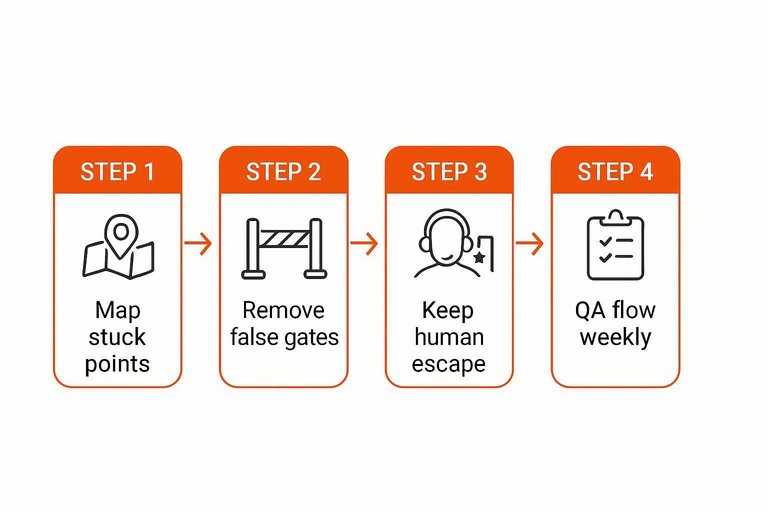
Map the stuck points
Find where your automation creates friction, so you fix the actual delays. Follow real journeys, not your intended flow.
- Pick your top five contact reasons from recent tickets.
- Run each reason through the bot as a new customer.
- Note every point you must retype details.
- Mark where you would give up or rage-click.
- Log the exact step, copy, and fallback reply.
If customers repeat themselves twice, your automation is doing negative work.
Remove false gates
Some automation is just a toll booth with no benefit. Delete or simplify anything that delays routing without improving resolution.
- Mandatory forms before you show options
- Extra qualifiers that don’t change routing
- Multi-step menus with vague labels
- “Choose one” lists missing common reasons
- Confirmation screens that add no value
Fewer gates beats smarter gates, because humans can ask one good question fast.
Keep a human escape
Bots should assist, not imprison. Give customers a clear way to reach a person, and protect your team with simple guardrails.
Add a persistent “Talk to a person” option in the first menu. Put it behind a short urgency check, like “billing,” “security,” or “can’t log in.” Route those to an agent immediately, and send the rest to a short form that pre-fills the transcript.
When escape is obvious, customers stop gaming the bot just to be heard. (See best practices for chatbot-to-human handoff.)
QA the flow weekly
Automation breaks quietly, then your queue pays the price. A short weekly script catches the failures before customers do.
- Test each top contact reason from a clean browser session.
- Click every button and quick reply at least once.
- Trigger two “unknown” inputs to test fallbacks.
- Verify routing, tags, and transcript carryover.
- File fixes with screenshots and exact message text.
Treat the bot like production code, because it ships bugs at scale.
Broken routing rules
Broken routing turns a shared inbox into a lost-and-found. When assignment and skills routing misfire, conversations sit unowned or land with the wrong team. If you’re a small team, one way to reduce routing complexity is to keep the “inbox” simple—tools like Eloqra route live chat messages straight to Telegram so fewer layers of automation can fail in the first place.
Common routing failures
Routing issues usually look random, but they repeat for predictable reasons.
- Missing business hours coverage
- No default assignee
- Conflicting rule conditions
- Skills not applied consistently
- Round-robin gaps or exclusions
If you see “no owner” more than once, your rules are the bottleneck. For lean setups, it can also be a sign you’ve outgrown complex routing for the volume you have—simplifying intake (e.g., a direct Telegram inbox) can remove entire categories of “no owner” failures.
Repair the rule order
Fix routing by enforcing a single priority ladder.
- Set a default assignee or queue for every conversation.
- Apply skills-based routing next, with clear matching criteria.
- Add VIP and escalation rules after skills.
- Run experiments last, with tight targeting and expiry dates.
- Document every exception, with an owner and rationale.
A stable rule order beats clever rules, because it fails predictably. And if you don’t truly need multi-layer routing, consider whether a lightweight flow—where messages land in one place you already monitor—would be more reliable than continuously tuning rules.
Make ownership visible
Unowned work is invisible work, so make ownership a required field. Pair it with a strict internal-notes habit, like “context, last action, next step,” so any teammate can continue immediately.
When ownership is explicit, handoffs stop costing you a second triage. If your workflow lives in chat (like Telegram), you can still enforce this with a simple convention—tag the owner and capture the basics up front (name/email via a pre-chat form, plus page/device context) so follow-ups don’t depend on someone re-tracing what happened.
Notifications not trusted
When alerts are noisy or missing, your agents stop treating them as urgent. Then customers wait, and nobody feels responsible.
- Sending every event as “urgent”
- Firing duplicates across channels
- Hiding routing rules in automations
- Muting alerts without a policy
- Burying mentions in long threads
Treat notifications like a contract: if they’re wrong twice, they’re ignored forever. The same dynamic is well-documented in research on alert fatigue from repeated alarms.

Slow internal handoffs
Ad-hoc escalation pings create a scavenger hunt. Context and approvals drift, and your customer waits.
Define escalation paths
A simple matrix removes guesswork and prevents ping-pong. Keep it short, and keep it visible.
| Issue type | Destination team | Required context | Response window |
|---|---|---|---|
| Billing credit request | Support Ops | Plan, amount, reason | Same day |
| Login or SSO failure | Identity/IT | IdP, logs, timestamps | Next business day |
| Product bug report | Engineering | Steps, repro, screenshots | Best effort |
| Data export issue | Data team | Sample file, query, scope | Next business day |
If you can’t place a ticket in one row, your escalation design is the problem.
Standardize context packets
Escalations slow down when the next team must interrogate you. Send a complete packet every time.
- Customer goal and expected outcome
- Environment details and versions
- Exact error text and timestamps
- Steps tried and results
- Account impact and urgency
When packets are consistent, escalations become routing, not rewriting.
Reduce approval bottlenecks
Approvals are where “quick help” turns into a waiting room. Remove the most common decisions from the critical path.
Pre-approve small, bounded credits under clear rules, and log them for review. Use macros for common fixes, and assign a named decision owner for each scenario.
Make decisions boring and repeatable, and your reply time stops depending on who is online.
Close the loop fast
Silence feels like neglect, even when work is happening. Keep the original agent responsible for customer-visible updates.
- Send an immediate status note with what you’re doing and when you’ll update.
- Share a clear workaround or safe next step, even if partial.
- Post time-boxed updates until resolution or a new ETA.
- Summarize the escalation outcome and confirm the customer’s goal is met.
Your customer doesn’t need the internal story; they need a steady heartbeat.
Run a 30-minute reply-time cleanup
- Pick one recent “slow reply” conversation and trace the full path: where it entered, who saw it, and when ownership changed.
- Check category fit and inbox design: confirm one clear intake path per request type, then merge or reroute any split inboxes.
- Simplify the flow: remove automation steps that require perfect data, add a human escape hatch, and reorder routing rules so the highest-priority matches win.
- Rebuild trust signals: tune notifications to be timely and actionable, and document escalation paths plus a standard context packet so handoffs don’t stall.
Frequently Asked Questions
- What should I look for in an Intercom alternative if my main goal is faster first-response time?
- Prioritize a single shared inbox, reliable mobile notifications, and clear ownership/assignment so every message has an accountable responder. Also check how quickly a human can take over from automation and whether visitor context (page, plan, history) is visible without extra clicks.
- Do I need a full help desk suite, or is a lightweight Intercom alternative enough for fast replies?
- If you mostly need website chat and fast replies, a lightweight chat tool can be enough and often reduces dashboard overhead. For example, Eloqra routes site messages directly to Telegram so you can respond from your phone without living in a support inbox.
- How do I measure whether my Intercom alternative is actually improving reply times?
- Track first response time, time to next response (during back-and-forth), and time to resolution, then segment by channel, team, and business hours. Validate by sampling transcripts to see whether delays come from waiting on ownership, missing context, or internal approvals.
- Can I keep Intercom for some channels and use an Intercom alternative just for website live chat?
- Yes—run them in parallel by keeping your website widget on the new tool while leaving email or in-app messaging in Intercom. Set clear boundaries and forwarding rules so customers don’t get duplicate threads across systems.
- How often should I review settings after switching to an Intercom alternative to avoid reply-time regressions?
- Review routing/assignment, notification rules, and tag/macros monthly and after any team or product change that affects support volume. Use missed-conversation audits (unassigned, reopened, or stale threads) to spot issues early.
Route Chats to One Inbox
If your intercom alternative is slowing reply times through fragmented inboxes, broken routing, and overbuilt automation, simplifying the workflow is the fastest fix.
Eloqra sends every website message straight to Telegram with visitor context, so you can reply instantly from your phone. Get started on the Free Forever plan.
Written by
Eloqra
Notes from the Eloqra team on collecting testimonials and building authentic social proof.
Share: