August 30, 2026
·
Updated October 14, 2026
·
10 min read
How to Switch from Intercom: 9-Step Migration Plan
A practical checklist for switching from Intercom without losing history or momentum — assess readiness, define success and risks, run a 9-step cutover plan, rebuild inbox/automation, and validate data, integrations, and channel deliverability.


Thinking about leaving Intercom but worried you’ll break your inbox, lose conversation history, or miss customer messages during the cutover? Most migrations fail in the unglamorous details: exports, routing rules, automation edge cases, and deliverability.
This checklist turns the move into a controlled project. You’ll clarify why you’re switching, lock in non-negotiables, map risks, then follow a 9-step plan to rebuild workflows, migrate data and integrations, and test every channel before you flip the switch.
Migration Readiness
Switching from Intercom is a systems change, not a tool swap. Set scope, owners, timelines, and success criteria before you touch data or routing.
Switch triggers
Migrations go smoother when you know what problem you’re solving. Use this checklist to confirm you’re switching for concrete reasons.
- Unpredictable pricing at scale
- Missing workflows or automations
- Slow inbox or sync performance
- New compliance or residency needs
- Support or sales model shift
If you can’t name the trigger, you can’t judge the replacement.
Non-negotiables
Pick your must-haves before demos start. Otherwise, you’ll optimize for shiny features and lose core operations.
- Inbox routing, triage, and assignment rules
- Automations, macros, and SLAs
- Reporting for support and sales
- Integrations with CRM and data tools
- Security, access, and audit controls
Write these as pass/fail requirements, not preferences.
Risk map
Most Intercom migrations fail in the same few places. Name the risks early so you can design around them.
Lost conversation history breaks context and trust. Broken routing floods the wrong team and hides urgent threads.
Duplicate contacts create split timelines and bad reporting. Domain, DNS, or auth mistakes tank deliverability and login during cutover.
Treat these as engineering risks with owners, not “support problems.”
Success definition
You need acceptance criteria that operations, security, and revenue teams will sign. Otherwise, “done” becomes a feeling, and cutover drags.
- Tickets and threads continue without gaps
- Messages deliver reliably across channels
- SLAs match your current commitments
- Data matches source of truth
- Agents maintain or improve throughput
Get sign-off before migration day, not after the first incident.
9-Step Migration Plan
Switching off Intercom is mostly a systems job, not a tool swap. You need a tight sequence with checks, or you’ll lose tickets, context, or routing.
- Audit what Intercom does for you today, including inboxes, bots, routing, and integrations.
- Export critical data and document what can’t be exported, like some event history.
- Choose your target setup and map each Intercom feature to a replacement or a retirement.
- Rebuild your support architecture in the new tool: channels, teams, SLAs, and permissions.
- Recreate automation carefully, starting with high-volume rules, then edge cases.
- Migrate templates, macros, and help content, and standardize naming while you’re there.
- Integrate your core systems and validate data flow both directions where needed.
- Run a parallel test with internal agents, then a small real-user slice, and fix gaps fast.
- Cut over in a planned window, monitor like a launch, and keep rollback options ready.
Treat the verification checks as gates, not suggestions, or you’ll ship a broken support loop. For a practical reference, use this help desk switching & migration checklist.
Step Details Checklist
Use this checklist to turn your 9-step migration into assigned, verifiable work. It keeps ownership clear and prevents hidden dependencies from derailing the cutover.
| Step | Owner | Key tasks | Dependencies | “Done” signal |
|---|---|---|---|---|
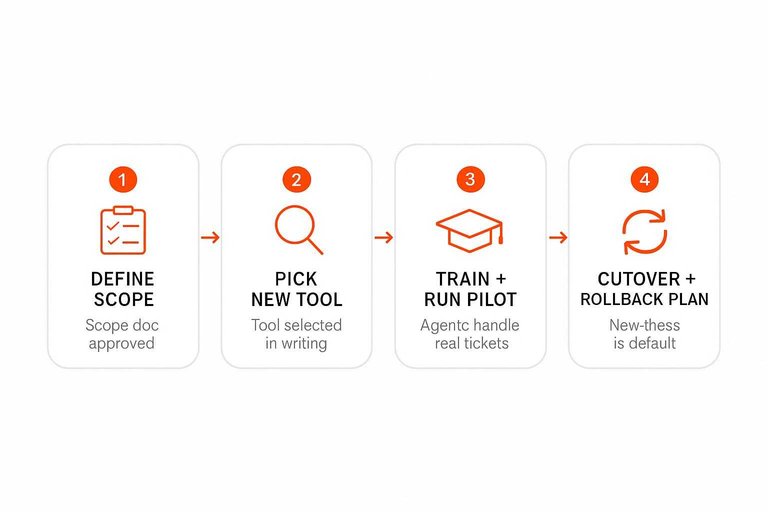
| 1. Define scope | Support lead | Channels, seats, SLA, regions | Stakeholder input | Scope doc approved |
| 2. Pick new tool | Ops + Support | Compare features, pricing, constraints | Scope finalized | Tool selected in writing |
| 3. Export Intercom data | Admin | Users, conversations, tags | Intercom access | Exports stored securely |
| 4. Map objects + fields | Ops | Users, companies, custom fields | Export samples | Mapping sheet complete |
| 5. Rebuild workflows | Support ops | Routing, triggers, macros, bots | Field mapping | Test flows match rules |
| 6. Migrate knowledge base | Content owner | Pages, redirects, permissions | New KB live | Articles accessible + searchable |
| 7. Integrate systems | Engineering | SSO, CRM, webhooks, apps | Vendor docs | Events firing correctly |
| 8. Train + run pilot | Support manager | Training, sandbox drills, pilot queue | Workflows built | Agents handle real tickets |
| 9. Cutover + rollback plan | Ops lead | Freeze, DNS/widget swap, rollback | Pilot results | New inbox is default |
A practical tip for Step 2 and Step 9: if your primary goal is to simplify live chat (especially for a small team), tools like Eloqra can reduce migration complexity because the website widget is installed with a single script and messages route straight to Telegram—so your “cutover” often looks more like a widget swap than a full helpdesk replatform.
The “done” signals are your leverage in meetings, because they end debates fast.
Data & Integrations
Switching from Intercom breaks in two places: the data you move and the pipes you reconnect. Get both right, and your team barely notices the cutover.
Data inventory
Start by listing what must survive the move and what can die on the old system. Your goal is continuity for support, sales, and reporting.
- Contacts and user profiles
- Companies and account links
- Segments, tags, and attributes
- Conversations, notes, and CSAT
- Attachments and message metadata
If you can’t name it, you can’t migrate it.
Export strategy
Pick export methods based on risk, not convenience. You want one clean snapshot, plus a path for deltas if the migration spans days.
Native exports work well for one-off dumps and audits. API pulls give you control, but you must handle pagination, rate limits, and retries. Third-party tools can speed things up, but you still own the schema mapping and data quality.
Snapshot before any config changes, then treat every later export as suspect. If you need a deeper QA-oriented view, see this helpdesk migration planning guide.
Integration map
Write down every system that touches Intercom, even if it feels “optional.” Hidden integrations are where migrations go sideways.
- CRM sync and lead routing
- Billing and subscription status
- Identity provider and SSO
- Data warehouse and ETL
- Slack, email, calendar, webhooks, Zapier
If it sends or receives data, it belongs on the map.
Rebuild order
Reconnect in an order that reduces cascading failures.
- Set up auth, domains, and identity mapping.
- Restore CRM sync with clear ownership rules.
- Recreate webhooks and event delivery paths.
- Add enrichment sources and profile updates.
- Connect analytics and warehouse exports.
Automations come last, because they amplify every mistake.
Data validation
Validate with targeted tests before you let the team loose. You’re checking correctness, not perfection.
- Spot-check records across key segments
- Verify dedupe and merge rules
- Confirm field mappings and data types
- Ensure conversations link to users
- Audit roles, access, and permissions
Trust is earned in the first week, and validation is how you buy it.
Inbox & Automation Rebuild
Rebuild your inbox like a system, not a pile of rules. You want predictable routing, clean tags, and automation you can debug at 2 a.m.
Routing standards
Routing is where speed and fairness are won or lost. Use a few proven patterns so work moves without constant human triage.
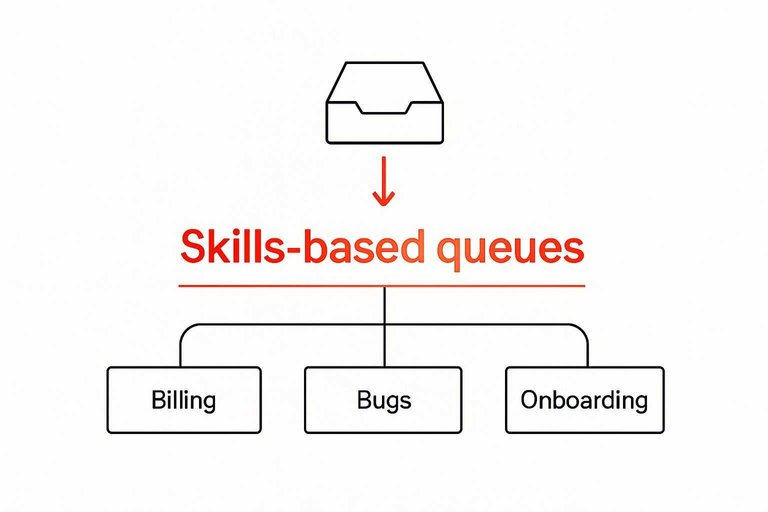
Start with skills-based queues for topics like billing, bugs, and onboarding. Add round-robin inside each queue to spread load. Then layer VIP rules for key accounts, time-zone routing for follow-the-sun teams, and an escalation path for stuck conversations.
If routing needs a flowchart, you’ve already added too many branches.
Tagging taxonomy
Tags should answer questions your reports and automations will ask later. Keep them few, consistent, and mutually understandable.
- Issue type: bug, question, request
- Product area: module or feature
- Urgency: low, normal, high
- Channel: email, chat, social
- Lifecycle: trial, active, churn risk
If a tag feels like “misc,” delete it before it spreads.
Macro playbook
Macros migrate poorly when you copy-paste blindly. Treat them like product copy with owners and change control.
- Export and dedupe replies, then group by intent.
- Rewrite for the new tool’s formatting and variables.
- Add an approval flow with one accountable editor.
- Localize from a master source, not forked versions.
- Track versions in a shared doc or repository.
The real win is consistency across agents, not just faster typing.
Automation guardrails
Automation should reduce work without hiding decisions. Design rules so any teammate can read them and predict outcomes.
- Keep rules short and named clearly
- Prevent loops with explicit stop conditions
- Log every automation action taken
- Provide manual override for edge cases
- Document exceptions with examples
If you can’t explain a rule in one breath, it will break in production.
SLA & alerts
SLAs only work when ownership is unambiguous. Define targets per queue, then tie each breach path to a real person or on-call role.
Set first-response and next-response SLAs separately, because they fail for different reasons. Use breach warnings before the deadline, route after-hours to an on-call queue or a clear autoresponder, and escalate by severity rather than by volume.
An SLA without an escalation owner is just a dashboard decoration.
Channels & Deliverability
You’re swapping more than a widget. You’re swapping identities, headers, and routing logic.
Treat channels like production infrastructure. Authenticate, test, and only then flip traffic.
Email authentication
Email breaks quietly, then ruins trust. Configure authentication and reply behavior before any live sends.
- Publish SPF for your sending domain, including your new provider.
- Enable DKIM signing and confirm aligned “From” domains.
- Add DMARC with a monitoring policy, then tighten after stable delivery.
- Set forwarding and Reply-To rules to avoid loops and lost replies.
- Send test emails to multiple inboxes and inspect headers for pass/fail.
If headers don’t pass in tests, they won’t pass at scale.
Web chat cutover
A cutover fails when the widget looks right but routes wrong. Use a checklist that covers identity, targeting, and fallbacks.
- Place widget on intended pages, including logged-in areas.
- Map identity keys to your user model, not just email.
- Prefill name and email fields when you already know them.
- Recreate targeting rules for pages, segments, and languages.
- Add a fallback path when chat is offline.
If you can’t explain who the user is, you can’t route them well.
Messaging channels
Messaging is policy-heavy and unforgiving. You need clean consent, approved templates, and realistic throughput expectations.
Do: lock down consent capture per channel and region.
Do: pre-approve templates and keep variables predictable.
Do: model throughput limits and queue behavior during spikes.
Don’t: reuse email copy in SMS or WhatsApp.
Don’t: skip agent training on tone, escalation, and closures.
Your biggest risk isn’t delivery. It’s sending the wrong thing to the right person.
Routing tests
Routing assumptions are where migrations go to die. Run test cases that hit every rule, queue, and edge condition.
- New lead: unknown user, no history.
- Existing customer: recognized identity, prior tickets.
- VIP: priority tag, fast lane routing.
- After-hours: offline behavior, autoresponse, SLA.
- Attachments and escalation: handoff, internal notes, spam handling.
If one scenario surprises you, your users will find ten more.
Run a Zero-Surprises Cutover
Treat your Intercom switch like an operations change, not a tool swap: define success, map risks, and decide what must be rebuilt versus retired. Then execute the 9-step plan with a clear rebuild order—data and integrations first, inbox routing and automation next, channels and deliverability last. Before you cut over, validate with real routing tests, spot-check migrated records, and set temporary alerts so you catch edge cases in the first week.
Simplify Your Support Stack
After you’ve mapped your readiness, data, and inbox rebuild, the last hurdle is keeping channels reliable without recreating a heavy dashboard workflow.
Eloqra replaces complex helpdesk suites with a lightweight live chat widget that routes every message to Telegram. Choose the Free Forever plan to get set up fast with one script snippet.
Written by
Eloqra
Notes from the Eloqra team on collecting testimonials and building authentic social proof.
Share: