August 24, 2026
·
Updated October 8, 2026
·
11 min read
Intercom vs Telegram Live Chat: Which Fits Solo Support?
A solo-friendly comparison of Intercom vs Telegram for live chat support — evaluate response expectations, channel fit, workflow and follow-up reliability, UX friction points, and automation/bot options so you can choose the simplest setup that still scales.

Trying to run support alone usually breaks in the same place: messages come in from everywhere, follow-ups get missed, and “quick questions” turn into a backlog you can’t see.
This comparison helps you decide whether Intercom’s structured support workspace or Telegram’s lightweight, messaging-native approach fits your reality. You’ll map your response expectations, channel needs, workflow complexity, and compliance sensitivity—then see how each option affects triage, knowledge capture, reliability, and the right level of automation.
Solo support needs
Solo support is a constraint game. You have one brain, limited hours, and a backlog that grows while you sleep.
Your decision criteria should reflect that reality: fastest time-to-reply, lowest ongoing overhead, acceptable channels, and sane workload control. Pick the tool that reduces context switching, not the one with the longest feature list.
Response expectations
Decide what “good support” means when you’re alone. Your real constraint is after-hours coverage and how often customers expect a live back-and-forth.
If most questions can wait, you want async-first conversations, clear status, and easy follow-up.
If issues are urgent, you need real-time alerts, reliable delivery, and a way to triage fast.
Intercom fits when you need structured async threads, routing, and business-hour expectations.
Telegram fits when you want lightweight real-time chat and you can personally “be there.”
Set expectations publicly, then pick the tool that enforces them for you.
Channel requirements
List the places customers will actually message you. Then choose the tool that covers those paths with the fewest hacks.
- Website widget and embedded help
- In-app chat for logged-in users
- Email intake and replies
- Mobile messaging for quick pings
- Social-style DMs and groups
Intercom naturally covers web, in-app, and email in one system.
Telegram naturally covers mobile messaging, DMs, and quick back-and-forth.
If you need three or more channels, consolidation beats convenience.
Workflow complexity
Count your moving parts before you pick a tool. One product and one inbox is simple; multiple products, tiers, or audiences is not.
Intercom-style tooling starts paying off when you need shared history, tagging, automation, and a single view of the customer. Telegram works best when each conversation can stand alone without much context.
If you’re already copy-pasting details between places, you’ve outgrown casual chat.
Compliance sensitivity
Decide how sensitive your support data is. Privacy expectations shift fast when payments, health, minors, or enterprise security reviews enter the picture.
If you need explicit consent, retention controls, access logs, or auditable workflows, casual messaging setups can become a liability. Intercom-like systems tend to offer clearer admin controls and policy alignment, while Telegram is better treated as a convenience channel.
If you might be asked “who accessed what, and when,” build for that now.
What Intercom is
Intercom is a customer messaging platform built for support at scale. It combines a shared inbox, a help center, automation, routing, and integrations so conversations stay organized as volume grows.
Core strengths
Intercom shines when you want one place to handle every support conversation, without losing context. For solo support, it’s less about “enterprise” and more about reducing repeat work.
- Unified inbox for chat, email, and tickets
- Branded in-app and website messenger
- Knowledge base with searchable articles
- Automation for triage and replies
- Reporting for volume and trends
If you’re answering the same questions daily, Intercom turns that chaos into a system.
Common friction
Intercom can feel like a full support department in a box. Solo founders often hit friction on pricing tiers, setup time, and “too many knobs.”
Many advanced features only pay off after you standardize tags, workflows, and content. Until then, you may be paying for capability you won’t touch.
Best-fit scenarios
Use Intercom when you need consistent support workflows across lots of conversations.
- Add Intercom to your site or app for branded chat.
- Centralize all messages into one inbox.
- Create help articles for repeat questions.
- Automate triage, routing, and basic replies.
- Track trends to prioritize fixes and docs.
When your support stops being “just chat,” Intercom becomes your operating system.
Not ideal when
Intercom is overkill when you need a lightweight, low-cost way to reply fast. It’s also a mismatch if most customers already live in Telegram and expect to stay there.
If you want near-zero setup, a full support stack will slow you down before it helps.
What Telegram chat is
Telegram isn’t a classic website widget. It’s messaging-first support through DMs, bots, and groups.
“Live chat” usually means a Telegram link or button on your site. Users tap it, then message you in the app, where the conversation continues like any other thread.
If you want the Telegram experience but with more of the “website live chat” feel (a widget on the page plus basic visitor context like what page they were on), tools like Eloqra essentially bridge that gap by routing site messages straight into Telegram so you can answer from the same inbox.
Core strengths
Telegram works when you want fast, familiar conversations without much setup.
- Instant replies in a native inbox
- Familiar UX for many users
- Low overhead for solo support
- Mobile-first by default
- Easy broadcasts and communities
If you’re the founder and you live on your phone, it fits your rhythm. This is also why lightweight “Telegram-first” site chat setups can work well: you keep the speed of Telegram while making it easier for visitors to start the conversation from your website.
Typical limitations
Telegram is not a ticketing system. It’s a stream of messages, and the stream gets messy.
Branding is thin, context fragments across threads, and internal handoffs are awkward. Discoverability and spam can also bite you if your link spreads.
One practical mitigation is ensuring you capture basic context at the start (like page and device) and, when needed, a name/email before the conversation moves into the Telegram thread—otherwise you’re stuck asking “which page were you on?” over and over.
Best-fit scenarios
Use Telegram when the channel matches how your customers already behave.
- Confirm your users already use Telegram daily.
- Keep support conversational, not form-based.
- Set a simple manual tracking habit, like tags in notes.
- Use bots for FAQs and routing, not complex workflows.
If the process depends on memory, you’ll feel it fast. For solo founders, a small layer of structure on the website side (like a pre-chat form and automatic visitor context sent into Telegram, as in Eloqra) can make Telegram support feel less memory-dependent without turning it into a full helpdesk.
Not ideal when
Telegram-only support breaks down when you need predictable operations.
If you need SLAs, audit trails, strict identity checks, or structured queues, you’ll miss the controls. Reliable handoffs get fragile once more people touch the inbox.
In those cases, either move to a helpdesk/ticketing system or be honest about what a Telegram-routed widget can and can’t solve: it can speed up replies and add basic context, but it won’t replace workflow-heavy support operations.
Side-by-side comparison
You’re choosing between a support platform and a messaging app you can bend into support. For a solo operator, the real question is control versus simplicity.
| Area | Intercom | Telegram | Solo-operator take |
|---|---|---|---|
| Setup | Product install + config | Bot + links | Telegram starts faster |
| Channels | In-app, email, more | Telegram chat only | Intercom covers more edges |
| Automation | Rules, bots, flows | Bot scripts | Intercom scales cleaner |
| Organization | Inbox, tags, SLA | Threads, pins | Intercom stays tidy longer |
| Compliance | Controls + exports | Limited controls | Intercom safer by default |
| Cost predictability | Seat-based pricing | Mostly free | Telegram is steadier |
If your support touches billing, identity, or audits, pick the tool built for guardrails. If you’re also evaluating what changes once you’re supporting multiple people, see Telegram live chat vs helpdesk chat.
Decision guide (solo support scenarios)
If you’re looking for an intercom alternative, it helps to decide based on your day-to-day support reality—not on feature lists. Use these common solo-operator scenarios to pick a direction quickly.
- You want to reply from your phone, stay in one app, and keep setup minimal. Choose Telegram-style chat. This fits when “good enough + fast” matters more than building a formal support operation.
- Your support is mostly pre-sales questions, onboarding nudges, and quick fixes. Choose Telegram-style chat. You’ll benefit from speed and a conversational workflow.
- You need structured triage (labels, clear ownership, follow-ups) because requests are piling up. Choose Intercom. When volume grows, structure is what keeps you sane.
- You handle account access, billing changes, or anything you may need to review later. Choose Intercom. Guardrails and audit-friendly workflows matter more than convenience.
- You expect to add teammates soon, or you already collaborate with an agency/freelancer on support. Choose Intercom. Multi-person workflows are easier when the tool is designed for handoffs.
- You only need one channel (website chat) and you’re optimizing for predictable costs. Choose Telegram-style chat.
- You want to unify multiple channels (in-app + email and beyond) into one customer view. Choose Intercom.
A practical rule: if your biggest pain is response speed, favor the simpler Telegram approach; if your biggest pain is keeping things organized and compliant, favor Intercom.
User experience fit
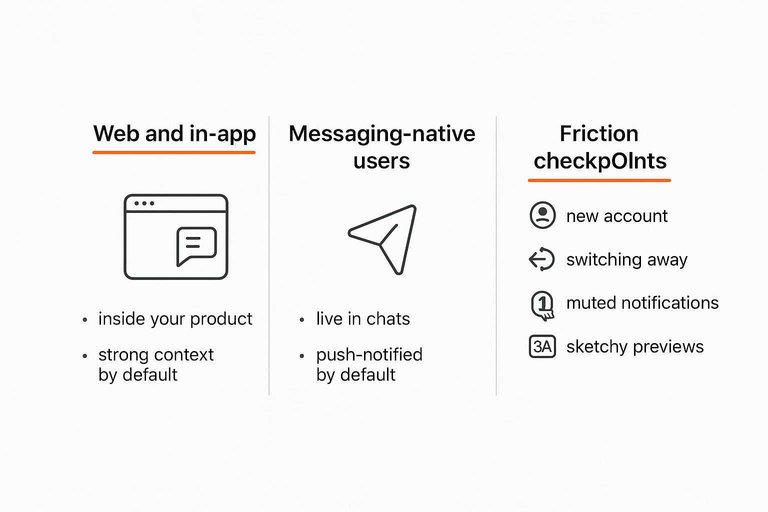
Web and in-app
Intercom fits when help should live inside your product, not beside it. Users can ask a question without leaving the screen they’re stuck on.
You get strong context by default: page, event history, plan, and past conversations. The widget can match your UI, so support feels like part of the product, not a bolt-on.
Messaging-native users
Telegram fits when your users already live in chats all day. They can message you like they message friends, with zero “support portal” vibes.
Threads are fast, informal, and push-notified by default on most phones. For a solo operator, that speed can beat perfect context.
Friction checkpoints
Small frictions compound fast, especially when users are annoyed. Watch these moments for silent drop-off.
- Needing a new account to ask
- Switching away from the product
- Missing or muted notifications
- Link previews looking sketchy
Remove two of these and support demand feels lighter overnight.
Solo workflow impact
Solo support lives or dies on flow. You need one loop you can repeat: capture, prioritize, respond, follow up, document.
Intercom is built to turn that loop into a system. Telegram can do it too, but you assemble it from habits and bots.
Intake and triage
Intercom gives you structured intake on purpose. Forms, tags, and routing rules turn “a message” into “a case” before you even read it.
Telegram intake is usually raw chat. You triage manually, or you add a bot that asks questions, tags chats, and posts the answers.
If you want fewer decisions per ticket, Intercom wins by removing the first messy step.
For a deeper look at what that looks like in practice, see the Intercom Inbox workspace.
Prioritization methods
Use one repeatable routine per tool. You’re not optimizing a queue, you’re protecting your attention.
-
In Intercom, route new messages into the right inbox.
-
Tag each conversation by severity and topic.
-
Sort by SLA, VIP, or “waiting longest.”
-
Use snooze for “later,” then clear the queue daily.
-
In Telegram, pin the top urgent chat.
-
Add a short tag in the first line or note.
-
Use folders to separate “New,” “Active,” and “Waiting.”
-
Use a bot to label, or forward to a triage channel.
If you can’t see your top three priorities in ten seconds, the tool is running you.
Knowledge capture
Repeated answers are either a drain or an asset. Capture them where you can reuse them fast.
- Turn answers into Intercom articles for self-serve.
- Save Intercom snippets for consistent replies.
- Link articles directly from the composer.
- Use Telegram saved messages as a reply library.
- Add bot commands that paste common answers.
Your best “knowledge base” is the one you can deploy mid-conversation.
Intercom’s approach is designed around an integrated help center—see the Help Center product overview.
Follow-up reliability
Follow-up is where solo support leaks. If you don’t have reminders and reopen flows, “I’ll get back to you” becomes “I forgot.”
Intercom reduces leakage with states, assignment, snooze, and reopen patterns. A conversation can sit “waiting” without disappearing into your scroll.
Telegram follow-up is mostly discipline. You can pin, set personal reminders, or rely on bots, but missed messages happen when chats stack up.
If follow-ups matter to your product, automate them. Don’t trust your memory.
Automation and bots
Intercom automation is a packaged system: rules, triggers, and guardrails that you tune over time. Telegram automation is a bot: flexible, lightweight, and easy to start, but fully yours to maintain.
If you’re solo, the real question is operational load. You’re choosing how many “automation jobs” you want alongside support.
Quick wins automation
Start with automations that reduce back-and-forth, not ones that “feel smart.” You want fewer clarifying questions and faster handoffs.
- FAQs and quick replies: Intercom; Telegram via bot commands
- Routing by topic: Intercom workflows; Telegram menus and handlers
- Collecting logs and context: Intercom forms; Telegram bot prompts
- Status updates and outages: Intercom banners; Telegram broadcast channel
- Follow-ups and nudges: Intercom sequences; Telegram scheduled messages
Pick the automations that remove typing first. Clever routing can wait.
Build vs buy
Intercom is “buy”: you assemble templates, rules, and flows, then maintain content and edge cases. Telegram is “build”: you write the bot logic, host it, and own every integration.
Intercom failure modes are usually configuration drift and stale articles. Telegram failure modes are downtime, broken APIs, expired tokens, and unhandled states.
If you want automation that survives your busy weeks, buy. If you need custom behavior, build.
When to automate
Automate after you understand the pattern, not before. Otherwise you ship a maze that traps users.
- List your top repeated questions from the last few weeks.
- Write a short script that resolves them safely, with links and checks.
- Add an instant “talk to a human” escape hatch everywhere.
- Test with real conversations, then fix the confusing branch.
- Monitor signals: retries, rage taps, “agent please,” and drop-offs.
If confusion rises, turn it off fast. Automation is reversible; lost trust isn’t.
Choose Your Default—and Add Structure Only Where It Pays Off
- Define your “must-not-fail” requirement: compliance/auditability and dependable follow-up (lean Intercom) vs fastest setup and messaging-native convenience (lean Telegram).
- Pick a primary channel and set expectations publicly (hours, response window, what belongs in chat vs email) so your workload stays predictable.
- Stress-test the workflow: can you tag/triage, find past context, and reliably close the loop a week later without mental overhead?
- Add automation last: start with saved replies/FAQ shortcuts, then introduce bots or routing only when volume proves the need—otherwise you’ll automate complexity you don’t actually have.
Frequently Asked Questions
- What’s the best Intercom alternative if I just need a simple website live chat for one person?
- Use a lightweight chat widget that forwards messages to a channel you already check (email, Slack, or Telegram) instead of a full helpdesk suite. If you want to answer from your phone inside Telegram, Eloqra is designed specifically for that workflow and keeps setup to a single script snippet.
- Can Telegram replace Intercom for in-app support, or is it only good for community chat?
- Telegram works well for messaging-first support (DMs, bots, groups), but it doesn’t replace in-app experiences like embedded chat, identity-aware user profiles, and tightly integrated product events. If your support depends on knowing exactly which account is contacting you inside the app, a dedicated in-app messenger is usually the better fit.
- How do I keep support organized in Telegram when I’m handling everything solo?
- Create a dedicated support account, use pinned messages and saved replies, and triage with labels via separate chats (e.g., “Bugs,” “Billing,” “VIP”) or a bot that forwards and tags messages. Also set clear expectations with an auto-reply and a short intake template to reduce back-and-forth.
- What’s the simplest way to capture email or order info when using Telegram as a live chat alternative?
- Use a short pre-chat form on your site or a Telegram bot prompt that asks for name/email and a problem summary before the conversation starts. Store the captured fields in your CRM or a spreadsheet so you can follow up even if the user disappears from Telegram.
- How do I measure whether switching from Intercom to a cheaper Intercom alternative is working?
- Track first response time, time-to-resolution, volume per week, and how often issues get lost or duplicated, using a simple log (sheet/CRM) plus your chat history. The switch is working when response and resolution stay stable while your ongoing admin time and tooling complexity drop.
Keep Support in Telegram
If Intercom feels like overkill for solo support, the real win is replying fast without living in another dashboard or paying for features you don’t use.
Eloqra routes website chat straight into your Telegram with visitor context, so you can respond from your phone and keep workflows lightweight—stay on the Free Forever plan.
Written by
Eloqra
Notes from the Eloqra team on collecting testimonials and building authentic social proof.
Share: