August 22, 2026
·
Updated October 6, 2026
·
12 min read
Live Chat Widgets vs Contact Forms: Which Fits Your Support?
A practical collection for choosing between live chat widgets and contact forms for customer support—use a decision map, understand core tradeoffs, match each option to common support scenarios, and plan UX, resourcing, and implementation without surprises.

Should you add a live chat widget, stick with a contact form, or run both? The wrong choice usually doesn’t fail because of software—it fails because expectations, staffing, and intake don’t match what customers need in the moment.
This collection helps you pick the right support entry point with a quick decision map, clear definitions, and scenario-based guidance. You’ll also get a grounded look at cost and resourcing, UX and accessibility considerations, and a practical playbook for routing, data capture, and measurement.
Decision Map
You’re choosing a support channel, not a feature. The right pick depends on urgency, volume, complexity, budget, and when your team is actually online.
Choose live chat
Use live chat when speed changes outcomes, like saving a checkout or unblocking setup.
- Handle urgent, real-time questions
- Reduce cart abandonment moments
- Answer onboarding “stuck” issues
- Triage high-volume repeats fast
- Troubleshoot complex problems live
If delays cost conversions or trust, chat is the sharper tool.
Choose contact forms
Use contact forms when the work is detailed, slower-moving, or hard to staff live.
- Collect structured, complete details
- Support after-hours requests cleanly
- Manage limited agent coverage
- Document regulated interactions
- Route non-urgent issues asynchronously
If you need clarity over speed, forms keep you in control.
Choose hybrid
Use both when your support splits into “quick unblock” and “deep investigation.” Put chat on high-intent pages and inside the app, then escalate to a form when you need logs, screenshots, or account verification.
Make the handoff explicit: chat resolves, or chat opens a ticket with the same transcript and required fields. That’s how you avoid the worst pattern. Two channels, two stories.
Fast self-check
Answer these quickly to pick your default channel.
- Do users lose money or time if they wait hours?
- Do you get the same questions repeatedly each day?
- Can your team staff predictable live hours?
- Do you need structured fields before troubleshooting starts?
- Do you need an audit trail or formal intake?
If you answer “yes” to 1–3, default to chat. If you answer “yes” to 4–5, default to forms.
What Each Is
Live chat widgets and contact forms both create a “support entry point” on your site, but they behave very differently. One is a conversation channel with presence and queueing. The other is a structured message handoff built for asynchronous replies.
Subsections: [
{
“subheading”: “Live chat basics”,
“content”: “A live chat widget is a small launcher, usually in the bottom corner, that opens a real-time chat panel. It works best when you can handle interruptions and route people quickly.\n\nWhen it’s online, visitors start a session, get routed by topic, page, or rules, and chat with an agent or bot. When it’s offline, it often switches to “leave a message,” captures an email, and sends a transcript. Most setups log transcripts, allow reassignment, and set expectations like “reply in minutes” during staffed hours.\n\nYour widget’s promise becomes your SLA, so set it to what you can actually meet.”,
“description”: “Widget entry points, agent/user experience, online/offline states, transcripts, routing, and typical SLA expectations.”
},
{
“subheading”: “Contact form basics”,
“content”: “A contact form is a page or embedded block that collects a request, then delivers it to an inbox or helpdesk. It’s built for clarity and completeness, not live back-and-forth. If you’re deciding between chat and email specifically (rather than forms), see <a href="https://eloqra.app/blog/live-chat-vs-email-which-is-better-for-fast-customer-replies">live chat vs email for fast replies.\n\nTypical forms include name, email, category, and a message, sometimes with attachments like screenshots. Submissions usually route by dropdown choice or keywords, then trigger an auto-confirmation with a ticket number or next steps. Responses are expected in hours or days, and the workflow assumes follow-up questions may happen later.\n\nForms win when you need clean intake and predictable processing, not immediate conversation.”,
“description”: “Form fields, attachments, routing to inbox/helpdesk, auto-confirmations, and expected turnaround times.”
},
{
“subheading”: “Common misconceptions”,
“content”: “Chat is always instant and always staffed.\n\n- Chat guarantees a human response\n- Forms are always slow and ignored\n- Either one replaces a helpdesk\n- Either one guarantees satisfaction\n\nThe channel is just the doorway; your process behind it does the real work.”,
“description”: “Clarify myths: chat is always instant, forms always slow, either replaces a helpdesk, and either guarantees satisfaction.”
},
{
“subheading”: “Key tradeoffs”,
“content”: “These differences show up fast in staffing, data quality, and how “easy” support feels.\n\n| Factor | Live chat widget | Contact form | What it tends to favor |\n| — | — | — | — |\n| Synchronicity | Real-time or queued | Asynchronous | Chat for urgency |\n| Context capture | Light unless prompted | Strong via fields | Forms for triage |\n| Queueing | Visible wait states | Invisible backlog | Chat for transparency |\n| Staffing load | Interrupt-driven coverage | Batch-friendly handling | Forms for small teams |\n| Effort perception | Feels low effort | Feels like “submit” | Chat for reassurance |\n\nPick the one whose failure mode you can tolerate under peak load.”,
“description”: “Contrast synchronicity, context capture, queueing, staffing load, and customer perception of effort.”
}
]
Use Live Chat When
Live chat works when a fast, guided conversation prevents drop-off and clears confusion in one sitting. Use it where intent is high, stakes are real, and a human reply changes the outcome.
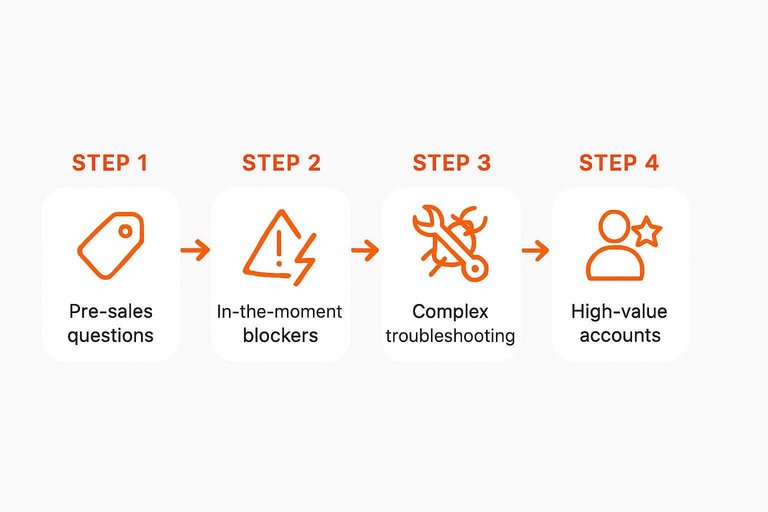
Pre-sales questions
Use live chat when a buyer is comparing plans, pricing, or fit and hesitation is the only blocker. Add proactive prompts on high-intent pages like pricing, comparison, and checkout, but keep the first message specific and helpful.
A gentle nudge beats a generic “Need help?” every time.
In-the-moment blockers
Use live chat for moments where one clear answer prevents abandonment. Checkout errors, login loops, billing confusion, and setup snags are all “fix it now” problems.
Treat these chats like incident response, not a casual Q&A.
Complex troubleshooting
Use live chat when the issue needs back-and-forth to diagnose, not a single reply. You want tight loops, shared context, and a clean handoff if it drags.
- Ask for steps already tried
- Request screenshots or screen recording
- Use co-browsing when appropriate
- Escalate to a ticket with transcript
- Set next action and owner
If the problem spans sessions, convert the chat into a tracked case fast.
High-value accounts
Use live chat when account value justifies priority handling and low patience. Route chats by segment, context, or plan tier so your best agents land the biggest conversations.
- Route by plan, ARR, or lifecycle stage
- Surface account notes in the sidebar
- Prioritize known renewal risks
- Offer scheduled callbacks if queues grow
- Confirm follow-up channel before closing
VIP support is mostly routing discipline, not fancy tooling.
Staffed hours fit
Use live chat only when you can staff it predictably, or you’ll train customers to distrust it. Publish coverage hours in the widget, show estimated wait times, and switch to an honest offline mode that captures context.
Speed is the promise, so don’t offer chat when you can’t keep it.
Use Forms When
Contact forms win when you need structure, a paper trail, and a predictable queue. They let you capture the right details without staffing a live channel all day.
Detailed intake
Forms are best when your team needs complete inputs up front. Think bug reports, feature requests, or refunds where missing details create long back-and-forth.
Required fields help you standardize what “complete” means: product area, plan, order ID, browser, and expected behavior. Add attachments for screenshots or logs, plus a “steps to reproduce” box with clear prompts.
If a request can’t be reproduced, it can’t be fixed fast.
After-hours support
Forms shine when nobody is online to chat. You still collect context, while setting expectations instead of leaving people hanging.
Use an auto-reply that confirms receipt and links to your status page and help docs. Offer a promised response window, and ask one clarifying question that prevents follow-ups.
Silence feels like neglect; an instant receipt feels like progress.
Compliance needs
Use forms when you must capture consent, identity, or an audit trail. You control what gets collected and how long it stays.
- Capture explicit consent for sensitive processing
- Verify identity with controlled fields
- Log submissions for audit trails
- Prompt for minimization and retention
If you can’t defend why you collected it, don’t collect it.
Lower-volume teams
Forms work when one person owns support and also ships product work. They create a queue you can batch, instead of a constant stream of interruptions.
- Add priority and category fields
- Batch responses in set blocks
- Triage by impact and urgency
- Use templates for repeats
Protect your focus, and your response quality rises with it.
Preventing spam
Forms give you more levers to reduce junk without harming real users. Live chat spam can be noisier and harder to filter.
Use CAPTCHA only when spam is real, not hypothetical. Prefer rate limits and honeypots first, then tighten rules based on what you see.
The goal is fewer bots, not a worse experience for humans.
Cost and Resourcing
Cost isn’t just the widget price. It’s coverage hours, staffing model, and the operational drag you discover at volume — including how quickly you can actually respond without adding another tool you have to live inside.
A simple way to compare live chat and contact forms is to map the costs you’ll actually manage day to day. For solo founders and small teams, the “tooling stack” and attention cost can be the difference between keeping chat sustainable vs. letting it lapse.
| Cost area | Live chat widgets | Contact forms | What changes at scale |
|---|---|---|---|
| Staffing model | Real-time coverage | Async queue handling | Scheduling gets harder |
| Peak-time load | Spikes hit instantly | Buffer via backlog | Queue discipline matters |
| Tooling stack | Chat + routing (sometimes a full dashboard) | Form + ticketing | More integrations appear |
| Hidden ops work | QA, macros, coaching | Triage, tagging, SLAs | Reporting becomes mandatory |
| Hours expansion | Nights, weekends cost | Delayed responses | Coverage promises harden |
This is where a lighter setup can reduce resourcing pressure: a widget like Eloqra routes messages to Telegram so you can reply from where you already work (your phone), rather than staffing a dedicated support console all day. If you’re weighing a traditional live chat suite against a Telegram-based workflow, see Intercom vs Telegram for solo support. If you’re considering an AI-first live chat tool, Tidio vs Eloqra for AI support breaks down the tradeoffs. That doesn’t remove the need for coverage planning, but it can lower the overhead that makes “live chat” expensive for small teams—especially when you factor in staffing and operational requirements for messaging.
If you can’t staff predictable hours, chat turns into a broken promise fast.
UX and Accessibility
Both live chat widgets and contact forms can feel effortless or annoying. Most UX wins come from friction control, mobile behavior, readable layouts, and accessible patterns.
| Consideration | Live chat widget | Contact form | Better when… |
|---|---|---|---|
| First-use friction | Interruptive bubble | Quiet entry point | Users browse first |
| Mobile experience | Overlay risks | Native scrolling | Screen is small |
| Readability | Tiny transcript | Full-page layout | Messages are long |
| Accessibility | Focus traps risk | Predictable fields | Assistive tech used |
| Error recovery | Back-and-forth | Validate before send | Data must be clean |
If either option breaks keyboard flow or zooms poorly on mobile, switch patterns or fix the implementation first.
Implementation Playbook
Picking chat or a form is easy. Implementing it without confusing users is the hard part.
Align expectations, routing, and measurement before you ship. Otherwise you’ll create noise, not support.
Set expectations
Write microcopy that tells people what happens next. Your goal is fewer repeat pings and fewer angry surprises.
- State availability and timezone in plain language.
- Promise a response window, not a vague “soon.”
- Explain the next step after submission or message.
- Add a fallback path for urgent issues.
- Include examples users can pattern-match.
Chat examples:
- “We reply in a few minutes during business hours. After hours, we’ll email you.”
- “If we miss you, you’ll get a ticket confirmation by email.”
Form examples:
- “We respond within one business day. You’ll receive a confirmation email.”
- “For outages or billing lockouts, use the emergency link above.”
Clear expectations turn channel choice into trust, not a gamble. (If needed, you can also turn off chat when no staff is online and fall back to an offline flow.)
Route and triage
Routing decides whether chat feels magical or pointless. Set rules so every request lands with an owner fast.
- Define departments and tag rules by topic and plan tier.
- Add priority rules for outages, billing, and security.
- Convert chat to a ticket when it needs async work.
- Trigger live follow-up from forms when urgency is detected.
- Set handoff rules for schedule, language, and escalation.
A channel is only “live” if your routing is live.
Design data capture
Collect the minimum context that prevents back-and-forth. Too many fields slow users and reduce completion.
For forms, keep the core fields tight: email, topic, product area, and a free-text description. Add account ID or order number only when it changes the outcome. For chat, use one or two pre-chat questions like “What do you need help with?” and “Which product?” Skip anything you can infer after the first message.
Treat privacy as a feature. Ask for sensitive data only when required, and say why.
Measure effectiveness
Measure what the channel is supposed to do. Otherwise you’ll optimize the wrong behavior.
- Time to first response, by channel and segment
- Time to resolution, including handoffs
- Deflection signals, like self-serve usage
- CSAT signals, like thumbs or follow-up replies
- Backlog volume and aging, by queue
Pick metrics that match your use case. Chat for speed. Forms for completeness.
Avoid common pitfalls
Most failures are operational, not technical. Fix ownership and workflow before you tweak the widget.
- Running chat without staffed coverage
- Shipping forms with too many fields
- Leaving queues without a named owner
- Answering without saved replies or templates
- Lacking an escalation path for risk
Your tooling won’t save you from an undefined process. Process first. Then polish.
Ship the widget with a clear operating mode
Execution is where a website live chat widget earns trust—or creates instant frustration. Before you turn it on, decide what “live” means for your team and make the widget behave accordingly.
- Define your coverage (and say it out loud)
- Pick real hours you can reliably staff.
- Show your timezone in the widget microcopy.
- If you’re solo or on-the-go, set expectations like “Replies within X during hours; after hours, next business day.”
- Choose a response promise you can keep
- Promise a window (“within 15 minutes”, “within 2 hours”), not a vibe (“asap”).
- Keep the promise consistent across the bubble greeting, the first auto-message, and any confirmation screen.
- Decide what happens when you’re offline
- Don’t leave visitors typing into a black hole.
- When no one is available, switch to an offline flow that collects what you actually need to continue (email + short summary is usually enough).
- Tell the user exactly what they’ll receive next (e.g., an email confirmation) and when to expect a reply.
- Set routing rules before volume forces your hand
- Route by topic first (billing, bug, sales, security), then by urgency.
- Use a simple escalation path for high-risk items (security, account lockouts) so they don’t sit in the same queue as “how do I…?” questions.
- For teams handling multiple sites or products, ensure every message has an obvious owner—“someone will look” is not a workflow.
- Make handoffs explicit
- If a chat needs async work, say so in the thread: what you’ll do next, who owns it, and when you’ll follow up.
- When you move from chat to email (or ticket), confirm the destination address and recap the issue in one line so the user doesn’t have to restate it.
A good widget feels fast because it’s predictable. A bad widget feels broken because it’s ambiguous.
Final Recommendation
Start with the channel that matches your support tempo, not your ambition. Choose based on urgency, team coverage, and how complex your typical request is.
- Start with live chat for urgent, simple questions.
- Start with contact forms for complex, documented requests.
- Start with hybrid when you need both speed and records.
- Default to forms if you lack real-time coverage.
- Default to chat if you can staff peak hours.
Use this rule: chat for “answer now,” forms for “solve later,” hybrid when you can’t predict which it is.
Choose Your Default Channel, Then Make It Work
- Pick your default based on urgency: If most requests are time-sensitive and you can staff it, start with live chat. If requests need context, attachments, or arrive after hours, start with contact forms.
- Add the second channel only with clear rules: Use a hybrid when you can define which issues go where (e.g., chat for quick questions, forms for detailed cases) and you can enforce routing.
- Set expectations on every entry point: Publish response windows, hours, and what information to include—this prevents frustration more than any UI tweak.
- Operationalize it: Establish triage tags, escalation paths, and a small set of metrics (first response time, resolution time, CSAT/feedback, deflection to self-serve) so you can refine the setup instead of guessing.
Frequently Asked Questions
- Does a website live chat widget hurt SEO or slow down Core Web Vitals?
- Usually not if the widget is lightweight and loaded asynchronously. Test before/after with Lighthouse or PageSpeed Insights and watch for added JavaScript, render-blocking behavior, and third-party calls.
- How do I measure whether my website live chat widget is actually reducing support tickets?
- Track chat-to-ticket deflection by tagging conversations that would have become emails, then compare contact form submissions and helpdesk tickets before vs after launch. Also monitor first response time, resolution time, and common topics to see what chat is intercepting.
- Can I run a website live chat widget without staffing a full-time support inbox?
- Yes—use clear “we reply in X hours” messaging, limit chat to business hours, and add an optional pre-chat form so you can follow up asynchronously. Tools like Eloqra can route chats to Telegram so a small team can reply from a phone without living in a support dashboard.
- Is a website live chat widget the same thing as a chatbot, or do I need both?
- A live chat widget is the interface, while a chatbot is automation that can run inside it; you can use the widget with only human replies. Add a bot only when you have repeatable intents (status, pricing, reset links) and a safe fallback to a human.
- What should I collect in a pre-chat form for a website live chat widget?
- Ask for the minimum needed to solve the issue: name plus email for follow-up, and optionally order ID/account email for billing or login problems. Avoid long forms—use conditional fields based on topic to keep the chat entry fast.
Launch Live Chat Without Overhead
If your decision map points to live chat but resourcing and tooling feel heavy, the right widget should stay fast, simple, and always reachable.
Eloqra routes every website message straight to Telegram with a lightweight script and visitor context, so you can reply from your phone. Get started on the Free Forever plan.
Written by
Eloqra
Notes from the Eloqra team on collecting testimonials and building authentic social proof.
Share: