October 21, 2026
·
8 min read
What Is a Pre-Chat Form and How Does It Work?
This explainer settles what a pre-chat form is (and isn’t) in a live chat widget — pre-chat form meaning vs contact form vs chatbot, the step-by-step user flow, which fields change routing and follow-up, where the submitted data ends up, and a deliberate setup checklist so you can choose what to ask (or whether to ask anything) before chat starts.

You’ve added a live chat bubble to your site and now you’re staring at a setting called “pre-chat form,” wondering if you should turn it on. If you treat it like a tiny contact form, you can accidentally add friction right when someone needs help—or collect the wrong details and still end up with chats you can’t route or follow up on.
This guide gives you a practical mental model: where the form appears in the chat flow, what each common field actually changes, where the data goes after submission, and how to configure the form intentionally instead of by default.
Which “chat form”?
Pre-chat form meaning
In this article, a pre-chat form (also called a pre-chat survey) is a short set of questions shown inside a live chat widget before the visitor can send their first message or enter the queue. It’s a gated step: the chat session doesn’t really start until the form is completed (or intentionally skipped).
Helpdesk products draw a hard line between this and “leave a message” flows. Zendesk Chat, for example, describes a pre-chat form as information you request before a live chat starts, and contrasts it with an offline form that collects messages when no agents are online (see Zendesk’s guide on pre-chat vs offline forms).
Pre-chat forms exist for operational reasons: to capture identity and context early enough to route and handle the chat efficiently. Salesforce frames it plainly—collect basics like name, email, and the reason for contacting support so requests can be directed more efficiently, agents spend less time asking setup questions, and the chat can be personalized (like using a first name in the chat window). Zendesk’s defaults show what vendors consider “minimum viable”: name, email, department, and the initial message.
Not a contact form
A website contact form is the classic “submit a message and we’ll get back to you” page element. It’s not a live session, and it works differently:
- Async by design: you submit once; you’re not entering a real-time conversation.
- No queue/agent session: there’s no concept of joining a live chat queue or being connected to an available agent.
- No immediate routing loop: contact forms usually land in an inbox/ticket list, not a chat routing system.
- No live customer service moment: it’s closer to email than to chat.
Chat support, by contrast, is customer service delivered through a real-time chat session with a support team (human, AI, or a mix).
Not a chatbot
Search results for “chat form” also mix in conversational forms and chatbots—tools that ask questions as a conversation and may never connect you to a human agent.
A pre-chat form can sit in front of a human chat, a bot, or both, but its defining feature is placement: it’s the gate before the chat session/queue, not the chat experience itself. It’s also not about setting up Google Chat (the product); this is strictly about forms used in website live chat widgets.
User flow mechanics
A pre-chat chat form sits in the tiny gap between “I opened the widget” and “I’m actually in a chat.” Here’s the lifecycle most widgets implement.
-
Visitor opens the chat widget. The widget loads and decides whether it can start a conversation immediately or needs inputs first.
-
The pre-chat form displays (the gate). Some platforms host the form on a dedicated page (Salesforce Service Cloud Chat supports hosting it on a Visualforce page or building your own) before the session starts.
-
Visitor fills fields and hits client-side validation. A required field—an input the visitor must complete before the widget will proceed, enforced differently by different vendors and sometimes bypassed by certain flows—blocks progress until it’s valid. Intercom Messenger, for example, can disable the send icon (“greyed out”) until an email address and a message are entered (as described in Intercom’s doc on requiring an email to start).
-
Submission starts the queue/session. Once validation passes, the widget creates the chat session and either connects to an available agent or places the visitor in a queue.
-
The agent receives identity + attached context. Platforms may attach “custom details” to the session; Salesforce’s
liveagent.addCustomDetail()can pass cross-domain context and store it in the chat transcript. If you rely onliveagent.details.preChatInit()(it’s asynchronous), submitting before its callback completes can drop those custom details. -
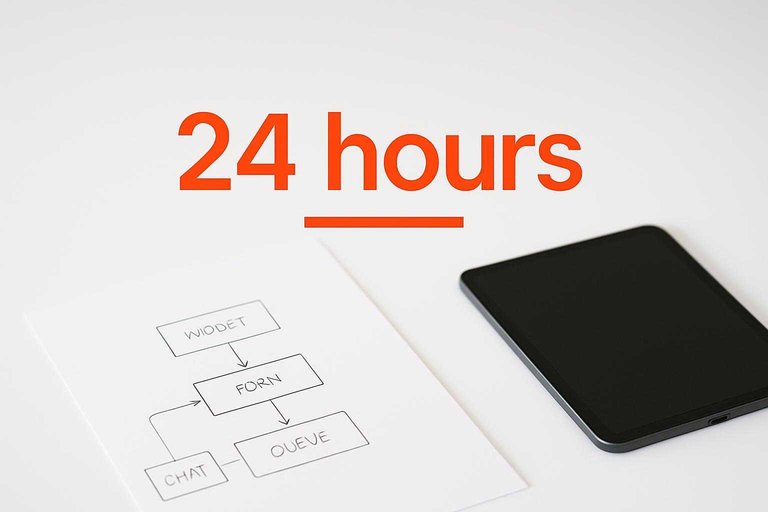
Conversation continues, then a record is finalized. Many systems create a transcript after the chat ends; Salesforce doesn’t treat it as a failure unless no Chat Transcript is created after more than 24 hours.
Once you see the pre-chat form as the session’s gatekeeper, “required” becomes an operational decision—not just a UI checkbox.
Fields that change outcomes
Every pre-chat field is either buying you an operational outcome or adding drop-off. Department/group routing—asking the visitor to pick “Sales” vs “Support” up front—routes the chat to the right team/queue instead of transferring later.
| Field | Operational purpose | Friction cost / constraints |
|---|---|---|
| Name | Personalize, identify | Low, but still a gate |
| Follow-up identity | Higher than name alone | |
| Phone number | Call/SMS follow-up | High; expect resistance |
| Department / group | Route to right queue | Extra choice, faster handling |
| Initial message | Faster triage | Zendesk label fixed “Message” |
| Consent checkbox | Compliance record | Another required blocker |
LiveChat documents the trade-off directly: the more (required) pre-chat fields you add, the less likely visitors are to start a chat—so treat “required” as a cost you only pay for routing, follow-up, or compliance (see LiveChat’s guidance on required pre-chat fields). Freshchat’s Web SDK bakes that discipline in by capping the pre-chat field list at 5.
If you’re thinking of requiring email, Intercom reports a concrete friction delta: requiring email “Always” reduces conversation volume by ~30% on average, versus ~5% when required “Only outside of office hours.”
Where the data goes
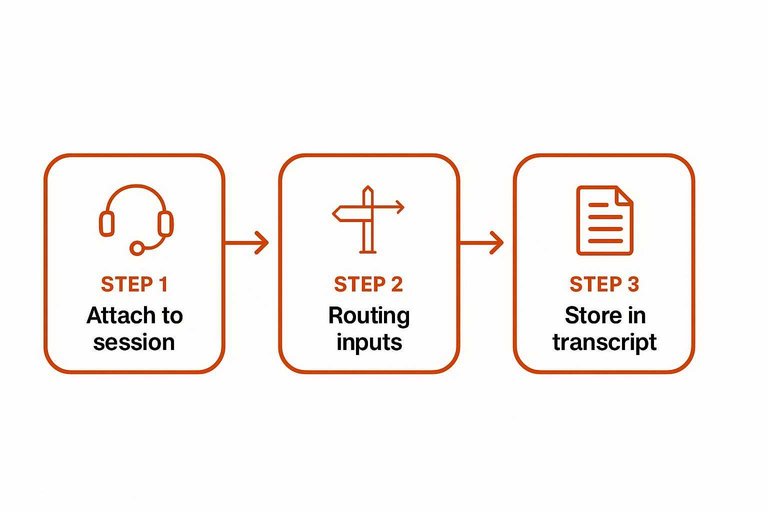
When a visitor hits “Start chat,” the form values don’t just sit in the widget. The platform has to (1) attach them to the live session so an agent can see them, (2) use them as routing inputs (for example, which queue to enter), and (3) persist them somewhere after the conversation ends.
That last destination is usually a transcript—the stored record/log of the chat conversation used for reporting and follow-up. In Salesforce Service Cloud Chat (Live Agent), a common pattern is to pass page context into the session as a custom detail (extra context values like product name or account number) and have it stored in the chat transcript for later reference; Salesforce explicitly recommends liveagent.addCustomDetail() for passing that context across domains instead of relying on browser cookies (per Salesforce’s article on passing custom values via addCustomDetail).
Two failure modes are responsible for most “but the field was required” surprises:
First, some chat entry points bypass the gate entirely. In Zendesk Web Widget (Classic), Visitor profile (Zendesk’s identity collection setting that controls whether name/email—optionally via social login—are collected and recorded for a chat visitor) can be configured to require identity, but Zendesk documents an exception: if a chat starts from a proactive trigger (a rule that automatically sends a message to a visitor), the pre-chat requirement is bypassed and the visitor is placed in the queue when they reply.
Second, timing bugs can drop values even when the UI looked valid. Salesforce’s preChatInit is asynchronous initialization (a setup step that finishes later via a callback); submit the form before it finishes, and the custom details you meant to attach can be missing.
If you want to trust your chat form, test the bypasses: start a chat via a proactive message, and start one while intentionally racing initialization. If the transcript and agent view don’t match, the “required” label wasn’t the contract you thought it was.
Configure it deliberately
Treat your chat form as a trade: making identity fields mandatory can reduce chats. Intercom reports that requiring email “Always” reduces conversation volume by ~30% on average, versus ~5% when required “Only outside of office hours.”
-
Start with the outcome, not the field list. If you won’t route by department, follow up by email, or record consent, don’t ask for it up front.
-
Keep the “required” set brutally small. LiveChat makes the friction point directly: more required pre-chat fields makes visitors less likely to start a chat—so only require what you’ll actually use for routing, follow-up, or compliance.
-
Use time-based gating for identity. If you need an email mainly for follow-up, require it only outside office hours; Intercom’s own numbers show far less volume loss with that setting than with “Always.”
-
Check platform constraints before you design. For example, LiveChat lists 8 different pre-chat field types—so confirm your platform supports the kind of input you’re planning (like a consent checkbox), not just “text fields.”
Free chat boxes exist: Eloqra is a lightweight website chat widget with an optional pre-chat form (name/email) and it’s free while in early access with no credit card to start (details on the Eloqra live chat widget).
Treat pre-chat as a gate
A pre-chat form isn’t a tiny contact form—it’s the gate that decides whether someone gets into a live session, what queue they enter, and what context an agent sees later in the transcript. Because every required field is paid for in drop-off (and “required” can still be bypassed by certain entry points or lost to initialization timing), the right default is intentional minimalism. Pick the operational outcome you truly need—routing, follow-up identity, or consent—require only what enables that, and then verify in real flows that the agent view and transcript actually capture what the UI promised.
Frequently Asked Questions
- What is the difference between a pre-chat chat form and an offline “leave a message” form?
- A pre-chat chat form appears before a live chat session starts and feeds the info into the chat session/queue. An offline form collects a message when no agents are available and creates an async follow-up instead of starting a real-time chat.
- Why am I still getting live chats with no email even though my chat form requires it?
- Some chat entry points can bypass the pre-chat requirement—Zendesk documents that chats started from proactive triggers can skip the pre-chat form when the visitor replies. Also test session timeout/expired-session flows, because they can start a new chat without presenting the form.
- Should I require an email address on my chat form or keep it optional?
- Require email only when you truly need it for follow-up or identity—Intercom reports that requiring email “Always” reduces conversation volume by ~30% on average, versus ~5% when it’s required only outside office hours. If you mainly need email when you can’t respond live, use an outside-hours rule instead of forcing it for every chat.
- How do I pass extra context (like plan name or order ID) through a chat form into the transcript?
- Use your chat platform’s pre-chat APIs to attach custom details to the session before the chat is created (for example, Salesforce’s Pre-Chat APIs support adding custom details). Then verify the agent view and transcript actually contain the fields by running a full end-to-end test.
- Is there a lightweight, free chat box that includes an optional pre-chat form?
- Eloqra is a website live chat widget with an optional pre-chat form (name/email) and a small script size stated as under ~5kb. It routes messages to Telegram so you can reply from your phone without a support dashboard.
Route Chats Without Friction
Once you’ve chosen the few pre-chat fields you truly need, the next hurdle is wiring them into real routing and agent context without adding dashboard overhead.
Eloqra adds a lightweight chat bubble with an optional pre-chat form and forwards every visitor message (plus context) to your Telegram for fast replies. Start with the Free Forever plan.
Written by
Eloqra
Notes from the Eloqra team on collecting testimonials and building authentic social proof.
Share: