September 3, 2026
·
11 min read
What Are Intercom Alternatives and How Do They Work?
A mechanics-first guide to Intercom alternatives that ends the “best tools” rabbit hole — SERP intent traps (Intercom vs intercoms), layered replacements vs full-suite swaps, the messenger dataflow, identity-and-cookie pitfalls, and a billing-units cheat sheet so you can verify differences in install docs and pricing definitions instead of affiliate tables.

You’re trying to add a chat bubble to your site so visitors can reach you and you can reply fast. The obvious path—pick a popular tool and paste a snippet—can still leave you with a widget that won’t load, messages that land in the wrong place, or conversations that lose context when someone logs in or out.
Searching “Intercom alternatives” makes it worse: some results assume you mean physical intercom hardware, and most comparisons stop at features and starting prices. This pillar gives you a practical map of how these tools actually work—installation, identity, routing, and billing—so you can evaluate any option by reading its own docs.
Intercom or intercoms?
“Intercom alternative” is a loaded phrase because searchers use it for two different product categories. If you pick the wrong meaning, you end up comparing chat widgets to in-wall speakers. This section keeps you on the SaaS buying path.
Two meanings
Intercom (capital I) is a customer messaging SaaS—best known for the Intercom Messenger embedded on a website or inside a product. An intercom system (lowercase) is physical hardware for homes and buildings, used for room-to-room or door-entry communication.
This guide is about Intercom-the-SaaS and the tools that replace that on-site Messenger + inbox layer, not home intercom panels or wiring.
SERP intent traps
A lot of top results mix these intents, so do a fast self-check before you start comparing “alternatives.”
- “home intercom system” → You want hardware, not a web Messenger.
- “Nutone replacement” → You’re shopping wall units and speakers.
- “Do people still use intercoms?” → You’re in the home/building category.
- “Intercom messenger not loading” → You’re in SaaS install territory.
What you’ll learn
The useful mental model for an intercom alternative (SaaS) is an implementation flow: snippet → identity/cookies → routing/inbox → transcript storage → billing unit. That flow is where products truly differ, and it’s also where most failures happen.
Intercom’s own docs show why mechanics beat feature lists: the Messenger snippet is placed right before the closing tag, and for logged-out visitors you’re told not to include user_id, email, or user_hash—only app_id. If your domain isn’t allowlisted under Intercom Trusted Domains, the Messenger won’t load at all, and even the “local dev” story is specific (no localhost; 127.0.0.1 and/or 0.0.0.0 for testing).
Once you see that level of specificity, affiliate roundups feel thin; install and security docs tell you how the system actually behaves.
What counts as alternative
An “intercom alternative” isn’t a product that matches a feature checklist. It’s anything that replaces one or more layers of the Intercom stack you actually rely on. In practice, that means being explicit about what you’re swapping in the messenger pipeline (what loads on the site, how identity/cookies persist, where messages route, and where transcripts live) versus what stays put.
Layered replacements
Intercom is a stack, so an “alternative” can be a partial swap.
- Website messenger (widget and chat UI)
- Shared inbox (where humans reply)
- Tickets + knowledge base (async support + docs)
- AI agent (automated handling)
- Integrations/APIs + reporting (plumbing + metrics)
If you can name the layer you’re replacing, comparisons get obvious fast.
Full suite swaps
Replacing the whole stack changes three things at once: your data model, your agent workflow, and your billing units.
Data model: you’re moving conversation history, user identity, and whatever counts as a “case” into a new system.
Workflow: the “happy path” for an agent shifts (triage, assignment, escalation, handoffs).
Billing units: even the same outcome can become a different meter—Intercom’s Fin AI Agent charges per “outcome,” with at most one outcome per conversation, priced at $0.99 for Resolution/Procedure handoff/Disqualification and $9.99 for Qualification (see Fin AI Agent outcomes).
Messenger-only swaps
A messenger-only swap replaces the on-site chat widget and the basic reply loop, while leaving your helpdesk, docs, and analytics alone.
That’s a valid Intercom use-case, and it’s where the “all-in-one replacement” debate usually breaks: some teams want a full suite, while early-stage teams just want a website Messenger plus a place to answer quickly.
Inbox routing apps
Some “alternatives” don’t try to be your inbox at all—they move where replies happen.
- Forward into Slack; reply in Slack (Crisp offers Slack integration on its Mini plan)
- Forward into Telegram; reply in Telegram (tawk.to’s Telegram bot doesn’t support group messages)
- Pipe to email; reply from your email client
- Post to API webhooks; reply from your own app
When routing changes, your day-to-day support muscle memory changes with it.
The messenger dataflow
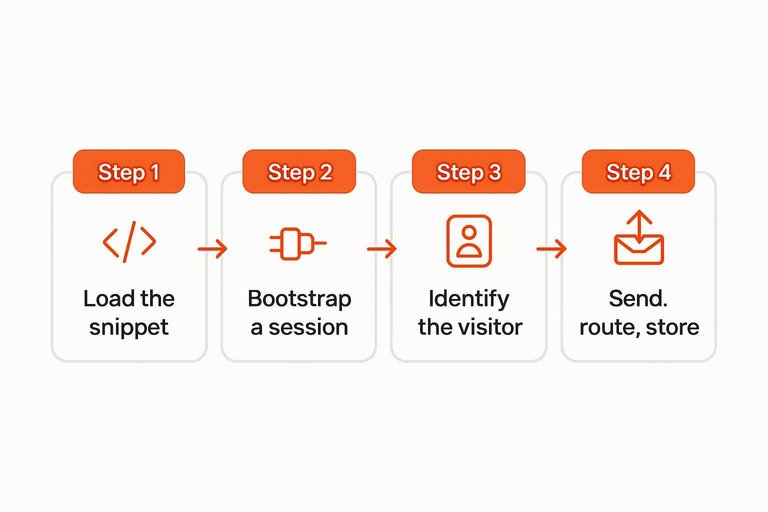
A website messenger is a small client + a back-end relay, and the work happens in a predictable order.
- Load the snippet: Your page loads the vendor’s JavaScript, which renders the launcher and opens a connection.
- Bootstrap a session: The script initializes a conversation session and pulls any existing state tied to that browser.
- Identify the visitor: Your app passes identity fields when you know who they are, linking the session to a person.
- Set cookies: The messenger writes session cookies on your domain (Intercom’s are prefixed
intercom-), and even callingIntercom('shutdown')does not remove all cookies. - Send, route, store: Visitor messages go to the vendor, get routed to an inbox/agent queue, and the full transcript is stored so replies and history can rehydrate later.
Install and security gates
Most “intercom alternative” widgets fail in boring, mechanical ways: the script never runs, or the vendor refuses to load it. Treat install like a pipeline with gates, not a UI toggle. When you debug it that way, “it works on my machine” becomes a hostname or payload mismatch you can fix.
Snippet placement
Intercom’s install guidance puts the JavaScript snippet immediately before the closing tag. That placement keeps the widget from racing your page render and makes “view source” a reliable way to confirm it’s actually present. If you only see it in a tag manager preview or a client-only component, you can end up with a launcher that appears in dev but never ships on the live HTML.
Logged-out rules
Intercom’s warning for logged-out visitors is about what you send in the snippet.
- Include only app_id.
- Do not include user_id.
- Do not include email.
- Do not include user_hash.
Trusted Domains gate
Intercom uses a Trusted Domains allowlist for the domains you use with the Messenger. When your local environment “works” but production doesn’t, the fastest check is whether the live hostname you’re testing is actually in that list (including the exact subdomain). A common gotcha is treating “staging” and “www” as the same site when the allowlist treats them as different hosts.
Wildcard and localhost
Intercom’s Trusted Domains rules are strict enough that one character can be the whole bug.
- Use the wildcard only once per domain.
- Put the wildcard as the first character.
- Don’t add localhost (unsupported).
- Use 127.0.0.1 for local testing.
- Use 0.0.0.0 for local testing.
When the hostname changes, your security gate changes with it.
Identity and cookie pitfalls
Visitor identity in a messenger isn’t stored “in the chat bubble.” For Intercom’s Messenger, session cookies are created on your domain and are prefixed intercom-, and shared devices are where that design bites you.
- Persist session state in browser cookies tied to that domain (
intercom-in Intercom’s case). - Rehydrate conversation history from leftover cookies on the next visit.
- Treat shared devices as hostile to “remember me” behavior.
- Delete
intercom-cookies during logout on shared devices. - Don’t rely on
Intercom('shutdown')alone; it does not remove all cookies, and leftover cookies can cause a previous user’s conversation history to appear for the next user.
If you don’t design logout to clear messenger cookies, you’re accepting cross-user transcript exposure.
Routing and inbox models
Routing is where a chat message becomes work: which queue it enters, what gets assigned, and what surface the reply is sent from.
Intercom alternatives tend to fall into three inbox models: a native inbox, a bridge into another tool, or an API-driven workflow that turns “replying” into your own product’s job.
Native inbox model
In a native inbox model, the vendor is the system of record for conversations and assignments.
A visitor message is stored in the vendor’s database, routed into a queue, and surfaced in a dashboard inbox where an agent replies. The vendor owns the workflow primitives (assignment, status, and conversation history), so “where the reply happens” is the same place “where the transcript lives.”
Bridge integrations
Bridge integrations keep the vendor as the message relay, but move the human workflow into a different surface.
- Mirror messages into an external tool
- Relay agent replies back to the visitor
- Use the external tool as the triage surface
- Keep the vendor inbox as an archive
Telegram bot constraints
Telegram bridges come with hard constraints that shape what “inbox” even means.
tawk.to documents that its current Telegram integration doesn’t support messages from supergroups or channels, won’t import historical messages from before you connect, and allows each bot to be connected to one property at a time (Connecting your Telegram bot to tawk.to). If your support habit is “route everything into one shared place,” those limits become routing rules, not edge cases.
API-first workflows
API-first setups treat the vendor like a messaging platform: you build the routing, UI, and automations yourself.
- Tidio OpenAPI is not available on Free
- Product endpoints require a paid Lyro plan
- Other endpoints require Plus or Premium
- Plus: max 60 requests per minute
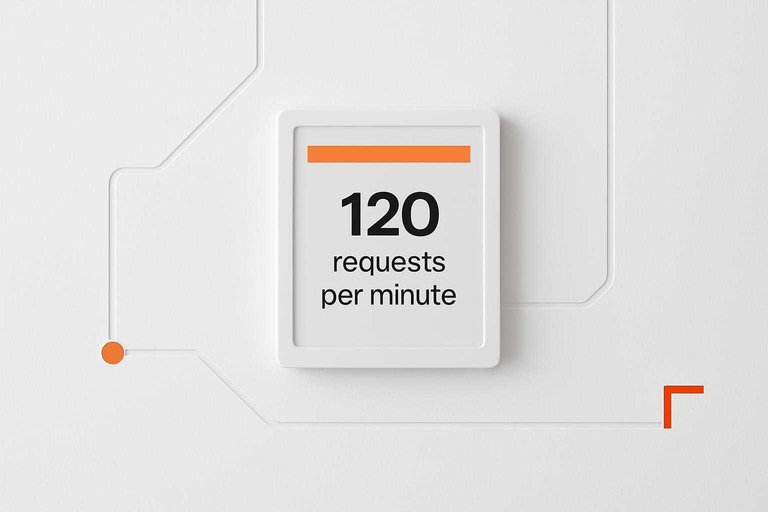
- Premium: max 120 requests per minute
Where context travels
“Visitor context” is a payload attached to messages: the page they’re on, plus device, browser, and country.
That context compresses the back-and-forth, because the agent starts with situational data instead of questions. It also triggers privacy debates: some practitioners treat it as essential for fast support, while others see it as surveillance-by-default risk.
Billing units cheat sheet
A pricing page is only comparable after you translate what’s being metered.
| Billing unit (the meter) | What you’re paying for | Concrete example | What becomes incomparable fast |
|---|---|---|---|
| Per outcome | A completed AI “result” in a conversation | Intercom Fin: max 1 outcome per conversation; $0.99 (Resolution/Procedure handoff/Disqualification) or $9.99 (Qualification) | AI that resolves more becomes “more expensive” |
| Per workspace | A team container, often bundling seats | Crisp Mini: $45/month per workspace, includes 4 agent licences | “Per seat” tools vs bundled-seat workspaces |
| Per add-on, per property | A feature surcharge tied to each site/property | tawk.to Remove Branding: add-on priced per property; $39/month (monthly) or $348/year (annual) | Multi-site setups pay the add-on repeatedly |
| Per quota / tiered limits | Monthly caps that gate usage by plan | Tidio Free: 50 conversations/month and Flows serve 100 unique monthly visitors | Same sticker price, different hard ceilings |
Debates that matter
These are the arguments practitioners keep having because they change cost, risk, and workflow—not because they’re “feature differences.” The point is to turn each debate into a decision criterion you can verify in docs (definitions, limits, and lifecycle notices) and in pricing language (what’s metered, and when the meter ticks).
Outcome-based AI
Outcome-based AI sounds clean until you read the vendor’s outcome definitions like a lawyer. Intercom’s Fin AI Agent charges for at most one outcome per conversation, and it prices outcomes in two bands: $0.99 for Resolution, Procedure handoff, and Disqualification, and $9.99 for Qualification; its docs also define “Resolution” as counting when the customer confirms the answer was satisfactory or exits without requesting further assistance (see Intercom’s outcome definitions).
That’s why the debate isn’t “AI vs no AI,” it’s “metered outcomes vs predictable spend.” Teams who like outcome pricing treat it as aligned with delivered value; teams who don’t treat it as a variable tax that grows with their own docs and processes.
Forecasting questions
To forecast outcome spend, you need questions that map directly to outcome definitions and handoff rules. Use these as a doc-and-pricing checklist.
- What exactly triggers “Resolution” in the vendor’s definition?
- Which conversations can reach an outcome at all?
- Where are “Procedure handoff” and “Qualification” defined in workflows?
- How do you count “one outcome per conversation” in exports?
- What ends a conversation without an outcome?
Suite vs layer
The most practical split is “replace Intercom entirely” versus “replace only Messenger + fast replies.” A full suite swap forces a new system of record (identity, transcripts, routing, reporting), while a layer swap mostly changes what loads on your site and where quick replies happen.
Suite churn is a real cost, not a hypothetical. LiveChat has stated its native Tickets feature will be sunsetted on a schedule—Starter plan (January 6, 2025), Team and Business plans (January 15, 2025), and Enterprise/custom deals (January 31, 2025)—which is exactly the kind of lifecycle event you inherit when you buy “one platform for everything.”
Context vs privacy
“More context” and “less tracking” are not compatible defaults; you have to draw a line. Make the line explicit before you compare an intercom alternative.
- What visitor context is shown to agents by default?
- Would a user expect that context from a chat bubble?
- Is browsing activity included, or just the current page?
- What happens on logout: cookie deletion or session carryover?
- Is “shutdown” documented as insufficient for cleanup?
Self-host reality
Self-hosting isn’t a pricing hack; it’s an operating model. The trade is simple: you stop paying a vendor to run the service, and you take on reverse proxy setup, upgrades, backups, security patching, and incident response.
That’s the disagreement behind “open-source Intercom alternatives”: the license can be free, but the work is not, and your ROI is your ability to keep the stack reliably patched and recoverable.
Evaluate alternatives by tracing the plumbing
- Start by naming the replacement layer you actually need: a full suite swap, or just the messenger + a place to reply.
- Trace the dataflow end-to-end: site snippet → visitor identity/session → routing rules → agent inbox → transcript storage.
- Pressure-test the failure modes before you buy: what blocks the widget from loading, what happens for logged-out users, and how logout clears (or doesn’t clear) identity.
- Normalize cost by billing unit—not headline price—then decide your stance on the real trade-offs: suite vs layer, context vs privacy, and outcome-based AI vs predictable spend.
Frequently Asked Questions
- Do people still use intercoms?
- Yes—people still use intercoms, but that search term often refers to physical home intercom hardware, not Intercom the customer-messaging SaaS product. If you’re shopping for a SaaS “intercom alternative,” include “live chat,” “website chat widget,” or “customer messaging” in your query to avoid irrelevant results.
- What is the best inexpensive home intercom system?
- That query is about physical in-home intercom hardware, not a SaaS intercom alternative for websites. Add “home intercom system” (hardware) or “Intercom alternative” (software) to your search so you compare products in the right category.
- Is there a free intercom alternative I can use on my website?
- Yes—some intercom alternative tools offer a free plan; Eloqra lists a $0 USD per month Free plan that includes 1 project. Confirm the billing unit and any limits (like projects/sites) before you switch.
- If I run multiple sites for clients, how should I compare intercom alternative pricing?
- Translate pricing into the unit you’ll actually scale—like “per project/site”—before you compare vendors. Eloqra includes 1 project free, then charges $4.99 USD per month per additional project (or $49.99 USD per year per additional project) beyond the free one.
- When replacing Intercom, what’s the clean way to remove the old widget so it doesn’t conflict?
- Use Intercom’s JavaScript API to shut down the existing messenger before loading a new intercom alternative; Intercom exposes an `Intercom('shutdown')` call for this. Removing the old snippet and calling shutdown helps prevent two widgets competing for the same page events.
Route Live Chat to Telegram
Once you’ve mapped dataflow, identity, and routing trade-offs, the next step is choosing a setup that stays secure without adding another dashboard to babysit.
Eloqra forwards every website chat message to your Telegram and sends your replies back to the visitor, using a single
Written by
Eloqra
Notes from the Eloqra team on collecting testimonials and building authentic social proof.
Share: