September 7, 2026
·
9 min read
Tidio vs Eloqra for AI support and live chat
A workflow-first comparison that settles whether Tidio or Eloqra fits your AI support and live chat setup — at-a-glance winners and fast fit checks, each product’s message loop, quota and cost modeling (billable conversations, Lyro, Flows), decision-critical constraints, and a pick-this-if checklist so you can choose and implement without surprises.

You want a chat bubble on your site that you can answer fast, without turning support into a second full-time job. The “obvious” choice can backfire: you either end up babysitting a support dashboard, or you miss messages when you’re away.
This comparison breaks the decision into two real workflows: a shared inbox with AI/automations and multiple usage meters (Tidio), versus a phone-first operator flow where replies happen inside your messaging app. You’ll see the exact message loop for each, what gets capped or counted, and the constraints that decide it before you install anything.
Two workflows, not features
You’re not really choosing “which chat widget has more boxes checked.” You’re choosing where support lives day to day: in Telegram with founder-speed replies, or in a helpdesk-style inbox where you deliberately build AI and automations into the loop.
With Eloqra, the operator surface is Telegram. You install a single script snippet, connect Telegram once, and every website message lands in Telegram; your Telegram replies go back to the visitor’s on-site chat in real time, without keeping a support dashboard open. That workflow is optimized for “answer it now from your phone,” with minimal ceremony. The trade-off is that routing depends on Telegram’s native Reply behavior—send a non-reply message in the thread and it can’t be matched to the right visitor conversation.
With Tidio, the operator surface is a shared inbox/helpdesk across channels, with AI and automation as first-class tools. Its pricing mechanics reflect that: a “billable conversation” is only triggered when a human agent replies, and Tidio says Lyro AI Agent and Flows replies don’t count as agent replies. But you’re also agreeing to manage multiple meters—Lyro’s free quota is limited to 50 non-renewable Lyro conversations, and Flows usage is measured as unique visitors reached per month (and stops for new visitors when you hit the limit).
A concrete example of the difference: Telegram is the inbox in Eloqra, while in Tidio it’s a channel you connect to the inbox—and Tidio’s Telegram integration is available only on Plus and Premium plans (details: Tidio’s Telegram integration).
If you want integrations, ticketing-style workflows, and an AI agent/automations you can tune over time, Tidio is built for that. If you want low-friction, founder-led replies with the least possible dashboard overhead, the Telegram-first workflow is the point.
Eloqra message loop
You set this up by dropping a single embed script into your site (it’s advertised as ~5kb) and linking your Telegram once. After that, the “inbox” you work from is just Telegram—no separate support dashboard needs to be open.
Here’s what the day-to-day loop feels like:
A visitor types into the site chat bubble. That message is forwarded into Telegram as a message you can act on immediately, with the same push notifications you already rely on.
When you answer, you don’t type a fresh message into the chat. You use Reply-to-message routing (meaning you hit Telegram’s Reply on the visitor’s forwarded message so the system can map your response back to the correct website conversation). That reply is then posted back into the visitor’s on-site chat.
If you run chat on more than one site, you use a Telegram Mini App (an operator UI that runs inside Telegram to view/switch conversations and reply with more context than a single forwarded message) to jump between threads without leaving Telegram.
The friction point is the same thing that makes it simple: there isn’t a helpdesk-style assignment layer. Your team coordination happens in Telegram, and the reply mechanic is the line you can’t cross.
If you’re offline, messages still land in Telegram; the backlog is waiting in the same place you’ll reply from later.
Tidio message loop
In Tidio, the “home base” is a shared inbox that behaves like a lightweight helpdesk: new messages land in one queue, you (or your team) pick them up, and the thread can live on as a ticket when it’s no longer real-time chat.
Day to day, the loop looks like this. A visitor starts a website chat (or you connect other channels into the same inbox). An agent sees the conversation in the inbox with its history, can leave internal notes/tags, and can assign it so ownership is explicit instead of “whoever replies first.” When you’re handling volume, that assignment layer is the difference between coordinated support and accidental double-replies. (If you’re a solo operator who doesn’t need assignment/ticket semantics and just wants to reply quickly from your phone, a Telegram-routed widget like Eloqra can be a simpler loop—but it’s solving a different problem than Tidio’s shared-inbox workflow.)
Lyro and Flows sit in front of (or alongside) that human workflow. Flows can intercept earlier with structured prompts and routing, while Lyro can answer directly and only hand off when it can’t resolve the request. The operational gotcha is that Lyro’s thread closes after 15 minutes of inactivity; a new message after that starts a new thread, and Lyro’s first response in that new thread is what consumes Lyro quota again (per Tidio’s Lyro AI agent limit).
When you’re offline, Tidio’s ticketing model is the safety net: the customer can still write, and you come back to an ordered backlog rather than a pile of missed chats.

Quotas and cost modeling
Metering changes what you choose to automate, answer, or ignore. The trap is treating “price” as a single number when the product is really three counters (Tidio) versus a “how many sites/projects?” counter (the Telegram-routed option).
How Tidio meters (three separate counters)
When you model Tidio, start by writing down which parts of your support you expect humans to touch.
- Billable conversations (Tidio’s support quota) = a support thread that becomes billable only when a human agent sends a reply. That’s why “we’ll reply only when it’s urgent” is a cost lever, not just an ops choice. On Starter, Tidio lists 100 billable conversations included at $24.17/month (billed annually) (see Tidio’s pricing).
- Lyro conversations = a customer interaction counted when Lyro (Tidio’s AI agent) replies for the first time in a new conversation/ticket thread; threads can reset after inactivity. The practical gotcha is the 15‑minute inactivity close: a follow-up after that can start a “new” Lyro-counted thread. Tidio’s help center also states Lyro’s free version is limited to 50 non-renewable Lyro conversations, and paid Lyro packages use renewable monthly tiers.
- Flows visitors reached = a monthly automation quota measured as unique visitors who triggered at least one Flow (not the number of flow messages). That makes Flows more “traffic-shaped” than “support-shaped”: a small change in how broadly you trigger a Flow can change the meter even if questions don’t.
The behavioral ‘gotcha’ is split incentives: you can push work from “human reply” into Lyro or Flows to protect billable conversations, then discover you’ve simply moved the pressure onto a different meter. That multi-meter reality is also why people disagree on whether Tidio feels predictable in practice.
Scenario comparison (what to watch before you commit)
| Scenario | Best fit | Why | Tidio meters to watch | Eloqra constraints |
|---|---|---|---|---|
| Low-volume founder | Telegram-routed workflow | No dashboard overhead | Billable conversations | Reply-to routing |
| Growing SaaS | Tidio inbox + automation | Assignment + AI routing | Lyro + Flows visitors | Project count |
| Ecommerce FAQs | Tidio with Lyro | FAQ deflection | Lyro conversations | Reply-to routing |
On the project-priced side, the cost model is simpler: 1 project is free forever, and additional projects are a flat $4.99/month per project or $49.99/year per project, with “no per-seat” and “no message metering” stated on the pricing page. The ‘gotcha’ shifts from “how many conversations?” to “how many distinct sites/brands do we need to separate into projects?”—which you can count today before your volume changes tomorrow.
Constraints that decide it
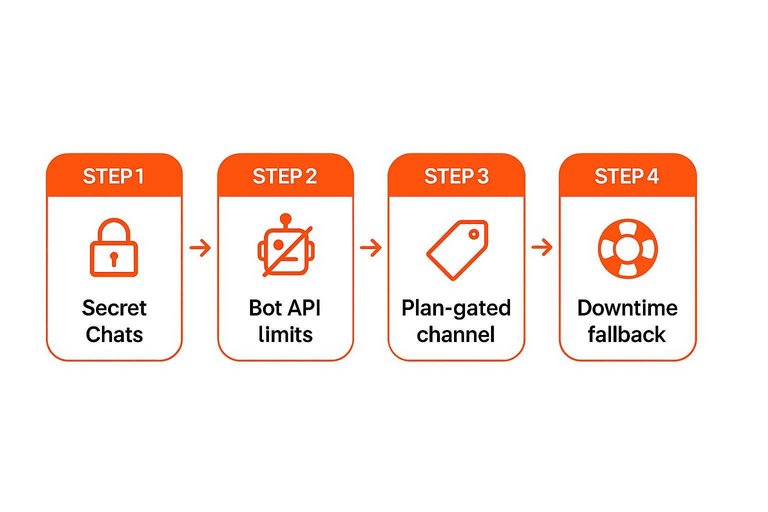
Telegram is the first place teams get tripped up on security assumptions. Secret Chats (Telegram’s end-to-end encrypted mode) are distinct from normal cloud chats, and Telegram’s official Bot API does not support Secret Chats—so any bot-based routing can’t run as a Secret Chat (see Telegram’s note on Bot API and secret chats).
That matters for compliance: if your requirement is “support must be end-to-end encrypted in Telegram,” you can rule out Telegram-bot workflows up front, regardless of how slick the demo feels. (This applies equally to lightweight “send website chat to Telegram” setups like Eloqra, since the moment you rely on the Bot API you’re in normal cloud-chat territory, not Secret Chat.)
Channel access is the other quiet constraint. In Tidio, Telegram is a plan-gated channel integration, so “we’ll start cheap and add Telegram later” isn’t a safe assumption—confirm the exact plan before you design your process around Telegram.
If you’re deciding on integrations, check the APIs, not the UI. Eloqra has a small REST API (api.eloqra.app/v1) for provisioning and pulling a ready-to-paste embed snippet, using header-based auth. Tidio’s OpenAPI is rate-limited by plan; on Plus, it’s capped at 60 requests per minute per project.
Finally, treat downtime as an operational failure mode: decide what your fallback is when the shared inbox is unavailable, or when the Telegram webhook path can’t be trusted in the moment.
Pick this if… + minimal setup checklist
Decide based on where you want support to live—and whether you want AI to sit in the loop by default: Telegram-first on your phone, or a shared inbox where Lyro/Flows can handle first contact and humans step in.
-
Pick the Telegram-first widget (Eloqra) if you’re doing low-volume, founder-led support and you want to reply fast without keeping a dashboard open—especially when your sites are simple marketing funnels on Webflow, Next.js, or Astro.
-
Pick Tidio if you actually want AI support/automation doing meaningful first-pass deflection and routing (and you’re comfortable with the trade-off that some teams find AI limiting on nuanced requests, or frustrating when it blocks a human).
-
If you choose the Telegram-first path, do this: connect Telegram once, paste the embed script, turn on the pre-chat form if you need email capture, then run a two-person test and practice replying only via Telegram’s Reply on the forwarded visitor message.
-
If you choose Tidio, do this: pick the plan that matches your channel needs, decide whether you need OpenAPI (it’s not on the Free plan), and model the three separate meters (billable conversations, Lyro conversations, and Flows visitors reached) up front—this “multi-meter” setup is where teams disagree most on whether pricing feels predictable.
-
Whichever way you go, write a one-line “handoff rule” that matches the tool: for Tidio, when AI hands off to a human agent; for Telegram-first, when you reply now vs leave it as backlog in Telegram—and test it before you send real traffic.
Choose where support lives
If your goal is a chat bubble you can handle fast without babysitting a support dashboard, the Telegram-first loop is the safer default: Eloqra keeps support in the one place you already answer from—just remember replies must use Telegram’s Reply-to-message routing, and Telegram bot workflows aren’t Secret Chats. Choose Tidio when you genuinely want a shared inbox with assignment/ticket semantics and AI/automations doing first-pass work across channels—but go in eyes-open that you’re managing three meters (billable conversations, Lyro conversations, and Flows visitors reached), plus edge cases like Lyro threads resetting after inactivity and Telegram being plan-gated. Your first move either way: write a one-line handoff rule, then run a two-person test (including an “offline” window) to confirm the message loop behaves the way you expect before you send real traffic.
Frequently Asked Questions
- Is Tidio’s Telegram integration the same thing as Eloqra’s “Telegram-first” live chat workflow?
- No—Eloqra uses Telegram as the operator console (your inbox), while Tidio treats Telegram as one channel connected into its shared inbox/helpdesk workflow.
- What’s the fastest way to avoid misrouting replies when you use Telegram for website live chat?
- Always reply using Telegram’s “Reply” on the forwarded visitor message so your response maps back to the right on-site conversation; don’t send a loose message in the thread.
- How do I model real cost in a Tidio vs Eloqra comparison without getting surprised later?
- Write down which interactions require a human reply (billable conversations), which ones you want an AI agent to answer (Lyro conversations), and how broadly you trigger automations (Flows unique visitors reached), then compare that to how many separate sites/brands you need as projects.
- Does a Telegram-based support inbox meet “end-to-end encrypted support” requirements?
- Not if the workflow relies on Telegram bots, because Telegram’s Bot API can’t run in Secret Chats, so bot-routed support can’t be end-to-end encrypted inside Telegram.
- If I want to build custom workflows, what’s a concrete API limit I should plan around in Tidio vs Eloqra?
- On Tidio’s Plus plan, the OpenAPI rate limit is capped at 60 requests per minute per project, so you need to design sync/automation jobs to stay under that ceiling.
Keep Support in Telegram
Once your two-person test confirms the loop, the next challenge is shipping it without adding a second inbox—or a bunch of new meters to track.
With Eloqra, every website chat bubble message forwards to your Telegram so you can reply from your phone with visitor context included. Start on the Free Forever plan.
Written by
Eloqra
Notes from the Eloqra team on collecting testimonials and building authentic social proof.
Share: