October 24, 2026
·
12 min read
Tidio alternatives for live chat, tickets, and AI agents
Map Tidio’s usage meters, translate your monthly volume, compare alternatives by chat/helpdesk/AI billing units, and migrate with a checklist.

You’re shopping for a new way to handle customer questions on your site without blowing up your support budget. If you’re on Tidio (or about to be), the hard part isn’t “does it have chat and tickets?”—it’s how each alternative counts usage, gates APIs, and charges for AI, because that’s where surprise bills and forced upgrades come from.
This collection starts with a Tidio meter map, then walks you through translating a real month of support into each billing model, from Telegram-first inboxes like Eloqra to helpdesk-first suites. You’ll also get a side-by-side table of AI billing semantics and a migration checklist for a clean widget and inbox cutover.
Tidio Meter Map
Your real “Tidio alternative” problem is usually one meter you can’t forecast. Here’s where Tidio charges, caps, or plan-gates usage (from https://www.tidio.com/pricing/?so=1" rel=“nofollow”), so you can name what you’re trying to escape.
| Meter / gate | What counts | What happens when you hit it | Primary driver it affects |
|---|---|---|---|
| Billable conversation | Billable conversation (Tidio)—a thread that only becomes billable once a human agent replies or proactively starts it; bot-only replies don’t count | You run out of included human-handled volume for the month | Predictable human support cost |
| Channel scope of that meter | Live chat, tickets, email, social conversations become billable once a human message exists | More channels → more ways to burn quota | Omnichannel consolidation |
| Flows monthly limit (Free) | Flows are limited by unique visitors reached; free default is 100 executions/month | Flows stop temporarily; resets monthly (or on upgrade) | Predictable automation reach |
| Lyro AI Agent usage | Metered as “Lyro AI conversations” (separate from billable conversations) | AI usage can scale independently from human replies | Stronger AI agent without surprises |
| OpenAPI plan gating | No OpenAPI on Free; Product endpoints unlock on any paid Lyro quota; all other endpoints require Plus/Premium | You may be blocked from building “AI that takes actions” via API | Deeper integrations / custom workflows |
| OpenAPI rate limiting | Plus: 60 requests/min/project; Premium: 120 requests/min/project | Automations/integrations can throttle under load | Reliability at scale |
Who should keep Tidio: teams that want live chat + ticketing + no-code automation + an AI agent in one product, and are comfortable managing separate meters (human conversations vs Flows reach vs AI usage). It’s also the clean choice if OpenAPI access is non-negotiable and you’re on Plus/Premium for the higher 60/120 requests-per-minute limits (per Tidio’s OpenAPI rate limiting). The moment your pain is “I can’t predict which meter I’ll hit first,” you’re ready to evaluate alternatives by billing unit, not by feature list.
Translate Your Support Month
-
Pull one clean month of raw volume. Export last month’s live chats, tickets, and AI-handled threads with timestamps, assignee/agent, channel, and whether the customer needed a follow-up.
-
Convert to “seats” (agent licences). Count the maximum number of human responders who needed access in the same week—not total employees. This maps directly to plans that sell agent licences (for example, Crisp’s Mini plan is priced per workspace at $45/month and includes 4 agent licences). If you’re considering a lighter live chat setup that routes messages to a shared channel you already use (for example, Eloqra sending chats straight to Telegram), note that the “seat” concept can change—your constraint may be response coverage rather than paid logins.
-
Convert to “workspaces.” List how many separate brands/sites/inboxes must be isolated (permissions, reporting, billing). Tools like Crisp price as a flat rate per workspace—so your key number is “how many workspaces do we truly need?” not “how many conversations did we have?” For small teams and agencies, it’s also worth checking whether your shortlist supports multi-site handling without forcing additional workspaces, since that can be the real cost driver.
-
Convert to “tickets” (ticket-fee meters). Recount your month as billable tickets using the vendor’s rule. In Gorgias, a helpdesk ticket fee applies to any ticket with at least one message sent from the helpdesk (human, AI Agent, or Rule), and an AI-resolved ticket can also trigger an additional automation fee.
-
Convert to “sessions.” For Freshworks’ Freddy AI Agent, a session is everything an end user does with the agent in a 24-hour window—and even previewing agents/bots while building them consumes sessions (session packs are priced at $49 per 100 sessions).
-
Convert to “outcomes/resolutions” and “credits.” If the vendor bills on completion, count the month’s solved requests under that definition—e.g., Intercom Fin charges $0.99 for a Resolution outcome when no further help is requested after Fin’s last answer (including assumed resolutions). If the vendor is token/credit-based, separate the AI-handled threads: Crisp’s Hugo is included from Mini, uses tokens/credits, and bills a “Hugo conversation” from the first AI-handled message until it’s resolved, routed, or escalated (not per message).

Alternatives By Use Case
Pick your shortlist by workflow first, then kill options fast with one or two early disqualifiers. The goal here isn’t “best live chat”—it’s “will this fit how we actually run support, and will the meters/channels/security rules block us later?”
Telegram-first inbox
If you want support to live where you already are all day—your phone—choose a Telegram-as-the-inbox setup. Eloqra is built for that: visitor messages route into Telegram with two-way replies and visitor context, so you’re not living in a helpdesk dashboard just to answer “quick questions.”
The gotcha is that “Telegram integration” can mean “notifications” or “partial syncing,” not a real inbox. For example, tawk.to’s Telegram channel supports private 1:1 chats only (no groups/supergroups/channels), and it doesn’t import history—only messages received after you connect the bot. If you’re an agency, also price in branding constraints: tawk.to sells Remove Branding as a $39/month add-on.
Flat-rate workspace
Per-workspace pricing is the cleanest fit when your support volume swings but the team and process don’t. You’re buying a stable “place to work” (one workspace/inbox) instead of trying to predict which month will spike in conversations or tickets.
The disqualifier to check early is whether the plan you can afford includes the integration surface you need. If your workflow depends on custom automation, look for an API requirement up front and confirm it’s not paywalled: Chaport’s REST and JavaScript APIs are only available on paid plans. That single line can decide whether “flat-rate” is a bargain or a dead end.
AI-first messenger
If you want the on-site messenger itself to be a controlled, security-aware surface (not just a chat bubble), evaluate the messenger rules before you evaluate the AI. Intercom’s Messenger lets you lock down where the widget is allowed to appear via “trusted domains.” If you leave the trusted-domain list blank, Intercom notes the Messenger can be added to any domain—great for flexibility, a problem if you need strict control.
There’s also a practical deployment gotcha: Intercom’s install instructions for the JavaScript snippet place it immediately before the closing tag. If your site setup makes script placement awkward, that becomes a real implementation constraint, not a preference.
Helpdesk-first AI
If ticketing, routing, and reporting are the core of your operation, start with helpdesks that treat AI as an extension of tickets—not as a chat feature that happens to create tickets later.
Zendesk is explicit about what you’re buying: Zendesk AI agents are included in every Suite and Support plan, and they’re measured in “Automated Resolutions” (successful resolutions without escalation to a human agent). On Zendesk’s pricing page, pay-as-you-go resolutions are listed at $2.00 per resolution.
Help Scout is equally explicit, but the definition differs: you’re charged for an AI resolution only when Scout provides a response and the customer doesn’t ask for additional help after the last AI response—and you’re charged once per session even if multiple questions are answered. Help Scout’s pay-as-you-go price is $0.75 per AI resolution.
That definition gap is the whole game: “resolution-based” pricing is only predictable when the vendor’s definition matches your real ticket mix.
Ecommerce ticket fees
If ecommerce support drives your volume, “ticket fee” billing can be either perfectly aligned—or surprisingly punishing—depending on what the product counts as a billable event.
The disqualifier isn’t “does it integrate with Shopify?” It’s “can a single customer request hit multiple meters?” Some helpdesks explicitly treat AI automation as an additional billable layer on top of the underlying ticket fee. If you’re piloting an ecommerce-focused helpdesk like Gorgias, test your real automation paths (rules + AI) before you migrate, because that’s where double-counting shows up.
Free tier agents
If your immediate constraint is seats, choose a tool that lets the whole team get into the inbox without paying before you’ve proven the switch.
Freshchat advertises a Free tier “for up to 10 agents.” The gotcha is how AI is packaged: Freddy AI Agent is an add-on billed per session pack. So you can start with free human coverage, but the moment you want AI deflection you’re back to managing a separate meter and a separate line item.
AI Billing Semantics
AI agents are easy to demo and hard to budget, because each vendor’s “billable success” unit is different—and even when two vendors use the same word (“resolution”), they usually mean different things. Zendesk bills an Automated Resolution (a customer request resolved by an AI agent without escalation to a human agent), and it also lists $1.50 per resolution for “Committed automated resolutions” on its pricing page. Intercom Fin bills an Outcome (the billable unit for Fin, counted when Fin achieves a defined result such as a resolution—no further help requested—or completing a configured procedure handoff).
Help Scout bills an AI resolution (a billed event when the AI answers and the customer doesn’t request more help; billed once per session even if multiple questions are answered). Freshworks bills a Session (all interactions between an end user and the AI agent/chatbot within a 24-hour window). Crisp’s Hugo uses Credits / token-based billing (AI usage measured by tokens/credits consumed based on context and conversation depth, rather than a flat per-message charge).
| Vendor unit | What triggers the charge | Predictability dispute | Pilot control that matters |
|---|---|---|---|
| Zendesk “Automated Resolution” | Resolved without human escalation | “Escalation” edge cases | Strict handoff triggers |
| Intercom Fin “Outcome” | Resolution or procedure handoff | “No further help” window | Limit eligible procedures |
| Help Scout “AI resolution” | No further help; per session | Session bundling vs tickets | Cap AI on high-risk topics |
| Freshworks “Session” | Any use in 24 hours | Long chats inflate sessions | Route repeat users to humans |
| Crisp Hugo credits/tokens | Tokens consumed by context | Context size drives spend | Trim sources + context |
The fight you’ll run into internally is what counts as “done.” Teams often argue that if an AI agent resolves a request, you should only pay the AI fee; some helpdesks explicitly charge both the base ticket fee and an automation fee, so one customer request can hit two meters—acceptable as accounting, but not an apples-to-apples comparison.
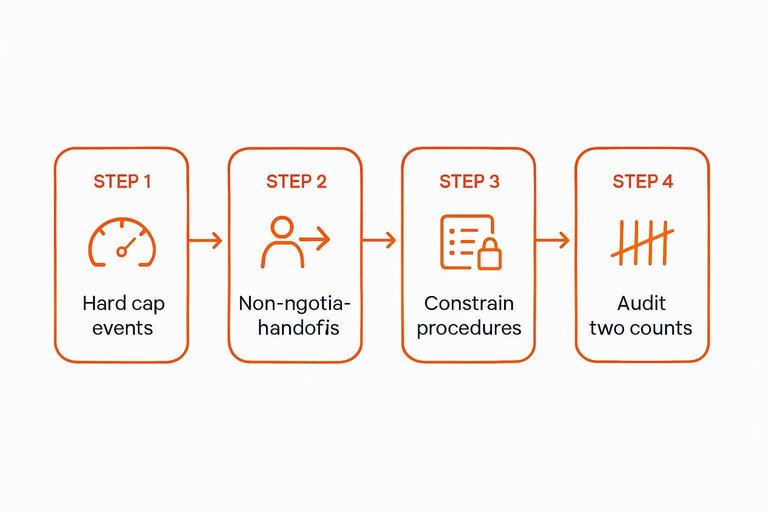
Pilot so you learn semantics before you learn a surprise invoice:
- Put a hard cap on billable AI events. Use your vendor’s unit (outcomes/resolutions/sessions/credits), not “conversations.”
- Define non-negotiable handoffs. Payment, identity, cancellations, refunds, or anything that changes account state should escalate on first mention.
- Constrain what the agent is allowed to “complete.” If outcomes include procedure handoffs, start with a short list of low-risk procedures.
- Audit with two counts. Track (a) vendor-billed units and (b) your own label of “actually resolved,” then adjust handoff rules until those converge.
A useful sanity check is whether the vendor publishes a clean, comparable unit price for the thing you’re trying to buy (for example, Zendesk’s $1.50 per “Committed automated resolution” on its pricing page). If they can’t state the unit clearly, you can’t forecast it cleanly.
Migration Checklist
-
Freeze the current setup. List every Tidio entry point you rely on: website widget, email/ticket intake, and any channels that end up as tickets. Take screenshots of routing rules and macros so you can rebuild them without guessing.
-
Export what you can—and plan for a “no import” world. Pull ticket/chat history into files you can keep as a read-only archive (for audits, refunds, and “what did we promise?” moments). Decide what must be searchable on day one vs what can live in storage.
-
Swap the widget with a clean rollback. Add the new widget snippet, but keep the Tidio snippet ready to re-enable. If you’re choosing a “free” live chat tool, confirm the branding terms before you ship it—some vendors forbid removing their branding unless you pay for a specific add-on, which can turn a “free” rollout (especially on client sites) into an immediate line item.
-
Cut over inbox routing before you cut over the widget. Make sure messages land where your team actually responds. If you’re moving to Telegram-as-the-inbox, create/confirm the bot in Telegram BotFather and test two-way replies end-to-end.
-
Rebuild Flows as outcomes, not diagrams. Rewrite each Flow as: trigger → required info → handoff condition → owner. Then implement in the new tool.
-
Ground your AI agent on your real rules. “Grounding” means giving the agent your approved knowledge and procedures (refund policy, identity checks, escalation rules) so it can’t invent answers.
-
Run parallel, then switch. A parallel run means both systems receive messages for a short window while only one is the “source of truth.” Set a rollback plan: the exact moment and method you’ll revert the widget and routing if messages go missing.
Choose by meter, then migrate
If you want to avoid the “second migration,” don’t pick a Tidio alternative by chat/tickets/AI checkboxes—pick it by the one billing unit you can forecast from a real month of support, then pilot the AI with hard caps and strict handoffs so the vendor’s definition of “resolved” can’t surprise you later. For solo founders, small SaaS teams, and agencies that mainly need fast live chat without living in a helpdesk dashboard, a Telegram-first inbox like Eloqra is the cleanest step down in workflow and overhead; if you need SLA-grade ticketing and reporting, start helpdesk-first (Zendesk or Help Scout), and if you’ll be paying ticket fees plus automation meters (like Gorgias), test your exact paths before you move anything. Keep Tidio (https://www.tidio.com/pricing/?so=1" rel=“nofollow”) when you specifically want its all-in-one bundle and you’re comfortable managing separate meters—and especially when OpenAPI access and higher rate limits are non-negotiable on Plus/Premium. Your first move is simple: export one clean month, translate it into each shortlist tool’s billable unit (seats/workspaces/tickets/sessions/resolutions/credits), and only then swap the widget with a rollback-ready cutover.
Frequently Asked Questions
- Are “free” Tidio alternatives for live chat actually free once you deploy them on client sites?
- Not always—some “free live chat” tools keep mandatory vendor branding unless you pay for a branding-removal add-on, which can turn a client rollout into an immediate line item (see tawk.to’s terms). Check branding and white-label clauses before you embed any widget.
- What’s the difference between a live chat tool with ticketing and a real helpdesk when you’re comparing Tidio alternatives?
- A live chat tool with ticketing is a shared inbox that turns chats/emails into assignable threads; a helpdesk adds structured routing, SLAs, auditability, and reporting that governs how work moves through a support team. Pick based on whether your operation needs workflow governance, not whether a tool merely “creates tickets.”
- If I want replies to happen in Telegram, what should I check when a tool claims it has “Telegram integration”?
- Verify it’s a true two-way inbox (you can reply from Telegram and the customer sees it in the site chat), not just notifications, and confirm whether it supports groups/supergroups and imports any history. If your goal is Telegram as the inbox, a Telegram-first widget like Eloqra is designed around that workflow instead of bolting it on.
- How can I compare AI agent pricing across Tidio alternatives when everyone uses different units like outcomes, resolutions, sessions, or credits?
- Run a pilot with a hard cap in the vendor’s own unit (outcomes/resolutions/sessions/credits) and track a second internal label for “actually resolved,” then tighten handoff rules until those counts converge. If a vendor can’t state a single clear unit price for the billable AI event, you can’t forecast it cleanly.
- Do I need an API (like OpenAPI) when evaluating Tidio alternatives for AI agents that take actions?
- Yes if your AI agent must do tool calls such as updating subscriptions, issuing refunds, or writing back to your database—those require an integration surface beyond a chat UI. Make “required endpoints + rate limits” an early disqualifier so you don’t migrate twice when you outgrow no-code automation.
Run live chat from Telegram
Once you’ve shortlisted tools by meter, the next bottleneck is day-to-day handling—staying responsive without living inside another helpdesk dashboard.
Eloqra forwards every visitor message to your Telegram so you can reply from your phone and have it appear instantly in the on-site chat bubble. It’s Free Forever while in early access.
Written by
Eloqra
Notes from the Eloqra team on collecting testimonials and building authentic social proof.
Share: