September 13, 2026
·
Updated October 2, 2026
·
8 min read
Crisp alternatives for live chat and shared inboxes
Crisp alternatives compared by pricing meter and workflow (timeline vs tickets), plus a pre-migration checklist: trusted domains and CSP nonce.

You added a chat bubble so customers could ask quick questions, but now the inbox feels like another tool you have to babysit. When you try to replace it, the “obvious” choices can quietly change how you work day-to-day—or how you get billed—until reply speed drops or costs stop being predictable.
This guide helps you figure out what you’re really leaving Crisp for, compare alternatives by the pricing meter they use and the workflow they enforce (conversation timeline vs tickets), and run a short pre-migration checklist so your new widget doesn’t fail to load or break in production.
Why leave Crisp
Switching off Crisp is rarely about “missing features.” It’s usually about what you want your support workflow and costs to optimize for as your team and volume change.
Crisp is built around a shared inbox—a team workspace where multiple people can read, assign, and reply to messages from shared addresses/channels (like support@) without collisions or duplicate replies. If that model still fits, Crisp can stay the simplest choice, because its pricing is a flat rate per workspace (not per conversation) on plans like Mini ($45/month), Essentials ($95/month), and Plus ($295/month).
Keep Crisp when
- You want one price for the workspace (not billed by conversation volume), with multiple agent licenses included (Free: 2, Mini: 4, Essentials: 10, Plus: 20+).
- You like an all-in-one messaging inbox that bundles live chat with lots of channels.
- Slack and Telegram are core to how you triage and reply—and you’re fine being on at least the Mini plan for those integrations.
- You don’t rely on X (Twitter) DMs as a primary channel, since Crisp’s X integration requires the X/Twitter Enterprise plan.
Switch for billing
- Headcount or “occasional collaborator” growth makes you allergic to anything that starts feeling like a user-license ceiling, even if the base plan includes seats.
- You want AI support to be either fully bundled or fully predictable. Crisp’s Hugo AI Agent is included by default starting from Mini, with included monthly credits ($5 on Mini, $25 on Essentials, $75 on Plus).
- You don’t want AI to silently turn off midstream: when Hugo credits are consumed, Hugo stops answering automatically and new conversations escalate to human operators until credits reset or Pay‑As‑You‑Go is enabled.
- You prefer a different AI meter entirely—Intercom Fin, for example, is priced at $0.99 per outcome.
Switch for workflow
- You want “reply from phone” simplicity as the default, not “live in a dashboard.” If your operators live in Telegram, a Telegram-first two-way inbox like Eloqra matches that habit.
- You’re done with conversation timelines and want a ticket-first helpdesk model where the unit of work is a case with explicit statuses, queues, and reporting.
Keep Crisp when
Use Crisp if you want one flat workspace price, a single inbox that unifies chat + channels, and you’re happy with its integration floor (e.g., Slack/Telegram from Mini) and channel constraints (X DMs need X Enterprise).
Switch for billing
Switch when your main stress is cost predictability: seat pressure, AI credits turning into a meter, or wanting AI priced on a different unit (like per-outcome).
Switch for workflow
Switch when the operator experience is the constraint: you want phone-native replies or you want a ticket-first helpdesk workflow instead of a conversation-centric inbox.
Pricing meters
Billing surprises usually come from what the tool counts.
- Per-seat pricing (you pay for each agent/user account that needs access) penalizes “occasional” collaborators—founders, engineers, part-time support—because every login becomes a recurring line item.
- Per-workspace pricing (one subscription covers a workspace with a fixed number of included agent licenses) makes headcount growth predictable until you exceed the included seats.
- Outcome-based AI pricing charges when the AI completes a defined result (for example, a resolved request), which turns “AI working well” into higher variable spend.
- Ticket/conversation volume pricing ties cost to how much support you process, which makes launches, outages, or seasonal spikes expensive.
| Meter (what gets counted) | Small-team budget risk | Crisp | Alternatives that use it (with a real catch) |
|---|---|---|---|
| Workspace subscription | Low if headcount grows (until you hit included seats) | Flat per workspace: Free ($0), Mini ($45), Essentials ($95), Plus ($295) with 2 / 4 / 10 / 20+ included agent licenses | — |
| Seats (agents/users) | High with “sometimes” logins | Seats are bundled into the workspace price (2/4/10/20+) and you only feel cost pressure when you outgrow the included licenses | LiveChat bills per person; its Starter plan includes 1 user and features like chat history are capped (and its native Tickets feature has been sunset on a fixed schedule). Zendesk/Front-style “seat licenses” are a common pattern: every additional teammate that needs access changes the monthly bill. |
| Tickets / conversations volume | High with seasonal spikes | Not Crisp’s core meter (Crisp frames pricing around the workspace rather than charging by conversation volume) | Gorgias is charged by number of tickets (billing doc). |
| AI usage (outcomes or credits) | High when automation succeeds (or when AI gets turned on broadly) | Hugo is included starting from Mini, with no Hugo credits on Free. Mini includes $5 monthly Hugo credits, Essentials $25, Plus $75; when included credits are consumed, Hugo stops answering automatically and new conversations escalate to human operators until credits reset or Pay‑As‑You‑Go is enabled (Hugo billing). | Intercom Fin is priced at $0.99 per outcome (pricing, outcomes definition). This is the classic “it’s affordable until it works”: every successfully handled request becomes a billable event. |
| Projects (sites/brands) | High for agencies with many properties | Workspace-centric (your costs are driven more by the workspace plan + included agents than by a per-site meter) | Eloqra: +$4.99 per additional project beyond the free 1 project. |
If you want predictability, reject tools that meter the thing you can’t control (spikes, launches, outages) and be extra cautious with meters that punish “just this once” teammates.
A practical way to stress-test a shortlist is to run the same scenario across the three common meters:
- Seat blow-up check: “If 3 people need occasional access, does my price triple?” (Typical in per-seat tools like LiveChat; less so in workspace-bundled models like Crisp.)
- AI blow-up check: “If AI resolves 200 requests, do I pay for 200 outcomes?” (That’s exactly how Intercom Fin works at $0.99 per outcome.)
- Spike blow-up check: “If I get a support spike, does my bill jump because tickets are the meter?” (That’s the risk profile of ticket-count billing models like Gorgias.)
Workflow philosophy
Support tools split into two philosophies: ticket queues (discrete cases with statuses, queues, reporting) and conversation timelines (one continuous customer thread). Ticketing tends to win when you need discrete cases with explicit statuses, queues, and reporting; messaging-first teams argue tickets/queues are a legacy layer and prefer keeping everything in a unified thread—so the right fit shows up in how you assign, escalate, and what you can actually report as “done”.
| Decision axis | Conversation timeline inbox | Ticket queue helpdesk | Concrete tell in real tools |
|---|---|---|---|
| Unit of work | One customer thread | One case per issue | “Inbox” vs “Tickets” IA |
| Assignment | Reassign the thread fast | Owner, queue, handoff trail | HubSpot auto-assignment requires paid seats |
| Escalation | Pull in specialists inline | Route by tier, priority | Priority + tier fields |
| Status reporting | Lightweight tags/notes | Status + backlog view | “Open / Pending / Solved” |
| “Done” definition | You replied; it’s quiet | Closed with a resolution | FreeScout is a self-hosted help desk (PHP/Laravel) |
If you need “done” to be a status you can report on (not just “we replied”), you’re asking for tickets; if “done” is simply “handled in the thread,” a timeline inbox is the more natural model.
Implementation tripwires
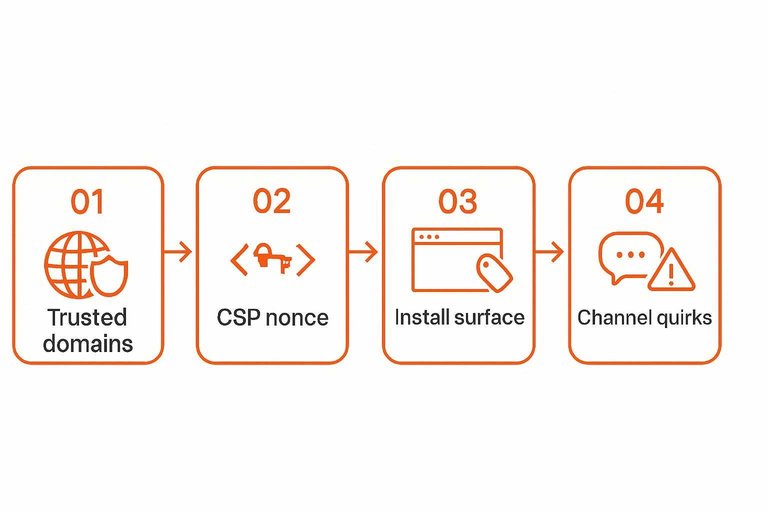
Run this checklist before you migrate anything. Most “it doesn’t load” incidents are security settings or channel rules you didn’t validate on your own stack.
-
Lock down where the widget is allowed to run
Set your Trusted domains (a security setting that restricts where a web messenger/widget is allowed to load; misconfiguration can block the widget entirely) for every hostname you’ll use: production, www/non‑www, app subdomain, and any staging domain you actually test on. Intercom Messenger, for example, won’t load if the current domain isn’t on the trusted list—and you’ll see a 403 in the browser console. -
Confirm your CSP won’t block the script
If your site uses a strict Content Security Policy, check whether it requires a CSP nonce (a per-request token that scripts must include to be allowed to run; some chat widgets require CSP-aware setup). Make sure your install method can inject the widget script in a nonce-compliant way—especially if you’re choosing a lightweight, single-script widget like Eloqra, where the simplicity depends on being able to load that snippet reliably across your stack. -
Validate the install surface (no “one-line snippet” surprises)
Decide where the snippet lives (tag manager, template, CMS “custom code” field, app shell). If you’re choosing a tool because it’s a single-script install (Eloqra’s homepage shows a one-line snippet), confirm you can place it on every page you need. -
Audit channel quirks before you promise them
Telegram is the classic gotcha. In tawk.to’s Telegram integration: group/supergroup/channel messages aren’t supported, historical messages aren’t imported, and each bot can be connected to only one property at a time. Also remember Telegram messages have a 4096-character maximum, which can break “send the whole transcript” workflows.
Best-fit alternatives
Pick the tool that matches where you reply from (phone vs dashboard), what gets metered (seats vs usage), and any hard channel/hosting constraints.
| Option | Use when | Avoid if | Concrete limitation to accept |
|---|---|---|---|
| Eloqra | You want Telegram-first replies | You need full helpdesk workflows | Requires Telegram for two-way chat |
| Help Scout (Beacon) | You want chat + help content | You need high-volume popups | Proactive Messages: 2,000 viewers included; more from $20 |
| LiveChat | You want dedicated live chat | You need built-in ticketing | Starter: 1 user, 100 tracked visitors, 60-day history; Tickets sunset 2025-01-15+ |
| tawk.to | You want a low-friction widget | You need unbranded chat | Terms forbid removing/altering branding; remove branding add-on is $39 monthly / $348 annually |
| Tidio | You plan custom integrations | You need API access on Free | OpenAPI only on Plus/Premium; Plus rate limit 60 req/min/project |
| Chatwoot Cloud | You want a modern inbox UI | You need non‑US hosting | Cloud runs on AWS servers in the US |
| HubSpot Service Hub | You already live in HubSpot | You can’t tolerate branding | Live chat on Free tools includes HubSpot branding |
If what you actually want is still a classic shared inbox that bundles channels into one place, Crisp remains the cleaner fit than these point solutions (https://crisp.chat/).
Choose your meter, then migrate safely
If you’re replacing Crisp, don’t start with feature checklists—start by picking the unit you’re willing to be billed on and the workflow you want to enforce (a conversation timeline inbox or a ticket queue where “done” is a status you can report). If the real goal is “reply from phone” simplicity, Eloqra is the cleanest fit because it routes website chat straight into Telegram so you don’t have to keep a dashboard open; if you need a full helpdesk workflow, choose a ticket-first tool instead. And if what you actually want is still an all-in-one shared inbox with a flat per-workspace price, Crisp remains the most straightforward option (https://crisp.chat/ rel=“nofollow”). Before you flip anything in production, do one short dry run: confirm trusted domains, confirm your CSP won’t block the script (including nonce requirements), verify snippet placement across every page you care about, and sanity-check channel quirks—especially Telegram bot constraints—before you promise the channel list to customers.
Frequently Asked Questions
- Do Front and Crisp solve the same problem, or is Front more of an email-style shared inbox with chat added on?
- Not quite—Crisp is centered on a messaging inbox, while Front is primarily a shared inbox for team communication with chat as one channel you can add via a website/app widget snippet.
- Is LiveChat a good Crisp alternative if I also need tickets and a shared inbox workflow?
- LiveChat is billed per user and its Starter plan includes 1 user, and its native Tickets feature was sunset on a fixed schedule in January 2025—so it’s a poor fit if your replacement decision depends on built-in ticketing.
- Is Zendesk Chat still worth switching to in 2026, or is it being phased out?
- Zendesk Chat is being removed, and Zendesk directs eligible Chat users to migrate to messaging instead.
- How is Intercom Fin priced compared to Crisp-style AI credits—what exactly counts as an “outcome”?
- Intercom Fin is priced at $0.99 per outcome, and outcomes are defined as specific resolved actions (with explicit outcome types and conditions) rather than a flat “AI access” add-on.
- Can I run HubSpot live chat without paying for seats, and what are the tradeoffs versus a Crisp alternative?
- HubSpot live chat is available in Free tools but includes HubSpot branding, and incoming conversations can only be automatically assigned to users with a paid seat (though free users can still assign/respond if they have inbox access).
Reply to chat from Telegram
Once you’ve validated the technical basics, the next bottleneck is day-to-day execution: staying responsive without another inbox tab, seat count, or workflow to babysit.
Eloqra forwards every website message to your Telegram so replies from your phone show up instantly in the on-site chat bubble. Start on the Free Forever plan.
Written by
Eloqra
Notes from the Eloqra team on collecting testimonials and building authentic social proof.
Share: