September 10, 2026
·
Updated October 4, 2026
·
8 min read
One-on-One Live Chat vs Shared Inbox: Which Fits Your Support Team?
This comparison settles whether one-on-one live chat or a shared inbox fits your support workflow — 1-on-1 live chat vs shared inbox basics, team-shape fit, the failure modes when 1:1 breaks, tool archetypes that match each model, and step-by-step implementation and migration paths.

You want customers to get quick, human answers without turning support into a second full-time job. The simplest setup routes every website message straight to you (or whoever is on), and it feels great—until more than one person needs to help.
That’s when conversations start slipping: two people reply to the same thread, nobody replies because everyone thought “someone else has it,” and you lose the private context you need to hand off cleanly. This guide helps you choose between direct 1:1 routing and a shared inbox based on your team shape, message volume, and collaboration needs—and shows how to switch without breaking your support flow.
Define the workflows
1-on-1 live chat
1-on-1 live chat (for support) is a website chat experience where each visitor conversation is handled as a direct thread with a single operator at a time—even if your company has multiple operators overall.
The workflow is simple: a message comes in, one person replies, and that same person “owns” the next move until the conversation ends or is explicitly handed off. Founders like this model because it’s fast and lightweight. It keeps you out of a ticket-queue mindset, and it makes response time feel like a personal back-and-forth instead of “your request has been received.”
The trade-off is that the simplicity comes from implicit coordination. If the wrong person is unavailable, or if context lives in someone’s head, the workflow doesn’t have many built-in ways to reroute work without dropping speed.
Shared inbox basics
A shared inbox is a team workspace where multiple people can see, assign, and collaborate on the same customer conversations (often across multiple channels like email + chat). In Help Scout’s framing, it can scale to “more than 50” people working in the same inbox, and it highlights team collaboration via internal notes that customers can’t see.
This is where the comparison gets real: you’re not choosing whether a chat bubble exists. You’re choosing whether “who owns this?” is always obvious.
A common hybrid is: live chat is just one channel inside the shared inbox. Front, for example, defines a channel broadly—an email address, SMS number, social handle, and even a live chat client—all flowing into the same team inbox. The customer still experiences a clean 1:1-style conversation, but your team operates with shared visibility and shared controls behind the scenes.
That’s the line to watch: customer experience can feel 1:1 while your internal workflow is unmistakably multi-person.
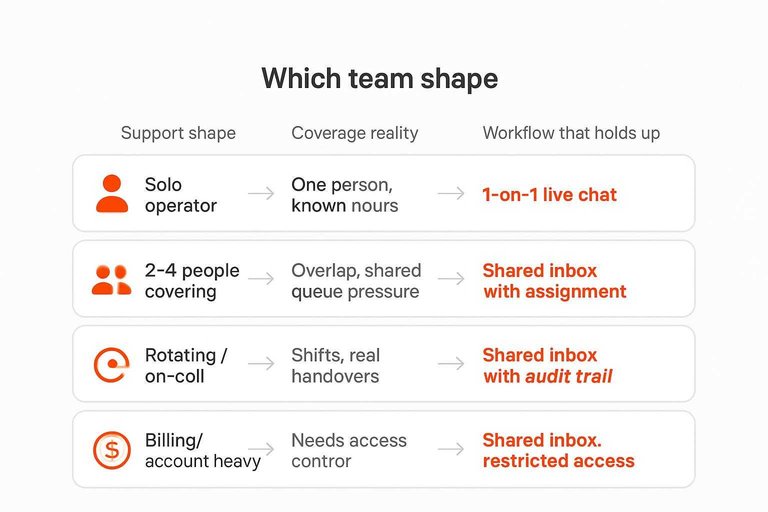
Which team shape
Before you compare chat widgets and inbox suites, name your support shape: how many people can touch the same customer thread, and how often you hand work off. That coverage reality is what determines whether 1 on 1 live chat stays clean or turns into coordination.
One tell is baked into pricing: LiveChat’s Starter plan only allows one user, while Crisp’s Mini is priced per workspace and includes 4 seats ($45/month per workspace). Tools price the workflow they expect.
| Support shape | Coverage reality | Message types that dominate | Workflow that holds up |
|---|---|---|---|
| Solo operator | One person, known hours | Pre-sales, quick “how do I…” | 1-on-1 live chat |
| 2–4 people covering | Overlap, shared queue pressure | Pre-sales + product questions | Shared inbox with assignment |
| Rotating / on-call | Shifts, real handovers | Incident support, escalations | Shared inbox with audit trail |
| Agency, multi-site | Many sites, many stakeholders | Pre-sales + account/billing per client | Shared inbox per site/client |
| Billing/account heavy | Needs access control | Refunds, invoices, identity checks | Shared inbox, restricted access |
If more than one person can reply, you’re no longer buying a chat bubble—you’re buying guardrails like collision detection (blocking a send if someone else added a newer reply or note).
When 1:1 breaks
1 on 1 live chat stays clean as long as “who’s handling this?” is always obvious. The moment two people can reply, you start paying a coordination tax—usually before you notice it.
The first failure mode is double replies. Two teammates see the same customer message, both start typing, and the customer gets overlapping answers. Good tools add collision detection—a guardrail that prevents two teammates from accidentally sending overlapping replies on the same conversation—by stopping a send if a newer reply or note was added that you haven’t seen.
The second is the quieter one: silent drops. Everyone assumes “someone else got it,” so nobody sends the next message. That’s an ownership problem, not a tone problem. You fix it with assignment / owner—the mechanism that makes one person responsible for the next action on a conversation (even if others can view it)—plus routing rules that decide who gets what, on purpose.
The third is context trapped in heads. In 1:1, you can remember the backstory. In a team, that backstory needs a place to live. That’s what internal notes are for: private comments inside a conversation that teammates can see but the customer can’t.
If you’re seeing any two of these—duplicates, drops, or “wait, what did we tell them?”—you’re already doing shared-inbox work without shared-inbox primitives.
Tripwire checklist: when to switch from 1:1 routing to shared-inbox controls
Use this as a hard “switch point” checklist. The moment you answer yes to any item, you’re no longer running clean 1 on 1 live chat—you’re doing team coordination, and you need shared-inbox primitives.
- Two people can reply to the same thread (even “just in case” coverage). You need collision detection so the product—not memory—prevents double replies.
- You ever ask “who’s on this?” or you forward screenshots/links to coordinate. You need assignment / owner so one person is responsible for the next action.
- A customer waits because everyone assumed someone else replied. You need assignment plus routing rules that intentionally decide where new conversations land.
- You need to hand off mid-conversation (shift change, escalation, vacations) without re-reading the whole thread. You need internal notes to store the “why” behind the last answer.
- More than one person needs to read before you send (pricing exceptions, refunds, policy calls). You need internal notes (and an owner) so review happens inside the conversation, not in side chats.
If you’re repeatedly doing any of the above with a separate chat app thread (“I’ll take it”) or a spreadsheet (“assigned to…”), that’s your cue: keep the customer experience 1:1 if you want—but move the operator workflow to a shared inbox.
Tool archetypes match
The useful split isn’t “chat vs inbox.” It’s (1) whether each conversation routes to one accountable person or lands in a team workspace, and (2) what the vendor actually charges for: seats, a workspace, API/automation limits, or resolved outcomes.
| Archetype | Use when… | Avoid when… | Pricing-model implications (with examples) |
|---|---|---|---|
| Direct-to-messenger 1:1 routing | You want replies from a phone app, fast | You need helpdesk-style controls and auditing | Ops cost is “stay in one app,” not “manage a dashboard.” Example: Eloqra forwards every visitor message into Telegram; its operator console runs as a Telegram Mini App, so you don’t need a browser open, and it uses a single ~5kb script snippet to install. |
| Per-workspace shared inbox suite | You’re staffing an inbox, not individuals | You only need one responder and want per-seat minimalism | Expect a flat workspace price that doesn’t rise with conversation volume. Example: Crisp explicitly prices per workspace (a flat price regardless of monthly conversations), and its Slack + Telegram integrations are available from the Mini plan. |
| Per-seat live chat / helpdesk | Headcount is the main scaling lever | You’ll add people quickly and hate seat math | Cost tracks agents. Example: LiveChat Starter is $19 per user/month (billed annually) and includes hard caps like tracking up to 100 visitors and 60-day chat history. |
| API-gated platform | You’ll automate routing/integrations via an API (application programming interface) | You need high-throughput automation without buying up | “Automation capacity” is tier-shaped. Example: Tidio OpenAPI rate limits are 60 requests/minute per project on Plus and 120 requests/minute per project on Premium. |
| Metered AI automation add-on | You want to pay for resolved work, not seats | You require fully predictable monthly spend | You’re buying outcomes. Example: Intercom’s Fin AI Agent is priced at 0.99 USD per resolution outcome. |
Use the archetype to predict your next pricing shock: adding another responder hits per-seat plans immediately, adding another client/site tends to favor per-workspace setups, and adding routing/integrations pushes you into API/automation tiers.

Implement and migrate
-
Pick your rollout direction, then freeze the customer experience. Decide what the visitor should feel: a single continuous 1 on 1 live chat thread. Keep that stable while you change the internal workflow behind it.
-
If you start with 1:1, add controls before you add people. Keep one named owner per conversation. The moment you schedule backup coverage, move the same chat channel into a shared inbox and turn on assignment and collision detection so “someone else will answer” can’t happen silently.
-
If you start with a shared inbox, force a 1:1 feel by default. Auto-assign every new chat to one person immediately, and treat internal notes as the only place for side discussions. Customers should see one voice, even when the team is collaborating.
-
Prevent “it doesn’t load”: lock down embeds deliberately. If you use Intercom, configure Trusted Domains—an allowlist of domains where the Intercom Messenger is permitted to appear; misconfiguration can prevent the widget from loading—and make sure every real host you use is on that list (production and any other customer-facing domain).
-
Prevent “we leaked identity”: keep anonymous snippets anonymous. Intercom’s logged-out visitor install guidance is explicit: don’t include
user_id,email, oruser_hashin that snippet—only theapp_id—and place the JavaScript snippet immediately before</body>. -
Set a privacy boundary if chats route into Telegram. Telegram’s regular cloud chats use client-server encryption (MTProto), while Secret Chats are end-to-end encrypted; treat anything sensitive as “not for cloud chat” and route it into a system with the access controls you need.
Choose ownership, then add guardrails
Make the decision based on one thing: whether every conversation can have a single, obvious owner from first reply to close. If that’s true, keep the direct 1:1 workflow and optimize for speed—routing chats straight to the accountable responder (for example, into the messaging app you already live in) is the simplest way to stay responsive without living in a dashboard. The moment more than one person can touch the same thread, stop relying on implicit coordination and move the chat channel into a shared inbox so assignment, internal notes, and collision detection prevent double replies, silent drops, and lost context. Whatever tooling you pick, freeze the customer experience as one continuous 1:1 conversation—and change the internal workflow behind it.
Frequently Asked Questions
- Do I need to keep a support dashboard open for 1 on 1 live chat?
- No—if your 1 on 1 live chat routes messages into a messenger you already use, you can reply without a dashboard open. For example, Eloqra forwards website chats to Telegram and states the dashboard is only for configuration, not for day-to-day replying.
- How do I stop two teammates from replying to the same 1 on 1 live chat message?
- Use collision detection plus explicit ownership so only one person is responsible for the next reply. Collision Detection blocks sending if a newer reply or internal note was added, which prevents duplicate replies when multiple people are watching the same thread.
- Is 1 on 1 live chat the same thing as a shared inbox chat channel (like Help Scout Beacon)?
- Not quite: 1 on 1 live chat describes the customer-facing conversation style, while a shared inbox describes the internal workflow where the whole team can view, assign, and collaborate. Tools like Help Scout Beacon can deliver a 1:1-feeling chat to customers while the team works it inside an inbox.
- If I route 1 on 1 live chat into Telegram, is it secure enough for billing or identity issues?
- Telegram’s regular cloud chats use client-server encryption (MTProto), while Secret Chats are end-to-end encrypted. Treat sensitive billing/identity details as “not for cloud chat” and route them into a system with the access controls and audit trail you need.
- How fast can I add 1 on 1 live chat to my website without a build step?
- If your tool only needs a single script snippet, you can ship it as a simple embed instead of a backend project. Eloqra claims “Live in 30 seconds” for its one-snippet install.
Run 1:1 Chat From Telegram
Once you’ve committed to single-owner conversations, the bottleneck is operational: staying fast without forcing your team to live inside another support dashboard.
Eloqra forwards every visitor message straight to your Telegram, so you can reply from your phone while keeping the on-site chat bubble continuous. Start with the Free Forever plan.
Written by
Eloqra
Notes from the Eloqra team on collecting testimonials and building authentic social proof.
Share: