September 14, 2026
·
Updated October 1, 2026
·
9 min read
Live Chat vs Email: Which Is Better for Fast Customer Replies?
A practical comparison that settles whether live chat or email is better for fast customer replies — what a website chat message is (and what it isn’t), benchmarks for “fast,” where live chat breaks down, how to run a truly fast email workflow, an asynchronous messaging bridge, and a winner-by-criterion decision with implementation picks.

You want customers to hear back quickly after they ask a question on your site, but you don’t have a staffed support desk sitting online all day. The obvious move—adding a chat bubble or pushing everyone to email—can backfire if it trains people to expect a reply you can’t reliably deliver.
Get it wrong and you’ll lose leads, rack up “are you there?” follow-ups, and turn simple questions into long back-and-forth threads. This comparison gives you concrete speed benchmarks, the common failure modes of each channel, and a hybrid “message us” pattern that keeps replies feeling fast even when you’re offline.
Chat message, clarified
What it means
A chat message is a single note a visitor sends through the on-site chat widget on your website (the little chat bubble), not a message inside a team chat app. They open it by clicking the bubble, typing into the message box, and hitting send—then your support workflow needs to route that message to a human fast enough to match chat expectations.
“Fast” on chat usually means two different moments: an acknowledgement (any sign a real person is there) versus the actual resolution (the fix). In an Aircall survey of 750 online shoppers, 96% expected a response within five minutes after starting a website chat, 80% wanted a reply within two minutes, and “almost half (49%)” said they’d navigate away if they didn’t see anyone typing within one minute. HubSpot’s 2020 Customer Expectations Report puts that minute-level pressure into bands: 11% expect a reply in under 20 seconds, 35% in 20 seconds–1 minute, 31% in 1–3 minutes, and 13% in 3–5 minutes.
That’s why chat targets start in seconds and minutes, not hours.
If you meant Google
If you were looking for your Google Chat messages, they live in Google Chat (in the Gmail left sidebar under “Chat,” or at chat.google.com, and in the Google Chat mobile app). Open a direct message or Space, then type and send.
That’s a separate world from an on-site support chat message, which is what the rest of this article compares against email reply expectations (for example, Aircall reports 94% of shoppers want an email response within 24 hours).
Benchmarks for “fast”
First response time (First response time) (FRT)—the time from a customer’s first chat message to the first agent reply—is the headline “speed” KPI for both live chat and email. But you still need to separate acknowledgement vs resolution: a fast first reply reassures the customer, while the actual fix can take longer. If you treat those as the same thing, you end up with “fast but unhelpful” support.
On chat, acknowledgement is often the moment the customer stops feeling alone (they’re connected, someone is typing, the queue is moving). Aircall’s 2019 shopper study reports that 96% expect a response within five minutes of initiating website chat, 80% want an answer within two minutes, and 49% would navigate away if they didn’t see anyone typing within one minute (Aircall). HubSpot’s 2020 Customer Expectations Report also shows how compressed chat expectations are: 11% expect a response in under 20 seconds, 35% in 20 seconds–1 minute, 31% in 1–3 minutes, and 13% in 3–5 minutes (HubSpot PDF).
On email, acknowledgement is usually the first human touch or a clear promised timeframe. In the same Aircall study, 94% said they want an email response within 24 hours, with 48% expecting a response within 6 hours and 15% within 60 minutes (Aircall). That gap—minutes for chat, hours for email—is why reply expectations (telling users how long you’ll take to respond, or showing a wait estimate) matter as much as the raw timer.
| Moment you’re being judged on | Live chat expectation bands (minutes/seconds) | Email expectation bands (minutes/hours) |
|---|---|---|
| Acknowledgement / “did anyone see my chat message?” | Under 1 minute is the critical window for “someone is there”: nearly half said they’d navigate away if they didn’t see anyone typing within 1 minute (Aircall). Separately, Zendesk notes satisfaction drops after 30 seconds of waiting (Zendesk). | For email, expectations start in hours, not seconds: 15% expect a response within 60 minutes, and 48% within 6 hours (Aircall). |
| First human reply (FRT) | If you’re aiming to match what customers say they want: within 2 minutes for the majority of “within 5 minutes” chat-expecters (80% within 2 minutes), and within 5 minutes for 96% overall (Aircall). Real-world benchmarks show what’s typical at scale: 35 seconds global average first response time (LiveChat), and 44.6 seconds average response time during an active conversation (Comm100). | If you’re aiming to match stated expectations: within 60 minutes for the 15% who want that, within 6 hours for 48%, and within 24 hours for 94% (Aircall). A separate benchmark study found 57% of consumers expect an email response in an hour, while 10% met that timeframe; it also reported an overall average email response time of 1 day 23 hours 38 minutes (insurance context) (Eptica/Enghouse Interactive PDF). |
| What “good” looks like at scale | “Speed-to-answer” leader vs average: 1.0 minute (leaders) vs 8.6 minutes (average) for web chat (NTT Ltd.). Queue waiting time is a separate reality check: 4 minutes 18 seconds global average queue waiting time (LiveChat). | “Speed-to-answer” leader vs average: 30.0 minutes (leaders) vs 108.6 minutes (average) for email/online form (NTT Ltd.). |
| Queue/dropout benchmarks (the “missed chat” reality) | Queue dropout rate: 27.4% global average (customers who left the queue before being served) (LiveChat). Pair that with queue waiting time (4 minutes 18 seconds global average) to sanity-check your staffing and hours (LiveChat). | Email doesn’t have the same “queue dropout” mechanic in these benchmark sets, so you won’t see a comparable abandonment rate reported here. |
Use the bands above to set targets founders can actually operationalize:
- If you call it “live chat,” build around minute-level acknowledgement. Aircall’s 1-minute “typing” threshold and the HubSpot distribution (20 seconds–1 minute, then 1–3 minutes) are the reality your chat message is being judged against (Aircall, HubSpot PDF).
- Treat queue time as its own KPI (not a footnote). LiveChat reports 4 minutes 18 seconds average queue waiting time and 27.4% queue dropout rate (LiveChat). If your queue time creeps into minutes, you’re not just “slower”—you’re training visitors to leave.
- For email, pick an “honest” hour-band and publish it. Aircall’s expectations ladder (60 minutes / 6 hours / 24 hours) gives you clear tiers for what to promise and measure (Aircall).
Once you’ve picked a tier you can operate in, publish that expectation in the UI and measure against it—especially on chat, where waiting becomes abandonment fast (see the LiveChat customer service report for benchmark definitions and ranges).
Live chat: when it fails
Live chat breaks for small teams when you promise “instant” but operate like email: you’re busy, a chat message lands, and the visitor ends up waiting in a queue. NTT Ltd.’s 2020 benchmarking report puts average web chat speed-to-answer at 8.6 minutes (vs 1.0 minute for leaders)—and if your operation looks closer to “minutes,” you’re no longer meeting what people mean by “live.”
The two metrics that make this visible are queue waiting time (the time a customer waits before an agent accepts/reaches them) and queue dropout rate (the percent who abandon before getting served). When queue waiting time climbs into minutes, dropout becomes your real “missed chat” count.
-
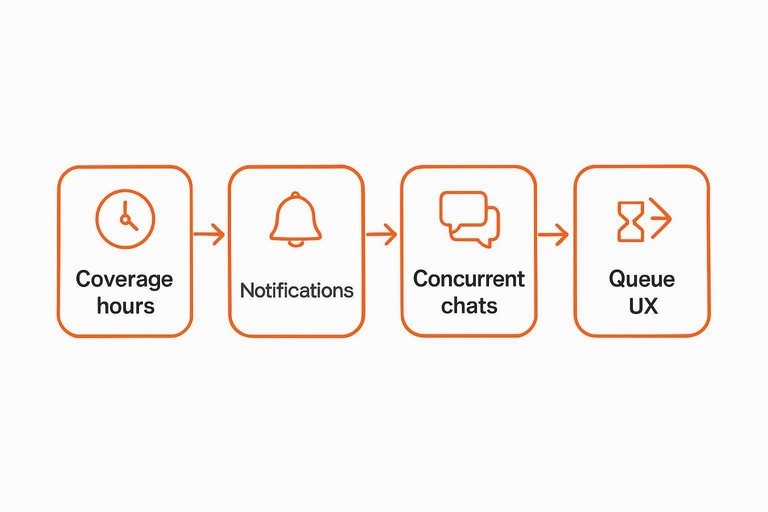
Set (and enforce) real coverage hours in the widget. If you’re not reliably online, don’t imply you are. Use wording like “message our team,” and state a reply-time expectation so visitors don’t sit there sending “are you there??” follow-ups.
-
Make notifications impossible to miss. Route alerts to where you already are (phone lock screen, desktop, on-call rotation). Live chat fails in the gap between “message received” and “human saw it.”
-
Cap concurrent chats before quality collapses. Concurrent chats means how many conversations one agent handles at once; raising it boosts throughput but creates response gaps inside each thread. Routing systems can technically be set much higher (for example, Zendesk’s Chat API example shows a per-agent chat limit of 7), but higher limits make “live” feel like silence to the customer.
-
Design the queue UX to prevent dead-ends. Show a clear wait expectation, and give an off-ramp (leave an email, book a time) before the visitor has already waited and decided to leave.
-
Switch channels when the chat is getting long. If the thread stops being a quick, back-and-forth fix, move to an async handoff (email follow-up, scheduled call) instead of trapping the visitor in a slow “live” experience.
If you can’t staff minute-level acknowledgement during stated hours without overloading agents, live chat will produce more abandonment than speed.
Email: the fast version
Email feels “fast” when you treat it like a queue, not like a back-and-forth conversation. The advantage for a small team is that you can batch and triage without creating the minute-level pressure a live chat message creates. In NTT Ltd.’s 2020 benchmarking report, email/online form speed-to-answer is 108.6 minutes on average vs 30.0 minutes for leaders—email can absolutely be “fast,” but it only happens when you run it deliberately.
-
Batching: answer in blocks, not drips. Reserve dedicated “inbox blocks” and clear the oldest high-impact threads first (billing, access, outages), instead of context-switching all day.
-
Triage: sort before you solve. First pass is just: identify the issue type, ask for missing info once, and park anything that needs engineering. That single pass prevents the “five emails to get the screenshot” loop.
-
Use a shared inbox—a system where multiple channels (chat, email, social) feed into one queue so you don’t lose context or miss messages—and keep one owner per thread. “Everyone saw it” is how nothing gets answered.
-
Publish an expectation window in hours. Don’t imply you’re live; say what you will do (“We reply within 4 business hours” / “by end of day”), then meet it consistently.
-
Make the first reply do real work. A large-scale analysis of 170,000+ customer-service chat sessions found conversation sentiment was more predictive of perceived satisfaction than session metadata like response time—so the first email reply should be clear and useful (restate the problem, ask for what you need, and give the next step + timeframe), not just quick.
Async messaging bridge
Asynchronous messaging—chat that doesn’t require you and the customer to be online at the same time—lets your chat UI behave like email after hours, while still feeling like chat in the moment.
How to run the hybrid (solo-founder friendly):
- Offer “Message us,” not “Live.” Treat every chat message as a thread that can continue later, so you’re never implicitly promising instant presence.
- Capture an email up front. Use a pre-chat form (a short form shown before chat starts to collect info like name/email) so you can follow up if the visitor closes the tab.
- Bridge the gap with email notifications. LiveChat’s “messaging mode” is an example of this pattern: visitors can start a chat while agents are offline, you can reply after they’ve left, and the visitor can read and respond via email after providing (and verifying) an email address.
- Set a clear off-hours expectation in the widget. Give a real timeframe you can meet, so “fast” means “acknowledged now, handled next.”
- Work the queue like email, but reply into the same thread. You keep context in one place instead of splitting the story across channels.
If you can’t staff minute-level coverage, this is the cleanest way to stop pretending you’re 24/7 while still catching every chat message.
Decision and recommendation
Winner by criterion
| Criterion | Live chat | Winner | |
|---|---|---|---|
| Speed expectation | Minute-level pressure | Hour-level window | Live chat |
| Abandonment risk | Higher if you miss | Lower while waiting | |
| Staffing burden | Interrupt-driven | Batchable queue | |
| Context needed | Best for quick fixes | Better for detail | |
| Follow-up continuity | Tab closes = risk | Thread persists |
Implementation picks
- Ship live chat (Eloqra) if you can truly acknowledge in 1–2 minutes during stated hours. Eloqra is a website chat widget that routes each chat message to Telegram, so you can reply from your phone without camping in a support dashboard. It’s positioned as a single ~5kb script install, and it’s “free while we’re in early access — no credit card to start.”
- Ship email-first (or an async “message us” widget) if you can’t. Set the widget copy to “message us” (not “live”), collect an email up front, and run it like an inbox so you never create a dead wait.
Your “ship this week” decision is simple: if you can protect a real 1–2 minute acknowledgement SLA during the hours you display, ship live chat; otherwise ship email-first.
What to measure next: time to first human reply, split by in-hours vs off-hours, and the share of new messages acknowledged inside 2 minutes.
Pick the promise you can keep
If you can reliably acknowledge new chat messages in 1–2 minutes during the hours you show, live chat is the right tool—because that’s the speed visitors assume when they click a chat bubble. If you can’t protect that, don’t ship “live” and hope: run email-first, or use a “message us” chat that captures an email up front so the thread can continue after they leave. Your first move this week is to choose one promise (minute-level chat acknowledgement or an hour-level email window), publish it in the UI, and track time to first human reply split by in-hours vs off-hours. If you do choose chat, route alerts to where you already are—so the gap isn’t your staffing, it’s that you simply didn’t see the message.
Frequently Asked Questions
- Is a chat message the same thing as a support ticket or an email thread?
- Not quite—a chat message is a real-time (or near real-time) message sent inside a website chat widget, while a ticket/email thread is an asynchronous queue designed for longer, back-and-forth updates. If you treat chat like a ticket queue without setting expectations, customers experience it as “silent live chat.”
- Do faster chat message replies automatically increase customer satisfaction?
- No—an analysis of 170,000+ customer-service chat sessions found sentiment in the conversation was more predictive of perceived satisfaction than session metadata like response time. Optimize for a fast first reply, but make the first answer clear, useful, and action-oriented.
- Can I reply to a chat message after the visitor leaves my site?
- Yes—asynchronous messaging modes let agents send messages after the visitor leaves, and the customer can read and reply later either when they return on-site or via email after providing (and verifying) an email address. This keeps the same conversation thread instead of forcing a restart.
- How many concurrent chat message threads should one agent handle at once?
- Set a hard concurrency cap and enforce it, because high concurrency creates long gaps inside each thread that feel like being ignored. If you need a concrete starting point, Zendesk’s Chat API documentation example shows a per-agent chat limit of 7—then tune down if replies start stalling.
- What’s the simplest way to make sure I don’t miss a new chat message when I’m not in a helpdesk dashboard?
- Route chat messages to the tool you already check constantly so notifications are unavoidable—on a small team, that often means your phone. Eloqra does this by forwarding every website chat message to Telegram, so you can reply from Telegram and keep the conversation in the site widget.
See Every Chat Message Fast
Once you’ve set your reply promise, the next bottleneck is simply noticing new chat messages while you’re busy elsewhere—especially off-hours and between tabs.
Eloqra forwards every visitor message straight to your Telegram, so you can reply from your phone with visitor context—no support dashboard left open. It’s Free Forever.
Written by
Eloqra
Notes from the Eloqra team on collecting testimonials and building authentic social proof.
Share: