October 14, 2026
·
9 min read
9 Live Chat CTA Phrases Worth Testing in 2026
Nine chat CTAs—from “I want to chat” to “Chat with Sales” and “Leave us a message”—plus where to use each and how to test them.

You’ve added a chat bubble to your site, but the words on it feel like a guess. “Chat now” can pull in the wrong people, set “live” expectations you can’t meet, or interrupt visitors who were ready to buy without talking. Get it wrong and you burn time, miss qualified leads, and create tiny trust breaks right where decisions happen.
This collection maps the main CTA copy surfaces—launcher label, expanded bubble text, inside-widget prompts, and offline states—then gives nine ready-to-test phrases grouped by intent (support, sales, leave-a-message, AI-first). You’ll also get a minimal test plan so you measure conversations, not just widget opens.
What “chat” means
In this article, “I want to chat” isn’t about social chat rooms, messaging apps, or dating. If you want an app for chatting with friends, you’re choosing a messenger. If you’re trying to chat someone up online, you’re in the world of social and dating dynamics. Here, “chat” means the on-site live chat entry point: the small piece of UI on your website that invites a visitor to start a conversation with your team.
That’s why the exact wording matters. This kind of CTA microcopy (the few words on a label, button, or prompt) doesn’t just “sound nicer” — it sets expectations: who’s on the other end, what the chat is for (support vs sales), and whether a real person is actually available right now.
The easiest way to break trust is to promise “live” when you aren’t. Zendesk’s Web Widget (Classic) bakes this expectation management into its default contact option texts: it uses “Live chat” when an agent is online, but switches to “Chat is unavailable” and “Leave us a message” when nobody is there to respond in real time. It even shows how teams swap in alternatives like “Message us,” “Make a request,” or “Get help” (Advanced customization of Web Widget (Classic)).
Get the promise right first. Then testing different “I want to chat” variants becomes conversion work, not just wordsmithing.
CTA copy surfaces
If you’re testing “I want to chat” copy, don’t treat it like there’s one magical button. Real chat widgets have multiple editable text surfaces, and visitors see different ones depending on state (closed, minimized, expanded, online, offline, or proactively prompted). When someone asks “How do I open up my chat?”, the practical answer is: make sure the launcher opens the widget—and, if you want chat to open from another page element (like a “Chat with Sales” link), some platforms expose an open action you can trigger on click (for example, HubSpot’s widget can be opened via window.hubspot.messages.EXPERIMENTAL_API.requestWidgetOpen()).
Launcher text options
The launcher (the on-page button visitors click to open the chat widget) is the obvious CTA surface—but it’s rarely just an icon.
Many tools let you add a minimized label: Tidio calls this a “button label,” a short message shown next to the icon while the widget is closed. That label is prime real estate for your test phrase because it’s seen before any click.
Some tools also support an expanded bubble (a wider launcher style that shows CTA text next to the icon). Chatwoot’s widget customization shows this pattern with text like “Chat with us,” which makes the CTA readable without hovering or guessing what the icon does.
A different twist is an AI-style launcher: KnowledgeOwl’s AI chatbot setup defaults the launcher button to a speech bubble icon followed by “Ask a question…”. That’s still CTA microcopy—it just frames the action as asking, not chatting.
Inside-widget prompts
Once the widget opens, your “CTA” keeps going.
Conversation starters (prewritten tappable options inside the widget that send a first message) are a second CTA layer. Tidio lets you enable up to five starters at a time, which means you can test a single “I want to chat” launcher while rotating the actual first-message options.
Proactive chat (a site-initiated prompt shown by rules like time-on-page or URL) is another surface. Chatwoot shows a pricing-page proactive message—“Have questions about our plans? I’m here to help!”—triggered after 15 seconds on /pricing.
If you use a pre-chat form (fields like name/email before the conversation starts), remember the copy on its submit button and the “why we ask” line are CTAs too. Zendesk’s proactive chat docs warn that proactive triggers can bypass the pre-chat form requirement, so your proactive message may become the real gatekeeper.
Finally, plan offline mode/offline message text (when no agent is available and the UI should collect a message). Otherwise your best “I want to chat” variant turns into a promise you can’t keep.
9 CTAs to test
You’ll get cleaner results if you pick CTAs that match two things: the visitor’s intent on that page (support, buying, or “I’m stuck”) and your actual availability (someone can reply now vs you need to capture a message). In practice, that means picking from the right rows: question-led/support (“Help”, “Ask a question…”), sales-led (“Chat with Sales”), or offline/reset (“Leave us a message”, “Chat is unavailable”) instead of treating every page like it needs the same “chat now” prompt.
Searchers ask “Is it chat with or chat to?” Pick the phrasing that matches the English you use elsewhere on the site, then keep it consistent across surfaces. You’ll learn more when your A/B test is changing intent and expectations—not accidentally changing voice.
CTA phrase table
Use this to choose 2–3 phrases that fit the page you’re editing (docs, pricing, checkout) instead of pasting a generic “Chat now.”
| Phrase | Intent | Best surface | Best page | Availability fit | What breaks |
|---|---|---|---|---|---|
| Chat | Generic entry | Launcher label | Any | Agent online | Feels “live” when offline |
| I want to chat | First-person, user-led | Launcher label | Docs, pricing | Agent online | Not staffed; wrong tone |
| Help | Support, urgent | Launcher label | Docs, errors | Agent online | Too vague for sales |
| Ask a question… | AI-first, question-led | Launcher label | Docs, help | Online or async | Sounds bot-only |
| Make a request | Ticket-style support | In-widget starter | Account, support | Async OK | Overkill for quick questions |
| Chat with Sales | Sales-led | Pricing CTA link | Pricing | Sales hours | Goes to support queue |
| Message us | Reassurance-led | Launcher label | Checkout, pricing | Async OK | Under-sells live help |
| Leave us a message | Offline capture | Offline state | Any | Offline | Frustrates if agents are online |
| Chat is unavailable | Expectation reset | Offline state | Any | Offline | Kills intent if inaccurate |
If you’re unsure what to start with: docs pages usually start well with “Ask a question…”, pricing pages with “Chat with Sales”, and checkout pages with “Message us” (so the copy still works if you’re not staffed 24/7).
CTA phrase table
Use this to choose 2–3 phrases that fit the page you’re editing (docs, pricing, checkout) instead of pasting a generic “Chat now.”
| Phrase | Intent | Best surface | Best page | Availability fit | What breaks |
|---|---|---|---|---|---|
| Chat | Generic entry | Launcher label | Any | Agent online | Feels “live” when offline |
| I want to chat | First-person, user-led | Launcher label | Docs, pricing | Agent online | Not staffed; wrong tone |
| Help | Support, urgent | Launcher label | Docs, errors | Agent online | Too vague for sales |
| Ask a question… | AI-first, question-led | Launcher label | Docs, help | Online or async | Sounds bot-only |
| Make a request | Ticket-style support | In-widget starter | Account, support | Async OK | Overkill for quick questions |
| Chat with Sales | Sales-led | Pricing CTA link | Pricing | Sales hours | Goes to support queue |
| Message us | Reassurance-led | Launcher label | Checkout, pricing | Async OK | Under-sells live help |
| Leave us a message | Offline capture | Offline state | Any | Offline | Frustrates if agents are online |
| Chat is unavailable | Expectation reset | Offline state | Any | Offline | Kills intent if inaccurate |
Why “worth testing”
Proactive: love/hate
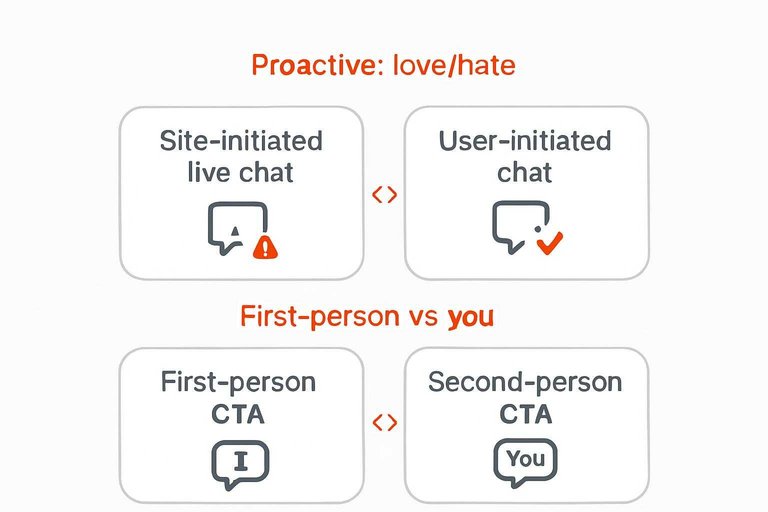
“Worth testing” starts with admitting that some chat CTAs are polarizing by design. Baymard Institute, based on large-scale e-commerce usability testing, argues that site-initiated live chat is generally perceived as an annoying interruption—and that chat is more likely to be seen as helpful when it’s user-initiated and placed where people expect it (like the footer, header, or a help section) (live chat usability issues).
But “people hate it” isn’t the whole story. Forrester reported that 27% of online consumers agreed with: “I like having an instant messaging/online chat box appear and ask if I need help with my online research or purchase.”
Put those together and you get a practical rule: treat proactive prompts as a targeted experiment, not a site-wide default. Keep them confined to places where a help interaction is already expected, and judge them by whether they create real conversations without creating backlash.
First-person vs you
The phrase “I want to chat” is a first-person CTA (it puts the action in the visitor’s voice). Alternatives like “Chat with us” are second-person/imperative (they address the visitor as “you” or tell them what to do). Which one wins isn’t stable.
Unbounce has published results that swing hard in both directions. In one A/B test, changing “Start your free 30 day trial” to “Start my free 30 day trial” increased click-through rate by 90% after three weeks. In a separate failed-test writeup, Unbounce reports a payment-page CTA treatment using “Your” performed 24.95% worse than a control using “My.”
That’s why “I want to chat” belongs in your test set: it’s a plausible winner, and a plausible loser. Don’t assume—run the experiment.
Minimal testing plan
Treat chat CTA tests like funnel tests: an “open” is not a conversation.
-
Pick one surface, lock the rest. Test one text location at a time (launcher label or an in-widget prompt), and keep timing rules, targeting, colors, and placement unchanged.
-
Define three success metrics (in order).
- Click-to-open rate: visitors who open the widget after seeing the CTA.
- First-message send rate: visitors who actually send a message after opening.
- Qualified outcomes: conversations that reach your real goal (e.g., booked demo, resolved support issue, captured lead).
-
Segment proactive vs user-initiated. If you use proactive prompts, report them separately. Zendesk documents that proactive-triggered chats can bypass the pre-chat form requirement—meaning chats may start without name/email—so your “better CTA” might just be a different gate.
-
Audit pre-chat form bypass. For each variant, check the share of conversations missing required fields before you declare a winner.
-
Don’t promise “live” when offline. If staffing isn’t guaranteed, keep the CTA wording compatible with an offline flow before you optimize anything else.
Make your chat promise true
The best chat CTA isn’t the cleverest—it’s the one that correctly signals what the visitor will get on this page, in this moment (support, sales, or a message when you’re offline). Pick 2–3 phrases that match the page’s intent, apply them to one specific surface (launcher label or an in-widget prompt), and judge the winner by first messages and qualified outcomes—not just widget opens. Keep proactive prompts constrained and audited, and make sure your offline state copy resets expectations instead of accidentally promising “live.” If you want to move fast as a small team, a lightweight widget like Eloqra makes these copy tests easier to run because replies land in Telegram; if you need a full helpdesk suite with deeper workflows, use a tool built for that and focus your testing on expectation-setting across every state.
Frequently Asked Questions
- Is “I want to chat” better than “Chat with us” for a live chat CTA in 2026?
- Neither is universally better—first-person CTAs like “I want to chat” and second-person CTAs like “Chat with us” can swing in either direction, so treat “i want to chat” as a test variant, not a default.
- Are proactive live chat popups still annoying, or do people actually like them?
- Both can be true: proactive chat invitations are widely perceived as interruptive, but Forrester has reported that 27% of online consumers agreed they like having an instant messaging/chat box appear and ask if they need help—so keep proactive chat as a targeted experiment, not a site-wide default.
- How many proactive chat triggers should I run at once?
- Start with one proactive trigger so you can attribute outcomes to a single rule; even Zendesk Chat’s Basic plans cap proactive triggers at 2, which is a practical upper bound for keeping tests interpretable.
- If my site isn’t in English, should I translate “i want to chat” or use a different CTA per language?
- Use a CTA written for each locale (not a literal translation) so the intent stays clear; Eloqra lets you choose 1 of 10 widget UI languages per project (English, German, French, Spanish, Italian, Portuguese, Polish, Dutch, Ukrainian, Russian).
- What visitor context should I capture so “i want to chat” conversations don’t start cold?
- At minimum, capture the page they’re on plus basic device/browser and location signals so you can reply with relevant context; Eloqra forwards messages with context including page, device, browser, and country.
Run Chat Copy Tests Faster
Once you’ve picked phrases that match intent and availability, the bottleneck is execution: changing the right widget surface, staying responsive, and capturing enough real conversations to judge outcomes.
Eloqra sends every visitor message straight to your Telegram, so you can ship CTA variants and reply from your phone without living in a support dashboard. Keep it simple with the Free Forever plan.
Written by
Eloqra
Notes from the Eloqra team on collecting testimonials and building authentic social proof.
Share: