September 2, 2026
·
Updated October 18, 2026
·
10 min read
9 Best Intercom Alternatives in 2026, Ranked by Setup Speed
A setup-speed case study that puts “best Intercom alternative” lists on a stopwatch — setup speed checkpoints, hidden gates like CSP and trusted domains, a Friday launch story, and a ranked table of tools by the steps that actually block first reply.


You’re trying to add a chat bubble to your site and be ready to answer customers today—not after a weekend of “why isn’t it showing up?” debugging.
When setup drags, you don’t just lose time: you miss leads, ship with half-baked support, or end up stuck in an inbox you never wanted. This case study ranks 9 Intercom alternatives by setup speed the way it plays out in real launches—timed checkpoints, the hidden gates that stall you, and a checklist you can run before you commit.
Setup speed, defined
Setup speed isn’t “how fast you can paste a snippet.” It’s how many gates you must clear before a real visitor gets a real reply.
Not office intercoms
This section is about an intercom alternative to Intercom.com’s Messenger, not office intercom devices or building hardware. In the web-chat world, “setup” starts with adding a JavaScript install snippet to your site (Intercom’s own guide places it before the closing tag). If you arrived looking for door buzzers or desk phones, you’re in the wrong aisle.
Stopwatch checkpoints
Start the clock at “new account created” and stop it at “first reply delivered.”
- Create a brand-new account and workspace/project.
- Make the widget visible on your site (on a real page, not a preview).
- Send a test message as a first-time visitor.
- Reply as an operator and confirm the visitor sees it.
Hidden setup gates
The time sink is rarely the snippet—it’s the gates that keep the widget from working.
- CSP blocks the widget script; you must whitelist allowed sources.
- Domain allowlists can block installs; Zendesk can block immediately when removed.
- Prerequisite accounts can be mandatory: Missive Live Chat needs Twilio credentials.
- Agent routing can be a gate: Chatwoot requires agents linked to the inbox.
- Branding rules can be a gate: Crisp shows “We run on Crisp” by default.
What “ranked” means
In this article, “ranked by setup speed” means ranked by gated steps to “first reply delivered,” not by feature breadth. If two tools both claim a fast install, the tie-breaker is what their own docs require you to configure before messages reliably flow—like CSP allowances, domain restrictions, or prerequisite credentials. That’s the difference between a demo that looks live and a widget that survives production.
A Friday launch story
The starting constraints
It’s Friday afternoon, and you’re adding an intercom alternative to a site with a strict Content Security Policy already in production. You also want replies to happen from Telegram on a phone, not from yet another support dashboard, and the widget has to look “day-one presentable” for an agency handoff.
So you do the obvious thing first: paste the vendor’s JavaScript snippet just before the closing tag and refresh the page.
What broke first
The snippet paste was the easy part; the first hour disappeared into “nothing is happening” failures. These are the ones that burn the clock.
- Widget script blocked by CSP; bubble never renders
- CSP blocks required domains; network calls fail silently
- Trusted-domain setting blocks production hostname
- Telegram bot connection blocked because it’s already in use
- Telegram sync shows only new messages after connecting
Fixes that shipped
Treat it like a delivery pipeline: remove one gate at a time, then rerun the loop.
- Open DevTools Console and look for CSP violation errors.
- Add the required script sources/domains to your CSP allowlist.
- Confirm the tool’s trusted/allowed domains include your real hostname.
- Send a test message as a first-time visitor on a real page.
- Reply via Telegram and confirm the visitor sees it end-to-end.
Lessons learned
You don’t ship “live chat” when the widget appears; you ship when a visitor gets a reply. The gap between those two is where setup speed actually dies.
- Time-to-first-reply is gated by policies and dependencies, not embed length
- CSP debugging starts in the console, not in the chat dashboard
- Trusted-domain controls can block installs before any chat arrives
- Telegram workflows have hard rules (one bot per property; no history import)
- White-label can mean DNS work: CNAME/TXT plus propagation delays
- Some “remove branding” add-ons are paid and operationally slow to verify
Setup blockers checklist
Copy this into your launch doc and clear each gate before you trust “live in minutes.”
| Setup blocker gate | Fast detection | Fix surface | “Done” signal |
|---|---|---|---|
| Embed code not as documented | “Single line” / “2 JS calls” | Re-copy install code | Vendor JS loads once |
| CSP blocks widget scripts | Console shows CSP errors | Allow required script sources | Bubble renders; no errors |
| Domain allowlist / trusted domains | Works in preview, not prod | Add production hostname | Widget appears on prod |
| Remove Branding add-on requires DNS verification | Add-on is $39/month | Add a DNS CNAME record + DNS TXT record | Verification passes; DNS propagation can take several hours, sometimes up to a full day |
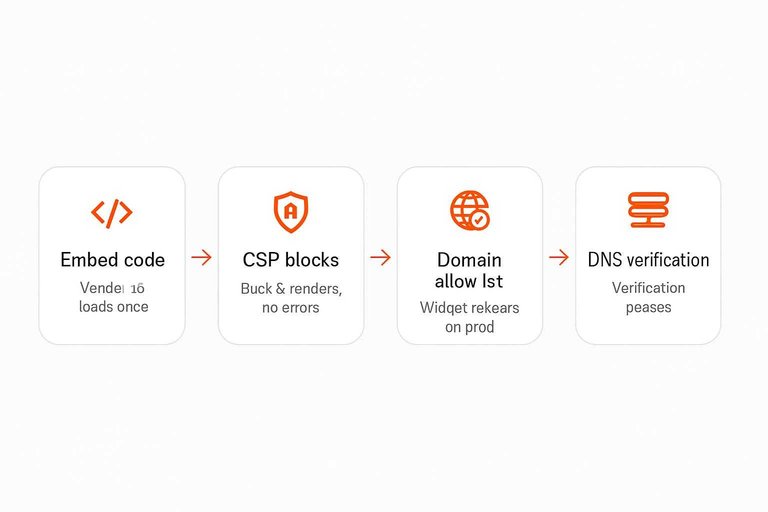
Ranked by setup gates
This ranking is about the fastest path to a real visitor getting a real reply.
Each tool below is scored by how many “setup gates” sit between “account created” and “reply delivered,” based on what its own docs make you clear.
Scoreboard table
Here’s the 9-tool scoreboard, optimized for time-to-first-reply.
| Rank | Tool | Fastest install action | Setup gates / gotchas |
|---|---|---|---|
| 1 | Eloqra | Connect Telegram + |
Written by
Eloqra
Notes from the Eloqra team on collecting testimonials and building authentic social proof.
Share: